Orders placed during Passover Holiday (Wed 4/1 after 4PM ET – Thurs 4/9) will ship Fri 4/10. View our holiday shipping schedule.
This item is no longer available.
Review Summary
Intel Core i5-6500 3.6 GHz quad-core processor
Total DIMM slots: 4
System memory: 16GB DDR4 RAM
Memory modules pre-installed: 8GBx2
Maximum memory: 64GB (16GBx4)
512MB DOM
2x M.2 2242/2260/2280/22110 SATA 6Gb/s SSD
2x 2.5" SSD
6x 2.5"/3.5" hard drive or SSD
SATA 6Gbps/3Gbps; Hot-swappable
2x Thunderbolt 2 high-speed port port
1x USB 3.0 port (Front)
4x USB 3.0 port (Rear)
2x 10GBase-T port
4xGBE port
3 (HDMI 1.4bx2, HDMI 2.0x1)
Audio In: 2x 6.3mm MIC In
2x built-in speaker, 1x 3.5mm Line-out jack
System status, 2.5" SSD, M.2 SSD, 3.5" HDD
System: Power button, Reset button, USB one-touch-backup button
Buzzer
Tower
Sound pressure (LpAm) (bystander position): 21.8 dB (with 6x Seagate ST2000VN000-1HJ164 hard drive installed)
0 to 40 deg. C / 32 to 104 deg. F
5 to 95% non-condensing, wet bulb: 27 deg. C
Input: 100-240V approx., 3-1.5A, 60-50Hz; Output: 250W
2 (1 PCIe Gen3x16; 1 PCIe Gen3x4)
System: 2x 8 cm cooling fan
CPU: 1x 9 cm fan
QTS 4.2 (embedded Linux)
Windows 7, Windows 8, Windows 10, Windows Server 2003/2008 R2/2012/2012R2
Apple Mac OS X
Linux & UNIX
Microsoft Internet Explorer 10+
Google Chrome
Apple Safari 7+
Mozilla Firefox
Chinese (Traditional & Simplified), Czech, Danish, Dutch, English, Finnish, French, German, Greek, Hungarian, Italian, Japanese, Korean, Norwegian, Polish, Portuguese (Brazil), Romanian, Russian, Spanish, Swedish, Thai, Turkish
Internal Hard Drive: EXT4
External Hard Drive: EXT3, EXT4, NTFS, FAT32, HFS+
TCP/IP (IPv4 & IPv6: Dual Stack)
Quad Gigabit NICs with jumbo frame (failover, multi-IP settings, port trunking/NIC teaming)
Service binding based on network interfaces
Squid Proxy server
Proxy client
DHCP client, DHCP server
Protocols: CIFS/SMB, AFP (v3.3), NFS(v3), FTP, FTPS, SFTP, TFTP, HTTP(S), Telnet, SSH, iSCSI, SNMP, SMTP and SMSC
UPnP & Bonjour Discovery
USB Wi-Fi Adapter Support
TCP/IP (IPv4 & IPv6: Dual Stack)
Quad Gigabit NICs with jumbo frame (failover, multi-IP settings, port trunking/NIC teaming)
DHCP client, DHCP server
USB Wi-Fi Adapter Support
Virtual Switch
Network access protection with auto-blocking: SSH, Telnet, HTTP(S), FTP, CIFS/SMB, AFP
CIFS host access control for shared folders
FIPS 140-2 validated AES 256-bit volume-based and shared folder data encryption
AES 256-bit external drive encryption
Importable SSL certificates
Instant alerts via email, SMS, beep, push service and LCD panel
2-step verification
File sharing across Windows, Mac and Linux/UNIX
Microsoft networking
Windows ACL
Advanced folder permissions for CIFS/SMB, AFP, FTP
Shared folder aggregation (CIFS/SMB)
FTP over SSL/TLS (Explicit)
FXP support
Supports mounting cloud drives (such as Google Drive, Dropbox, Microsoft OneDrive, Amazon Cloud Drive, Yandex Disk and Box).
Supports mounting remote shared folders through FTP, WebDAV or Microsoft networking (SMB/CIFS)
Supports opening documents via Office Online, Google Docs or Chrome Extension (Edit Office files in Google Docs, Sheets and Slides)
Supports ISO Mounting (Up to 256 ISO Files)
Supports sharing download links and upload links
Drag-n-drop Files via Chrome and Firefox Browsers
Photo, music and video preview and playback with hardware-accelerated transcoding
File Compression (ZIP or 7z)
Creation of and sending download links for sharing public files with expiration date and password protection
Supports displaying subtitles (.SRT, UTF-8 format): Video seeking support for Video playback during on-the-fly transcoding, Supports slideshow playback in media viewer
Mobile App: Qfile for file browsing and management
Transcode video files to 240p, 360p, 480p, 720p and 1080p resolution
Automatic video transcoding for watched folders
Hardware accelerated transcoding support
Embed subtitles into videos for background transcoding
Remote replication server (over rsync)
Real-time remote replication (RTRR) to another QNAP NAS, FTP or CIFS/SMB server
Works as both RTRR server & client with bandwidth control
Real-time & scheduled backup
Backup versioning for RTRR
Snapshot support for RTRR/Rsync
Encryption, compression, file filter and transfer rate limitation
Desktop backup with QNAP NetBak Replicator for Windows
Apple Time Machine backup support
Data backup to multiple external storage devices
Third party backup software support: Veeam backup & replication, Acronis True Image, Arcserve backup, emc retrospect, Symantec Backup Exec, etc.
Multiple cloud account management like Google Drive, Dropbox, OneDrive and hubiC
Supports multiple cloud accounts
Manual, scheduled, periodic and continuous sync
Flexible file filtering using type, date and size
SSL transfer encryption
Dashboard and job statistics
Configurable network error recovery options
Extensive job activity logging for tracing history of status and statistics
Concurrent job execution and multi-threaded data transfer
Per-account bandwidth throttling
S3 Plus (including Amazon S3)
Amazon Glacier
Google Cloud Storage
WebDAV-based cloud storage
Microsoft Azure
OpenStack Swift
Max number of printers: 3
Supports Internet Printing Protocol
Print job display and management
IP-based and domain name-based privilege control
Show photos by thumbnails, list, timeline, or folder view
Supports virtual/smart albums
Validity control for sharing albums
Tag photos with text, colors and ratings
Slideshows with background music and different transition effects
Geotag photos and display them on Google maps
Supports uploading photos/videos to Picasa, Flickr, Weibo, YouTube
Supports face detection (with the Photo Station Extension)
Supports PDF to image conversion (with the Photo Station Extension)
Supports Facebook friends login
Backup/Restore album configuration
Play or share music via web browser
Supports streaming music to multiple devices.
Supports changing album covers via Google search or by uploading photos.
Internet radio (MP3)
Up to 8 music alarms
Mobile app: Qmusic for music streaming and management
Audio and video sharing for Windows & Mac iTunes
Show photos by thumbnails, list, timeline or folder view
Supports virtual/smart collections
Tag videos with text, color and ratings
Share video links to social websites or through email
Display movie information and posters from Internet sources or user-uploaded files
Supports displaying subtitles (.SRT,.ASS, .SSA)
Supports online searching and downloading of subtitles as well as importing subtitle files
Supports adjusting the display style of subtitles
Supports Facebook friends login
Supports multi-zone video display
Video seeking support for video playback during on-the-fly transcoding
Mobile app: Qvideo for online video browsing and management
Streams videos, photos and music from NAS to Apple TV or Chromecast via File Station, Music Station, Photo Station, Video Station or mobile app (Qfile, Qmusic, Qphoto or Qvideo).
PC-less BT, FTP/FTPS and HTTP/HTTPS, Thunder, FlashGet and qqdl download (up to 500 Tasks)
BT download with search, Magnet Link and PT support
Scheduled download and bandwidth control
RSS subscription and download (broadcatching)
Proxy support for BT download
Mobile app: Qget for downloads browsing and management
Direct and quick backup from Evernote with re-editing availability
Supports Google Calendar
Import/Export PDF and .epub file
RSS live feed and auto update
Online quick preview of multimedia attachments
Notes encrypt/decrypt
Smart snapshot for version control
Full site backup for admin user
Wake on LAN
Internal hard drive standby mode
Scheduled power on/off
Automatic power on after power recovery
USB and network UPS support with SNMP management
System sleep mode (S3)
Batch users creation
Import/Export users
User quota management
Local user access control for CIFS, AFP, FTP and WebDAV
Application access control for Photo Station, Music Station, Video Station and File Station
Subfolder permissions support for CIFS/SMB, AFP, FTP and File Station
Storage Space Utilization monitoring
QNAP flexible Volume/LUN with thin provisioning and space reclaim
Disk volume types: RAID 0,1, 5, 6, 10, + hot spare, JBOD single
Supports storage pools
Supports Qtier Technology (Auto Tiering, 8GB System RAM and SSD drives are required)
Supports snapshots (4GB System RAM required): Supports Volume/LUN snapshot, Snapshot manager, Snapshot clone, Snapshot vault, Snapshot replica, Snapshot agent for Microsoft Windows and VMware vSphere
Online volume expansion
Online storage pool expansion
Online RAID capacity expansion and online RAID level migration
SMART data migration
Storage expansion via QNAP TX-500P/UX-800P expansion units
JBOD enclosure roaming
SSD read-only/read-write cache
Bad block scan and hard drive S.M.A.R.T.
Bad block recovery & RAID recovery
Bitmap support
Microsoft Active Directory (AD) & Domain Controller support
LDAP server, LDAP client
Domain users login via CIFS/SMB, AFP, FTP and File Station
Private cloud storage and sharing
Free host name registration (DDNS)
Optional myQNAPcloud SSL certificates (DDNS)
Auto router configuration (via UPnP)
Web-based file manager with HTTPS 2048-bit encryption
CloudLink for remote access without any complicated router setup
myQNAPcloud connect for easy VPN connection (Windows VPN utility)
Sync files across multiple devices with SSL secure connection
Selective synchronization for only syncing specific folders
Use team folders as a file center for greater team collaboration (maximum sync tasks: x86:32, ARM:5)
Shares files by links via e-mail
Policy settings for conflicting files and file type filter support
Version control: up to 64 versions
Unified privilege management
Unified configuration management
Supports central configuration mode
Supports remote erase/restore
Supports shared folders sync
Supports Windows & Mac OS
Multi-window, multi-tasking based system management
Smart toolbar and dashboard for neat system status display
Dynamic DNS (DDNS)
SNMP (v2 & v3)
Resource monitor
Network recycle bin for file deletion via CIFS/SMB, AFP and File Station: Automatic Cleanup, File Type Filter
Comprehensive logs (events & connection)
Syslog client/server
System settings backup and restore
Mobile app: Qmanager for remote system monitoring & management
Playback videos, music, photos on TV with Kodi via HDMI
Watch various online content such as YouTube, Flickr, Picasa, Shoutcast, etc.
Web browsers (Chrome, Firefox)
Supports international keyboards, input and mouse
Supports QNAP Qremote app and the official Kodi remote app
Supports user login permissions
A variety of applications are available including Skype, Plex Home Theater and more
Up to 7.1 channel audio passthrough is supported
Support install the Ubuntu OS via Linux Station. Use your NAS as an Ubuntu PC using the NAS HDMI output
Download and use a variety of applications from the Ubuntu Software Center
Supports remote desktop to monitor and access Ubuntu remotely
An open source software platform for developers
Supports Virtual Machine (VM) creation to run operating systems such as Windows, Linux, Unix and Android
Supports VM import and export
Supports VM cloning & snapshots
Supports VM backup and restore
VM console can be displayed via HDMI output - QVM
HTML5-based shared remote console
Supports three different networking modes: Isolated, External-only and Bridged
Supports GPU pass-through via the discrete card
Supports LXC and Docker
Download applications from the built-in Docker Hub Registry
Supports one-click installation, container export/import & console mode
Supports two network modes (NAT and host)
Supports auto-start containers
Supports downloading Docker certificates
Supports adding private registries
Added an application repository for users to switch to any repository on GitHub.com.
Supports dynamic content including videos, images, music and text
Supports multi-user collaboration
Supports sharing by email and social network
Supports design software: iArtist Lite
Supports playback on Chrome browser
Supports full-text search
Supports near real-time search
Bar chart to show data distribution
Supports previews for photos, music, videos, Gmail, PDF .etc
Show search results using thumbnails or a list
Supports search Chrome extension
'iSCSI target with multi-LUNs per target (Up to 256 targets/LUNs combined)
Supports LUN mapping & masking
Online LUN capacity expansion
Support for SPC-3 persistent reservation
Supports MPIO & MC/S
iSCSI LUN backup, one-time snapshot and restoration
iSCSI connection and management by QNAP Windows Qfinder
Virtual disk drive (via iSCSI initiator)
Stack chaining master
Max No. of virtual disk drives: 8
Supports over 3,000 IP cameras
Includes 8 free camera licenses, up to 80 camera channels by purchasing additional licenses
Instant playback to check recent events
Visual aid by e-map
Playback and speed control using the shuttle bar
Video preview on playback timeline
Intelligent video analytics (IVA) for advanced video searching
Surveillance client for Mac
Mobile surveillance app: Vmobile (iOS and Android)
Mobile recording app: Vcam (iOS and Android)
Secure remote access: PPTP, L2TP/IPsec & OpenVPN VPN services
Max number of clients: 45
Supported VPN protocols: PPTP and OpenVPN services
PPTP Authentication: PAP, CHAP, MS-CHAP, MS-CHAPv2
PPTP Encryption: None, AES 40/128 bit, AES 256 bit
OpenVPN Encryption: None, AES 40/128 bit, AES 256 bit
Transmission package monitor
OpenVPN port control
OpenVPN link compression
Supports DLNA/UPnP TVs and players such as PlayStation 4 and Xbox One
Support CUE indexing file for APE, FLAC audio format
Video and Audio On-they Transcoding
Multiple NAS monitoring
Utilization history reports
Unified configuration management
Visual display reports
Monitor NAS behind NAT routers with Q'center Assistant
Virtual appliances supported with Microsoft Hyper-V and VMware ESXi
Use the NAS as a karaoke machine
Display songs by artists, languages and favorites
Enhance the experience with effects such as tuning echo, key, or applause
Control the playlist with a mobile app
Supports keyboard and remote control (RM-RF001/ RM-IR002)
Creating and mapping shared folders by QNAP Windows Qfinder Pro
Creation of and connection to iSCSI target/LUN
Over 100 official and community software add-ons
231.9 x 292.8 x 319.8mm / 9.13 x 11.53 x 12.59"
NAS only: 9.05kg / 19.95lbs
885022011223
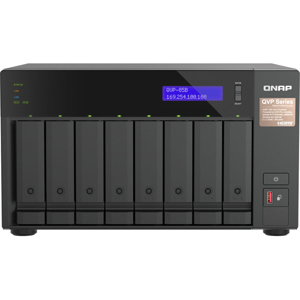
The TVS-882T features advanced hardware by adopting 6th Generation Intel 14nm multi-core processors and was designed around the concept of tiered storage, application-based partitioning and network traffic distribution. Providing a Thunderbolt DAS/NAS/iSCSI SAN triple solution, the TVS-882T delivers the incredible power of Thunderbolt 2 to double the speed potential to 20 Gbps, supports smooth 4K 60 fps video transfer and display and is a perfect match for Thunderbolt-equipped Mac (Requires OS X El Capitan 10.11 (or newer).) users for 4K workflows, file storage and high-speed sharing. Incorporating reliability, security and rich applications, the TVS-882T delivers the highest transfer rates ever as storage with persistent throughput and provides a complete business-ready storage solution.
Built-in M.2 SATA 6Gb/s slots & 2.5" SSD slots
Qtier technology and SSD cache enable 24/7 optimized storage efficiency
The Network & Virtual Switch app assists network traffic distribution and re-routes dedicated bandwidth for diverse applications
Triple HDMI output (including one HDMI 2.0) for smooth 4K video playback
Thunderbolt 2 (20Gbps) and 10GbE dual network for on-the-fly video editing and speedy sharing
4 available combinations with Mac/PC and JBOD for flexible attaching, sharing and expansion
Scalable up to 432 TB with the Thunderbolt 2 storage expansion enclosures TX-800P/ TX-500P
Virtual JBOD (VJBOD) allows to use QNAP NAS to expand the TVS-882T's storage capacity
Supports QRM+ unified remote server management, QvPC technology, virtual machine and container applications and storage for virtualization
Seamless storage expansion
Use NAS to expand NAS capacity with Virtual JBOD
Ideal for Thunderbolt-equipped Mac users
Thunderbolt 2 NAS, extraordinary performance
The TVS-882T is powered by a high-performance Intel Core i5 quad-core processor and 16GB DDR4 RAM, driving outstanding system performance for CPU-demanding applications. Offering a comprehensive DAS/NAS/iSCSI SAN multi-mode storage solution in a compact form factor, the TVS-882T not only features Thunderbolt 2 technology but also has dual 10GbE ports giving you incredible flexibility for network connectivity.
Advanced hardware for greater efficiency
High-performance hardware, well-designed application functionalities and thoroughly-planned usage scenarios are three distinctive cornerstones for achieving optimum performance.
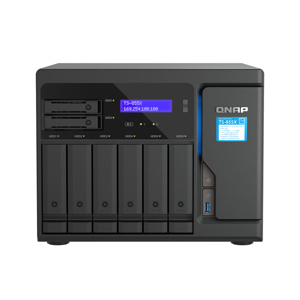
2x 2.5" SSD slots
Tool-less HDD tray and installation
2x built-in M.2 SSD slots
DDR4 2133 MHz memory
6th Generation Intel Core Processor
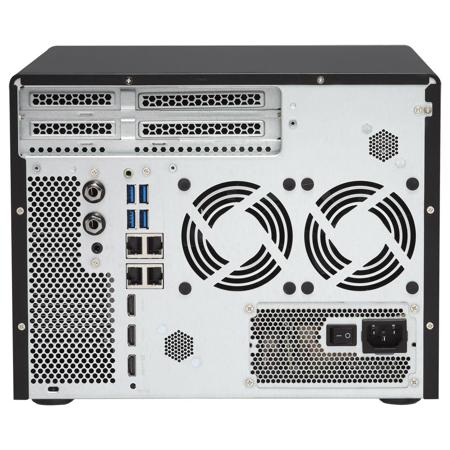
2x 10GBase-T network port
2x Thunderbolt 2 connectors
Compartmentalized smart cooling
4x Gigabit Ethernet ports
3x HDMI outputs
3.5mm audio jack
2x built-in speakers
M.2 SATA 6Gb/s SSD & 2.5" SSD cache
The TVS-882T provides 2 SSD slots dedicated for caching to increase IOPS performance and provides higher transfer speeds and reliability with the compact, energy-efficient M.2 SSD. Using an SSD cache boosts overall system performance and is perfect for improving overall workflow of random IOPS demanding applications such as virtualization. The TVS-882T combines M.2 SSD, 2.5" SSD and HDD in one box to effectively realize tiered storage for exceptional application performance and lower TCO of storage at the same time.
Perfect storage trio: tiered storage, application-based partitioning & network traffic distribution
The advanced hardware design of TVS-882T can facilitate optimized storage deployment based on different usage scenarios.
Tiered Storage
QNAP's Qtier Technology empowers the TVS-882T with Auto Tiering that helps continuously optimize storage efficiency across M.2 SSD, SSD and SATA drives. With Auto Tiering, the TVS-882T can automatically move frequently-used "hot" data to high-performance storage tiers and less-accessed "cold" data to lower-cost, higher-capacity drives, making the TVS-882T an extremely efficient shared resource. Businesses will no longer have to invest heavily in expensive Flash technology, but can still enjoy exceptional application performance and cost efficiency from Auto Tiering with the TVS-882T.
Application-based Partitioning
Every application requires different performance. For example, Surveillance Station requires higher-priority access to storage to ensure the integrity of recordings, while normal transmission speeds are sufficient for file sharing. However, when multiple applications are running on the same storage media, the required throughput level cannot be guaranteed as the storage media is busy handling I/O requests from all of them. The TVS-882T supports three different types of storage media: M.2, SSD and SATA hard drives and they can be configured as independent partitions for different applications, ensuring a sufficient throughput level for every application.
Network Traffic Distribution
With four 1 Gigabit Ethernet ports and two 10 Gigabit Ethernet ports, the TVS-882T allows applications to use dedicated interfaces to meet network traffic distribution requirements. Network interfaces can also be easily managed with the Network & Virtual Switch app, which enables optimized network resources for TVS-882T, virtual machines and containerized apps. No matter if they are business organizations or individual users, they can effortlessly manage network connections by using the Network & Virtual Switch.
HDMI 2.0 for playing 4K 60 fps videos
The TVS-882T features three HDMI ports, including one HDMI 2.0 port for smoothly playing Ultra HD 4K (4096 x 2304) videos. You can connect the TVS-882T to a TV or A/V receiver and use the powerful Kodi media player in HD Station with the QNAP remote control to enjoy rich media content and 4K 60 fps videos with the best audiovisual experience. Featuring Intel HD Graphics, the TVS-882T delivers superior real-time 4K (H.264) and 1080p video transcoding to convert videos to universal formats that can be smoothly played on PCs, mobile devices and Smart TVs.
Three HDMI outputs - switch between HD Station and Linux desktop
The TVS-882T comes with three HDMI outputs for using three monitors in either "duplicated" or "extended" desktop configuration. Duplicating will display the same content on every display and extended desktop mode allows users to display applications across the displays for improved multitasking convenience and productivity. When displaying content using HDMI, you can use the TVS-882T as an amazing multimedia player by using HD Station to enjoy rich apps including Kodi, HD Player, Plex Home Theater, YouTube, Spotify, JRiver, Google Chrome, Mozilla Firefox and more. Alternatively, you can choose to output the Linux operating system desktop to use the TVS-882T as a PC.
Thunderbolt/Ethernet dual network
The Thunderbolt 2 protocol uses industry-standard networking technologies meaning the high-speed transmission over your Thunderbolt 2 cable is able to run all network services (such as file sharing, FTP and other services). The TVS-882T can also simultaneously run general Ethernet services in addition to the Thunderbolt 2 network, completely independently and with no bandwidth interference. You can flexibly allocate proper bandwidth for different concurrent tasks.
Pioneering DAS/NAS/ iSCSI-SAN triple solution
The TVS-882T is an unmatched NAS that combines DAS, NAS and iSCSI-SAN into one box. It prevents the restriction of DAS connecting to only one device and breaks the cost barrier for creating 10GbE high-speed network environments. The TVS-882T Thunderbolt 2 NAS dramatically redefines the private cloud, combining the best of DAS and NAS.
DAS file-based mode
You can directly access files on the TVS-882T on a file-based level. Simply attach your Mac computer to the TVS-882T with a Thunderbolt 2 cable and you will find the TVS-882T in Finder with accessible shared folders available for you. It is plug-and-use and completely simple.
Thunderbolt/Ethernet NAS mode
The TVS-882T features Thunderbolt & Ethernet dual networking for flexible file sharing across multiple devices simultaneously, using SMB/CIFS, NFS and AFP protocols for sharing across Windows, Mac and Linux/UNIX networks. Use Qfinder Pro to find the TVS-882T attached to your computer and you can find the Thunderbolt IP and Ethernet IP for file sharing based on your needs.
iSCSI SAN block-based mode
The TVS-882T supports iSCSI SAN configuration, while the Thunderbolt interface can contribute a lot to iSCSI SAN storage performance. After creating an iSCSI target on the TVS-882T, you can access the iSCSI with your computer (iSCSI initiator for Mac: ATTO Xtend SAN or SNS globalSAN; for Windows: Microsoft iSCSI initiator.) through Thunderbolt IP.
Flexibly attach, share and expand in 4 ways
High accessibility (Mac+JBOD)
Optimal collaboration (Mac+Mac)
Dividing resources (Mac+NAS)
Seamless expansion (JBOD+JBOD)
A feature-rich NAS with QTS operating system
QTS - simple and powerful
QRM+: Centralized Remote Server Management Solution
QmailAgent: a mailroom center for your private cloud
Storage for hosting virtual machines and containerized applications
Storage for comprehensive virtualization applications
Use your TVS-882T as a PC
Comprehensive security
Well-rounded backup & disaster recovery solutions
Cross-device file synchronization