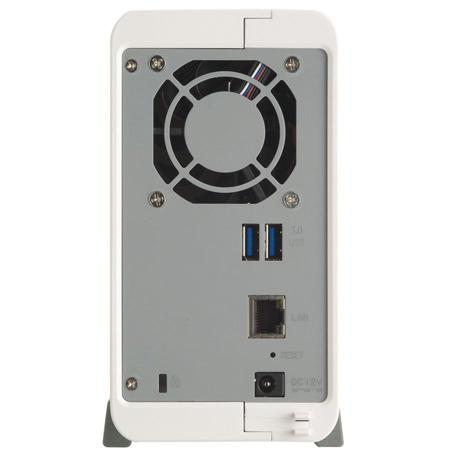
QNAP VioStor VS-2108L 8-Channel 2-Bay Portable NVR for SOHO Surveillance, No HDD, 40Mbps Network Throughput, H.264, MPEG-4, M-JPEG

SKU: QNVS2108LUS

This item is no longer available.

Overview
Compare
Specs
Protection

Reviews about this item

Review Summary

Select a plan in the Add Protection section above and purchase with this product by clicking “Add to Cart”.

image-protection

TRUSTED PROTECTION PLANS, EXCEPTIONAL SERVICE.

Invest In Your Gear and Peace Of Mind!

Accidents happen where life happens. Protect your favorite Adorama products and purchase a protection plan to stay covered from accidental damage, mechanical or electrical failure, and more.

Repair or Replacement

Repair or Replacement

If we can’t fix it, we’ll replace it at no additional cost.

Accidental Damage

Accidental Damage

Protect your product from drops, spills, and more.

Peace of Mind

Peace of Mind

Enjoy your gear without fear. We have you covered!

Malfunction Protection

Malfunction Protection

When regular use of your product over time results in mechanical or electrical failure.

Zero Deductible

Zero Deductible

We will never charge you a deductible after the purchase of a plan.

Customer-Focused Support

Customer-Focused Support

Our claims process is simple & easy and our customer service team is happy to help.

Adorama Protect powered by Extend is available for purchase to customers in the United States. Not available for purchase Internationally or in U.S. Territories.

QNAP VS-2108L Specifications

  • CPU

    Marvell 1.6GHz

  • DRAM

    512MB DDRIII RAM

  • Flash Memory

    512MB

  • Hard Disk Drive

    2x 3.5" SATA I/II hard disk drive (HDD) (The system is shipped without hard disk drives.)

  • LAN

    Gigabit RJ-45 Ethernet port

  • LED Indicators

    USB, Status, HDD1, HDD2, LAN, Power

  • USB

    USB 2.0 port (front: 1)
    2x USB 3.0 port (back: 2)
    Support USB mouse, USB keyboard, USB sound card, and USB UPS etc.

  • Buttons

    System: Power button, one-touch-auto-video-backup button, reset button

  • Alarm Buzzer

    System warning

  • Form Factor

    Portable

  • Power Consumption (W)

    In Operation: 13W (with 2x 500GB HDD installed)

  • Temperature

    0-40 deg. C / 32 - 104 deg. F

  • Humidity

    0-95% R.H.

  • Power

    External Power Adapter, 60W, 100-240V

  • Secure Design

    K-lock security slot for theft prevention

  • Fan

    1x quiet cooling fan (6cm, 12V DC)

  • Number of Channels Supported (Recording)

    Up to 8

  • Video Compression

    H.264/ MPEG-4/ M-JPEG (depending on the camera models)

  • Video Setting

    Video compression, resolution, quality, frame rate, audio

  • Recording Mode

    Continuous/ schedule/ manual recording
    Alarm recording by multiple events
    Smart recording (depending on the camera models)
    Auto snapshot

  • Buffer Storage for Alarm Images

    Before and after events:
    Pre-recording: Up to 300 sec
    Post-recording: Up to 300 sec

  • Recording Performance

    Up to 30 fps at HD/megapixel for each channel (Real performance may vary in different environment)

  • Network Throughput

    40Mbps

  • File Format

    AVI (QNAP codec is required for playback)

  • Recording Enhancement

    Real-time digital watermarking

  • Application: Fisheye Dewarping

    Support the specific fisheye IP Cameras on remote monitoring/playback

  • 360 deg. Panomorph Video

    Support the specific IP camera with panomorph lens on remote monitoring/playback.

  • Remote Monitoring (Windows)

    Display Mode: 1, 4, 6, 8, 9, 10, 12, 16, 20, 25, 36,42, 64 channel display, sequential mode
    Dual-display Mode: Up to 2 monitors
    Multi-server Monitoring: Up to 128-channel monitoring from multiple VioStor NVR servers (browser-based)
    Monitoring Enhancement: Full screen display, video snapshot, manual recording, event notification, PTZ control, digital zoom
    E-map: Uploading the digital maps and indicating the locations of the IP cameras and GPI devices of a monitoring location or region

  • Remote Playback (Windows) 1

    Display Mode: 1, 4, 6, 8, 9, 10, 12 or 16-channel display
    Search Mode: By date & time, timeline, event, and intelligent video analytics (IVA)
    Intelligent Video Analytics (IVA): Motion detection, missing object, foreign object, out of focus, and camera occlusion
    Playback Mode: Play, pause, stop, reverse play, next/ previous frame, next/ previous video file, different speed control

  • Remote Playback (Windows) 2

    Playback Enhancement: Full screen display, video snapshot, digital zoom, digital watermarking
    Export: Convert multiple recording files to client PC instantly
    Download: Download recordings via the web

  • QNAP Surveillance Client for Mac

    Display Mode: 1, 4, 6, 8, 9, 10, 12, or 16-channel display mode, sequential display mode
    Monitoring Enhancement: Full screen display, event notification, PTZ control, digital zoom
    Playback: Single view playback
    Search Mode for Playback: By date & time
    Playback Control: Play, pause, stop, reverse play, next/ previous video file, different speed control
    Playback Enhancement: Full screen display, digital zoom
    Export: Convert multiple recording files to Mac device instantly

  • Advanced Event Management: Events

    Motion detection, alarm input, connection failure, recording failure, and user-defined event

  • Advanced Event Management: Actions

    Video recording, email alert, SMS alert, buzzer, PTZ camera control, alarm output, and user-defined action

  • Backup: Schedule Remote Replication

    Schedule video data backup to a NAS on the local network

  • Security Control: Authority Management

    Different user groups and rights can be assigned to different users

  • Security Control: Host Access Control

    Specify the connections to be allowed and denied to access the VioStor NVR

  • Security Control: Auto Logoff

    Automatic user logoff from idling configuration pages

  • Security Control: Event Logs

    Detailed event logs

  • Security Control: On-line Users List

    Record of the users currently logged on and previously logged on to the VioStor NVR

  • Security Control: Digital Watermarking

    Verify whether or not the videos and snapshots are original

  • Operation System

    Linux-embedded system, free from PC crash and virus attack

  • Disk Management

    Single disk, RAID 0, RAID 1 and JBOD/Linear
    HDD S.M.A.R.T., bad blocks scan

  • Network Services: Support

    HTTP, HTTPS, TCP/IP, SMTP, DHCP, Static IP, DNS, DDNS, FTP, NTP, UPnP

  • Network Services: Services

    FTP, SMB/CIFS

  • Language

    Czech/ Danish/ Dutch/ English/ Farsi/ French/ Finnish/ German/ Hungarian/ Italian/ Japanese/ Korean/ Norwegian/ Polish/ Portuguese/ Russian/ Spanish/ Swedish/ Simplified Chinese/ Traditional Chinese/ Turkish

  • Remote Surveillance

    Client PC: Google Chrome, Internet Explorer, Mozilla Firefox (Browser-based) QNAP Surveillance Client for Windows
    Mac: QNAP Surveillance Client for Mac
    Android Tablet, phone: VMobile
    iPad, iPhone, iPod Touch: VMobile
    Windows Mobile (6.1, 6.5) Device: VMobile

  • Client PC Requirement: CPU

    M-JPEG format (up to 8 channels): Pentium 4 CPU 2.8 GHz or above
    MPEG-4/ H.264/ MxPEG format (up to 8 channels): Dual core CPU 2.4 GHz or above

  • Client PC Requirement: Memory

    2GB or above

  • Client PC Requirement: Operation System

    Microsoft Windows Vista/ 7/ 8 or Mac OS X 10.7.x, 10.8.x

  • Client PC Requirement: Web Browser

    Microsoft Internet Explorer 8/9/10 (Windows PC, desktop mode, 32-bit)
    Google Chrome 30.0.1599.69 m (Windows PC)
    Mozilla Firefox 24.0 (Windows PC)

  • Client PC Requirement: Network Interface

    10/100/1000Mbps

  • Client PC Requirement:Display Resolution

    1280 x 720 pixels or higher for better user experience

  • Utility Software 1

    QNAP Finder: The client application to discovery and quick setup of the VioStor NVR
    QNAP Surveillance Client For Windows: The client application used to remotely access QNAP NVR servers for performing video monitoring and playback functions on client PC.
    QNAP Surveillance Client For Mac: The client application used to remotely access QNAP NVR servers for performing video monitoring and playback functions on Mac.

  • Utility Software 2

    QNAP Codec: The video codec to play the recording files on Windows Media Player.
    VMobile: The Mobile App to monitor the network cameras on the VioStor NVR by the Android phone, Android tablet, iPhone, iPad, iPod touch, and Windows mobile (6.1, 6.5) device.

  • Dimensions (H x W x D)

    6.52 x 3.35 x 8.60" / 165.5 x 85 x 218.4mm

  • Weight

    2.01lbs / 0.91 kg

  • UPC Code

    885022004744

About QNAP VS-2108L

Powered by the Marvell 1.6 GHz processor, the VS-2108L delivers high performance to ensure stable recordings and smooth playbacks of multiple megapixel cameras. It is designed for the SOHO segment with the features of robust performance, solid reliability and high-definition local display.

• 40 Mbps for recording and playback from multiple megapixel cameras
• Simultaneously handles inputs from up to 8 megapixel cameras
• Online RAID capacity expansion and online RAID level migration
• Anytime anywhere surveillance with a mobile app

Vmobile is an official mobile app that enables you to monitor QVR anytime, anywhere. Using iOS and Android devices, Vmobile provides camera live-view, PTZ control, instant event notifications, video snapshot, video playback and searching for videos by date and time. Another mobile app, Vcam, allows you to turn your mobile device into a network camera and to directly save recordings to your VioStor NVR for portable surveillance options.

Multiple IP camera management comes easy
You can directly configure IP camera recording schedules when needed without leaving the Live-view page, maintain a seamless monitoring so you won't miss any suspicious events. You can also visualize IP camera deployment with the E-map function. Just upload the pictures of the monitored locations, drag and drop the IP camera icons to the right place on the E-map and you can easily monitor your surveillance deployment at a glance.

Intuitive, zero learning
Unlike traditional NVR software that can be hard to use, QVR 5.0 is free from complicated options and terminology, offering an innovative desktop design to compliment smooth working efficiency. The multi-window design allows concurrent multi-tasking and enables administrators to easily switch between tasks to increase their productivity.

Cruise for wider areas, zoom in for greater detail
With QVR system, users can easily manage & monitor multiple IP cameras in a real-time basis using web browsers and attain the first-hand status of monitored corners. You can directly adjust the PTZ (Pan/Tilt/Zoom) functions of supported cameras, flexibly monitoring every desired corner and detail. Auto-cruising is also supported to allow you to define preset positions for PTZ cameras to automatically adjust their monitoring angles to preset positions by the time interval.

Find out the critical recordings without the hassle
How to find suspicious alarm recordings from huge amount of recordings can be a challenge. QVR 5.0 provides an intuitive playback interface to you to easily distinguish between regular and alarm recordings in the timeline bar. For greater efficiency, you can also enable Intelligent Video Analytics (IVA) to quickly search videos corresponding to particular modes (includes motion detection, foreign/ missing object, out of focus and camera occlusion) to screen for critical recordings.

Flexible recording functions
QVR 5.0 provides flexible options to set up IP camera recording, including manual recording and scheduled recording. What can be even more convenient, you can set up the system to only record when motion is detected or other events occur. The smart recording function can also automatically switch the recording detail to a higher resolution when alarms are triggered. This greatly saves the cost spent on hard drives.

High reliability
The VS-2108L supports Single/ RAID 0 (disk stripping)/ RAID 1 (disk mirroring)/ JBOD disk configurations. QNAP's advanced RAID recovery technology also assists if any healthy drives are accidentally removed from a degraded RAID volume. The system can be recovered to degraded mode by reinserting the wrongly removed hard drives so the data can still be accessible.

Utilities
Various handy utilities are available for you to work smartly with your VioStor NVR. These utilities help increase your productivity and make it absolutely easy with connecting the VioStor NVR, setting up the system, data backup and synchronization, downloading files and so on. Visit the Download center, find your VioStor NVR model and the list of available utilities are ready for you.

Qfinder
Connect and set up NVR easily
Qfinder is a utility, available for Windows and Mac to quickly find and access the VioStor NVR over the LAN. Install the Qfinder on your computer, open it and double click your VioStor NVR name and the login page is ready for you.

QVR Client for Windows / Mac
Powerful Surveillance application on Windows / Mac
QNAP QVR Client is a client application developed by QNAP, used to locally or remotely access QNAP NVR servers for performing video monitoring and playback functions. Instead of using web browsers, IT administrators can directly use the QVR Client to conduct their surveillance operations. This allows them to both comply with corporate IT policies and manage daily surveillance operations.

Monitor & Manage Multiple IP Cameras
With the QVR Client, you can easily monitor & manage multiple IP cameras and receive instant notifications when event occurs. You can use 'Instant Playback' feature to check suspicious events of a camera channel you just missed. You can also directly configure IP camera recording settings when needed without leaving the Live-view page, maintaining a seamless monitoring so you won't miss any suspicious event.

Play Recording Files
QVR Client allows you to play the recording files on your Windows computer easily. You can play the video files saved on the computer or search and play the recording files on the VioStor servers. It also provides advanced features e.g. playback and speed control by shuttle bar, preview recordings by thumbnails and zoom in to see details.


What's in the box:

  • Qnap VioStor VS-2108L 8-Channel 2-Bay Portable NVR for SOHO Surveillance
  • CD-ROM
  • Ethernet Cable
  • Power Cord
  • Screw Pack
  • SATA Cable
  • SATA Power Cable
  • Quick Installation Guide
  • Adaptor
  • Qnap 2 Year Limited Warranty




