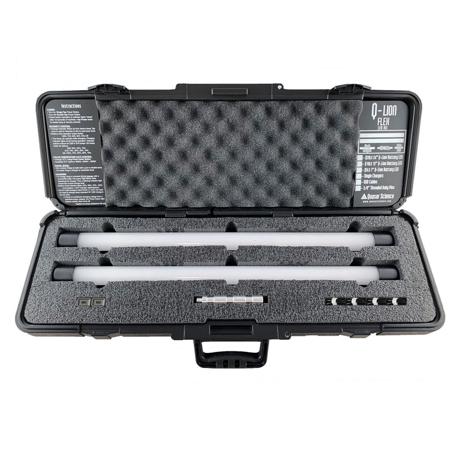
Quasar Science Q Lion Flex 2 Kit with 2x Q20 20W 24" LED Lamp
SKU: QSKITQLFLEX2
This item is no longer available.
Share:
Overview
Compare
Specs
Protection







About Quasar Science Flex 2 Kit
What's new in V3 software:
• New Color Temp: 4300K.
• 50% 3000K and 50% 5600K giving you a new level of 4300K
• Operating while charging!
• Ability to update V3 lamps
Color Temp: 3000K/4300K/5600K
Press and hold the power button to alternate between color modes.
Dimming Levels: 100%, 75%, 50%, 25%, 10% OFF
A single button press cycles through the dimming levels
Power:
Rechargeable Lithium Ion Battery
Charges from Mirco USB power adapter - V3.0 -9V @2A / 12V 1.5A
- (Will not charge on standard 5v USB Charger)
Battery Level Indicator
Runs for about 4 hours at 100%.
Flicker Free
25,000 + Hour Lifetime
Operation:
Press button once to turn on.
Press multiple times to dim.
Press and hold to change from 3000k to 5600k.
• To disable the Power Button when traveling, using a pen, press and hold the the KILL button button on the side for 5 seconds.
• To enable the Power Button after it has been killed, plug it into your charger.
• To Reset the lamp to default settings of 5600k and 100%, press the RST button.
If the Q-Lion LED will charge but will not turn on with a button press, press and hold the kill button for 5 seconds. Then plug back into the QC 3.0 Charger.
- Customized Hard Case with Foam -
The Q-Lion Flex Case comes with perforations for you to customize your case. It requires a blade to separate the foam for the different configurations.
- Battery LED Baby Pins per Lamp -
Accessory Pin for Q-Lion Battery Lamps, BQ-Battery Mounts
M10 Threaded - 4" Long
Note: a 3/8 thread will screw into the pin. However, the Pin will not screw into a 3/8 Threaded receiver.
Quasar Science Flex 2 Kit Features
- Magnetic Feet
- M10 Threaded Receiver
- NEW Recessed Power Button (V3)
- Kill switch to disable power button when traveling (V3)