
This item is no longer available.
Transform Presentations into Interactive Collaborations
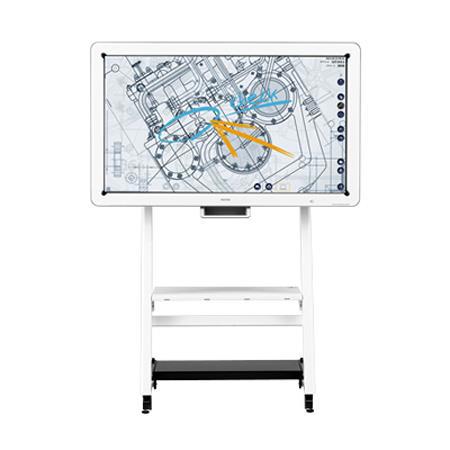
You share your ideas because you believe in them. But does your audience have something to add to make them even better? Use the RICOH Interactive Whiteboard D5510 to improve collaboration with more people in more places. Review designs, share notes and edit data with clients, coworkers and students in real time. Customize your presentation with handwritten text as you think of it or as you receive feedback from your audience, so everybody has the most up-to-date, accurate information to make more informed decisions. Send a PIN prior to the meeting to prevent unauthorized access. To protect you and your work even more, your entire presentation is permanently deleted as soon as the board is turned off.
Collaborate with Anyone, Anywhere
You have important information to share. Why waste precious time and money bringing an audience to you, when you can bring your message to your audience in moments with incredible ease? With the Ricoh Interactive Whiteboard D5510, you can connect up to eight Ricoh Interactive Whiteboards or Ricoh Interactive Business Projection Systems across your network so all participants can communicate. Each whiteboard offers interactive controls to participants in multiple locations simultaneously. It can also support an additional 20 remote viewers who simply log in via web browser from their PC, tablet, smartphone or other device to view the meeting in high definition wherever they are. It's a fast, easy and cost-effective way for participants from many locations to interact like they were all in the same room.
Present with Confidence in Only Moments
You want people to concentrate on your message, not on how long it takes you to set up your presentation. That's why they designed the HDMI-ready Ricoh Interactive Whiteboard D5510 to be quick to set up and easy to use. Because it doesn't have any software or calibrations, you simply connect it to your PC, tablet, smartphone, USB flash drive or other device with a VGA or DisplayPort cable and follow a couple of prompts to start your presentation. Navigation includes easily identifiable icons designed to mirror other business applications you use every day, so you can fine-tune system controls and manage presentations with minimal searching and effort.
Change Your Message to Accommodate Your Audience
Your audience will lose interest quickly if they don't feel like they can relate to your message. Use the special electronic pen to write, draw, edit, resize and move information on blueprints, schematics, algorithms, photos and more to highlight key points in your presentation for them. Enhance charts and other graphics with embedded shapes and line drawings even when there's minimal space on screen. Or, use feedback taken directly from the audience and make changes to your presentation in real time. The Ricoh Interactive Whiteboard D5510 includes Intelligent Character Recognition (ICR) technology, so your additions are saved as searchable PDF text that you can access and share at any time using convenient keywords
Protect Your Message
Maintain control of critical information at all times. Because the Ricoh Interactive Whiteboard D5510 offers pin code authorization, only authorized participants can view your presentation. You also decide what happens to your information after the meeting. You can save the presentation including your handwritten notes to a USB drive, network shared directory or temporarily on the board's solid state drive. To secure your document, the data is erased the moment you shut off the device or when it enters Auto Standby or Auto Shutoff mode. Information is never written directly to the operating system and McAfee whitelist security helps protect your information from ending up in the wrong hands
Receive Feedback and Share it With Others
Chances are, you're sharing your presentation with an audience because you value their feedback. The comments and changes they provide can enhance what you've presented - and foster a true collaborative meeting. But now that the meeting is over, how do you get your modified document to attendees quickly? How do you keep your message in front of participants while it's still top of mind? With the Ricoh Interactive Whiteboard D5510, it's easy. Within minutes you can turn your revised presentation into a PDF file, which you can name and password protect at the whiteboard and email it directly from the whiteboard to participants
Collaborate with Audiences Large or Small
With the Ricoh Interactive Whiteboard D5510, you not only tailor information for audiences, you can also control how they view it. Use the whiteboard as a high-quality display with Ricoh's Unified Communication System P3500 or other video conferencing systems and interact directly with audiences at several remote locations via the system's picture-in-picture function. Connect it to a projector and showcase your presentations, videos and other images on larger screens for larger audiences in auditoriums and other venues. There's no need for software and calibrations. You simply choose who you want to participate and how you want your information to be displayed
Run Engaging, Interactive Meetings
Present your ideas and materials in real time with people who are onsite or remote. The RICOH D5510 Interactive Whiteboard helps you collaborate interactively with tools that let you write, draw, edit, resize, move and save information easily. Connected whiteboards are common space, so anything you write on one board shows Upon all boards
Get More Collaboration Choices
With the right technology, you can choose how you want (or need) to collaborate in real time they don't lock you in. Their D5510 Interactive Whiteboard gives you the freedom to connect multiple Ricoh boards, share desktops, connect to video conferences via the cloud or use the boards as presentation tools with projectors
Put a Fine Point On It
Allow your audience to see every detail, even fine lines and shading, in glorious HDMI and high-resolution color. Use the pen for normal handwriting or switch to the intelligent character recognition (ICR) mode for neat, searchable text. With drag-and-drop lines, arrows and shapes, you'll save time and express yourself precisely.
Control Your Ideas and Who Sees Them
Keep meetings private by creating and distributing a personal identification number (PIN). During a meeting, you can save and share information in PDF format. And when the meeting is over, you don't need to erase what's on the board the information is permanently deleted when you turn it off. McAfee's anti-virus software provides additional protection.
Skip Software Downloads and Complicated Setups
Connect a PC and start your meeting in about a minute or less using smart icons. Or, configure the device remotely on a web page. You can connect up to 8 Ricoh whiteboards and 20 browser viewers who are using tablets, PCs, mobile devices, Ricoh's Unified Communication System P3500 or other video conferencing systems.