
This item is no longer available.
Pave the way for clutter-free collaboration
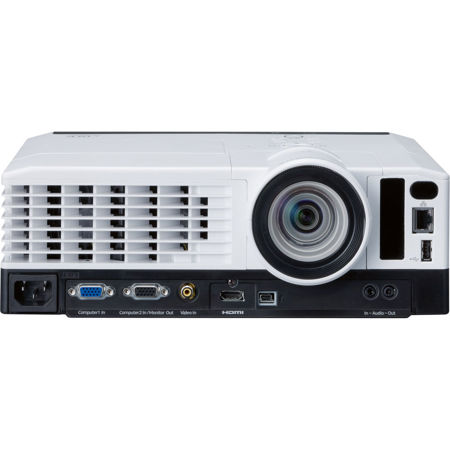
When you have to compete for attention with a traditional tabletop projector, the cables and noisy fan can derail your presentation. Ricoh's PJ Wx3351N wide-format desk-edge projector can be placed at the front edge of a table, well away from the participants, who will be free to focus fully on you - without distractions.
Choose how to connect: wired, wireless or both
To protect corporate information, you want to keep guests on the guest network and employees on your secure network. With the PJ Wx3351N, you can accommodate both. It comes with standard wired and wireless networking that lets everyone in the meeting access the information they need. The projector also comes with Miracast connectivity, so you can mirror screens from Android and PC smart devices.
Turn static whiteboards into digital whiteboards
With the PJ Wx3351N's interactive toolkit, your old whiteboard becomes a digital model that lets you display information, capture notes and circulate your ideas. And with the digital pen and drawing software, you can express your ideas your way and share them easily with the group.
Communicate creatively with 360-degree projection
Sometimes you want to market a project creatively, get people's attention in an unexpected way, or spice up a training session. With the PJ Wx3351N, you can use the 360-degree installation angle to project on the ceiling or floor. Keystone correction automatically fixes any image distortion.
Use cutting-edge innovation to put your ideas into focus
When you're presenting, the last thing you need is distractions. Lens glare, cables, fan noise and blowing hot air from your projector can undermine your message. You want your audience to stay focused on your presentation - not the tangle of cords or the hum of the device right next to them. Now you can with the RICOH PJ Wx3351N Desk Edge projection system. Project brilliant, high-quality images from the edge of any table or stand - and keep the projector away from audience participants. Take advantage of its intuitive controls, advanced connectivity and 360-degree viewing angle to display critical information on the wall, ceiling or floor of conference and training rooms. Add the optional interactive kit to encourage collaboration with your audience, then distribute the presentation to everybody in attendance so they can take the information they need to make faster, smarter decisions.
Transform Information Into Inspiration
Great ideas come from many places. Use the Ricoh PJ Wx3351N desk-edge projection system to grab information from almost any source, including networked Macs, PCs and your Windows or Android smartphones or tablets, and turn conventional screens into interactive whiteboards. And with Miracast, you can share images and information directly from the screen of your personal Microsoft or Android device. Or, you can present without any computer at all. Save files to a USB memory drive and plug it directly into the projector to begin your presentation. Want your message to reach even more people? Take advantage of multi-screen mode to share the same presentation from four different projectors and reach multiple groups of people simultaneously.
Make a Bigger Impact Using Less Space
With the same lens technology as a digital SLR camera, the Ricoh PJ Wx3351N can showcase crisp, concise images up to 400 inches diagonally from a table's edge with less glare and fewer shadows. Its footprint is similar to a letter-sized piece of paper - which gives audience members more room to take notes and look at handouts. All connections are on the front of the device, so there are no cables, fans or heat to distract participants. Best of all, you don't have to be an expert to use it. With PJLink, administrators can power the unit on or off, configure settings and run status reports remotely to ensure everything is functioning properly.
Manager Presentations Quickly and Effortlessly
Use the Ricoh PJ x3351N/PJ Wx3351N to make sharing your hard work the easy part. You can connect to the network through the LAN, wirelessly - or both. For example, you can use your wired secure network and have your guests access the presentation using the wireless network to protect any sensitive information. From there, the projector does the rest. You can begin presenting within seconds and the device shuts down automatically without residual noise. If images are distorted or out of focus, the projector balances itself and auto-focuses instantly. Colors are even adjusted to compensate for the color of the projection surface. For manual operation, access easy-to-reach controls on top of the projector or use the convenient remote control without distracting your audience.
Customize Your Presentation for Almost Any Audience or Room
You might have the right message, but are you sharing it with the right audience at the right time? Use the Ricoh PJ Wx3351N to give your audience the experience they prefer. With its 360-degree, tilt-free projection, you can use it to project information on walls, showroom floors and ceilings from almost any angle. Add the optional interactive kit and you can transform your projector into an interactive smartboard that encourages audience collaboration. Add content directly to the board using a digital pen and drawing software with embedded shapes and lines.
Keep your Audience Captivated and Your Budget in Check
Use the Ricoh PJ Wx3351N to display extraordinary images, movies and more with up to WXGA (1280 x 800 dpi) resolution. You can connect it to DVD or Blu-Ray players for live-action displays, including 3D projections and MPEG4 formats, on a huge screen with exceptional quality. Its brightness rating reaches 3,500 lumens for XGA resolution and 3,600 lumens for WXGA resolution and has a 13,000:1 contrast ratio so your presentations explode with color and clarity even when presented in rooms with varying ambient lighting. Auto Brightness mode senses the amount of light in the room and makes adjustments automatically. With Digital Light Processing (DLP) and Eco Mode, the device requires less heat and energy. In addition, power settings and lamp brightness can be preset to extend lamp life and reduce operating costs. Take advantage of booming audio from 10-watt, built-in speakers and eliminate additional speaker costs.