
This item is no longer available.
As healthcare becomes more accountable, you have never been more pressured to boost productivity and streamline your HIPAA compliance processes. Ricoh introduces its next generation of healthcare printing devices with a built-in locking-tray and security firmware to help accelerate your innovation. Learn how our printing devices and healthcare business services can help you optimize workflow efficiency in healthcare environments ranging from acute care to admissions, pharmacies and nursing stations with limited space.
• Prints up to 42 ppm
• 1200x1200 dpi max print resolution
• Paper capacity up to 1,600 pages
• Optimized for healthcare with built-in locking tray
• Standard automatic double-sided printing
• Easy-to-read, four-line-LCD panel
Key benefits
• Avoid workflow interruptions by printing on regulated media (e.g., prescription forms) and non-regulated media with the same printing device
• Maximize productivity with a unique multifunction printer that can safeguard regulated media across print, copy and fax modes
• Install almost anywhere thanks to a small footprint and low profile allowing the device to fit below a shelf and into other tight spaces
• Add optional paper feed units (locking or non-locking) to increase total paper capacity up to 1,600 sheets
Built for healthcare printing
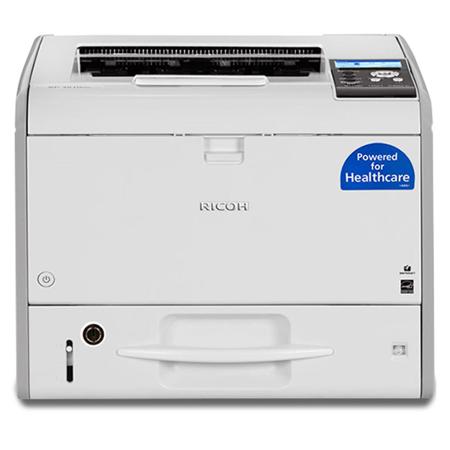
Make work life simpler in healthcare offices with the RICOH SP 4510DNTE black and white printer. Now, send all print jobs for regulated and standard media to a single device without interrupting workflows to change trays or wait for jobs with regulated media to finish. Advanced firmware helps to keep regulated media and standard media jobs apart, so you no longer have to use a separate printer dedicated to locking down regulated media.
Lock down regulated media
A built-in locking tray comes standard on the SP 4510DNTE to help protect pre-printed prescription forms, pre-printed checks and other regulated media from theft or unauthorized viewing. Additional paper feed units (for a total paper capacity of 1,600 sheets) can be added via optional trays, which can either be locking or non-locking.
Stay firm about security
Advanced security firmware further safeguards regulated media from theft and mishandling as workers send jobs for both regulated and standard media. In print mode, stop the "auto tray switching function" from feeding private media from a locking tray. Limit user access to locking trays through PIN codes or via an optional ID card reader.
Speed through heavy workloads
Get more work done with the SP 4510DNTE. A powerful controller with standard 512 MB (1 GB max) of RAM can easily handle simultaneous print jobs and large files. Expect professional print quality of up to 42 pages per minute at 1,200 dpi. Plus, add two 500-sheet paper units for a 1,600-sheet total capacity for smooth, uninterrupted print jobs.
Maximize mobile data
Get the most out of your mobile information with the RICOH Smart Device Print & Scan app. Use your Apple iPhone, iPad or Android mobile device to print images, documents, photographs and more when you are connected to the same office network as the printer.
Over Achieve
Attain new heights of productivity without sacrificing quality. Standard LED Imaging technology ensures true 1,200 dpi image quality at full speed. Use genuine Adobe PostScript 3 with host print applications. Also, enjoy greater media flexibility by handling a variety of special stocks, weights and sizes effortlessly. Plus, add an optional HDD for document server functionality that lets you store up to 9,000 pages and print on demand.
See all. Know all. Manage all
Help reduce your printing costs and increase your efficiency with Ricoh's Web Image Monitor. Check system status, change settings, manage job queues and expedite maintenance - all from your desktop. You can also assign up to 1,000 user codes to track volumes and trends by individual and then leverage that information to modify and improve print behavior.
Save. Recycle. Repeat
Save paper with automatic double-sided printing and eliminate printing blank pages. Conserve energy by using preset on/off settings, a low-power mode and the ECO-Night Sensor. The SP 4510DNTE also meets EPEAT Silver criteria and is certified with the latest ENERGY STAR specifications. Plus, our Resource Smart Return Program makes it easy to recycle your used consumables.
Unlock your true productivity
Find the right healthcare business partner
As both the manufacturer of your locking-tray hardware and developer of your locking-tray security firmware, Ricoh uniquely tailors healthcare printing devices to help you optimize your HIPAA compliance workflows-today and in the future as you face changing regulations and new potential threats. Additionally, Ricoh healthcare business services can help you reach your goals faster so you can spend more time caring for your patients, less time managing your printing workflows.
Gain Freedom of deployment
You may find it difficult or impossible to designate unique secure locations to process regulated media, particularly, pre-printed prescription forms. With a built-in locking tray, you can deploy a Ricoh healthcare printing device where it makes the most sense to streamline your workflow. Process jobs with both regulated media and non-regulated media on a single device instead of limiting print jobs with regulated media to designated devices tucked away behind locked doors.
Take-On increased workloads
Spikes in patient flow do not have to disrupt your workflows. Or perhaps you need to increase the workload for a particular print device. With Ricoh, convert your print station into a dynamic hub of productivity. Configure Ricoh healthcare printing devices to handle large workloads with optional paper feed units that can increase total paper capacity up to 1,600 sheets. Added paper trays can be locking or non-locking-depending on what makes the most sense for your workflows.
How it Works
Explore key innovations on Ricoh healthcare printing devices to help you thrive in critical healthcare environments.
Locking tray hardware
A standard built-in locking tray and optional additional locking trays help to secure regulated stock such as pre-printed prescription forms. Maximum paper capacity: 1,600 sheets.
Locking tray security firmware
Advanced security firmware helps to safeguard regulated media from theft and unauthorized viewing when
• In copy mode: Prevents the ability to see and select locking tray(s) from the Operation Panel and Web Image Monitor (remote management tool)
• Print, copy and fax modes (on Ricoh healthcare multifunction printers): Disables access to the locking tray(s) for the Auto Tray Switching function, which might otherwise take paper from a locking tray if a non-locking tray were to become empty during a job
• All modes: Disables access to the locking tray(s) by the local hard drive
• All modes: When printing from a mobile device or storage device such as a USB drive, access to the locking tray is disabled
• All modes: With an optional or standard HDD installed, automatically overwrites latent images on the hard drive via DataOverwrite Security System (DOSS)
Portable print configurations
Store and export your device settings to an SD card so you can configure a different device quickly and easily.
Empower your modern workstyle
• Cost-Effective Ownership, Simple Maintenance
• Conserve Energy, Protect Your Budget
• Collaborate and Share Information Easily
• Monitor your performance
• Healthcare printing devices