
This item is no longer available.
More control to perform more tasks
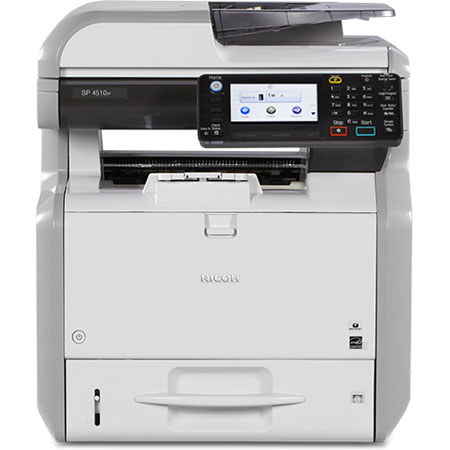
Just because your budget is tight or your office is limited on space, it shouldn't limit what you can do. Use the RICOH SP 4510SF to perform a wider range of everyday document management tasks - including printing, scanning, faxing and copying quickly - so you can move from one project to the next without missing a beat. Place the compact MFP nearly anywhere, even on your desk, to save space while you save time. Customize the device to accommodate personal preferences. Take advantage of security controls to protect your information. Access administrative controls remotely to keep the SP 4510SF running efficiently - whether you add it to an integrated Ricoh Managed Document Services (MDS) portfolio or use it as your primary device.
Tackle big tasks in small spaces
You need a powerful multifunction printer to take on more challenges - not take up space. With the Ricoh SP 4510SF, you can perform a wider range of everyday information management tasks in any office or from any desk. Need to print quickly Use the device to print at 42 ppm and transition quickly to the next job. Need to impress a client Print documents with crisp, clear text and graphics in high-quality 1200 dpi resolution without compromising speed.
Customize your commands
Nobody knows how to improve your productivity more than you do. That's why Ricoh designed the Ricoh SP 4510SF with customizable controls that complement your workflow demands. Set shortcuts for frequently used tasks right on the tilting 4.3" color touch panel Home Screen. Need to work on the go Bring your work with you on a USB memory card or SD card and print it when you need it. Or, simply use your smartphone or tablet for convenient mobile printing. The Ricoh Smart Device Print&Scan app gives you more functionality and control for programming jobs, it's the closest you can get to the PC experience on a tablet or smartphone.
Simplify complex tasks
Want to accomplish more by working less With the Ricoh SP 4510SF, you can automate a wide range of processes to save time so you can move on to your next project. Remotely check supply levels, system settings, usage rates and more to ensure the device is ready to work when you are. The optional web browser lets you access and print web pages directly from the control panel. Add the optional Ricoh Integrated Cloud Environment (ICE) service and connect your MFP seamlessly to popular Cloud-based services. Print from or Scan directly to apps like Document Mall, Evernote, Dropbox or Google Drive without expensive on-site servers, system integration or software updates.
Protect what's most important - your bottom line
Share information quickly
You have important information. But can you get it to the right people at the right time, so they can make game-changing decisions for your organization Send any document in color within moments with Scan-to-Email/Folder/URL/USB/SD Card. Create searchable PDFs when scanning with Ricoh's OCR option. The SP 4510SF supports Distributed Scan Management (DSM) which allows administrators to create predefined recipient-specific, scanning workflows centrally to simplify scanning to different users. You can even scan two-sided documents, including IDs and patient insurance cards, onto a single sheet of paper to reduce paper costs. For those times when you need to fax legal or other professional documents, you can take advantage of advanced fax capabilities, including forwarding to Email and Folder, Internet Fax, support for LDAP and more.
Conserve energy, protect your budget
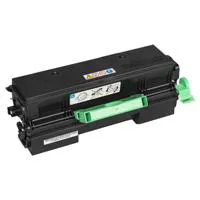
Use less energy to do more work. With recovery from sleep mode under 10 seconds and first-copy times at 5.1 seconds, you won't have to spend a lot of your time waiting for the information you need. Program automatic startup or shutdown to conserve energy when you're out of the office. Reduce paper costs with default double-sided printing. You can even check to see if your efforts are worthwhile. The MFP includes an indicator that prominently displays paper-saving metrics to encourage more sustainable printing. Plus, the device meets EPEAT Silver criteria - a global environmental rating system for electronic products - and is certified with the latest ENERGY STAR specifications. In addition, with Ricoh's toner cartridge/container recycling program, you can return all empty Ricoh branded toner containers and cartridges to Ricoh recycling vendor.
Control critical information
Keep prying eyes off of your confidential information. When you deploy advanced user authentication controls, a proximity card swipe or login and password entry at the device is required to access critical functions, including the release of documents. You can also restrict access to specific functions for specific users to curb unnecessary printing. Other security features include Data Overwrite Security System (DOSS) and embedded encryption to help protect images and data on the Ricoh SP 4510SF hard drive
Additional Features:
Copier Features: ID Card Copy; Auto/Manual Density Control; Auto Start; Batch Mode;Mixed Size Originals; Copy Mode - Text, Text/Photo and Photo, Generation Copy, Pale; Combine Pages; Margin Adjustment; Auto Tray Switching; Image Rotation; Electronic Sort; Job Program (25);User Codes (1, 000).
Print Features: Scheduled Print, Auto Continue, Store and Skip Errored Job, Classification Code, PDF Direct Print, Sample/Hold/Stored and Locked Print, WSD Printer, Unauthorized Copy Prevention, Poster Print, Collate, Toner Saving Mode.
Security Features: Administrator and User Authentication, User Lockout, Auto Logout, Menu Protect, Data Encryption (Address Book/User Authentication Information/Job Logs/Temporary Stored Document/Network Interface Settings/System Settings), Network Security via TCP/IP Access Control, Encrypted communications using SSL/TLS, IPsec or IEEE 802.1x; SMNPv3, IPP Authentication, Kerberos Authentication Encryption, Wireless LAN Security (WEP, WPA2/ WPA2-PSK), Protect document data with Locked and Stored Print, Unauthorized Copy Prevention, Compulsory Security Stamp, HDD Data Overwrite and Encryption.