Red Giant Warp V1.1, Plug in Video Editing Software for Mac & Windows.
SKU: RDGWARPD
This item is no longer available.
Recommended Alternatives
Share:
Overview
Compare
Specs
Protection
About Red Giant Warp 1.1
The Warp v1.1 Warping Software from Red Giant is a package with three plug-ins in the Warp toolset that are designed to offer control over shadows, reflections and corner point warps. The Shadow tool renders realistic shadows for text or subjects shot on green screen. The Reflection tool creates mirror-like reflections. The advanced Corner Pin tool includes features for working with warped images, importing tracking data from Mocha for After Effects and adding secondary transforms and motion blur to heighten scene realism.
Red Giant Warp 1.1 Features
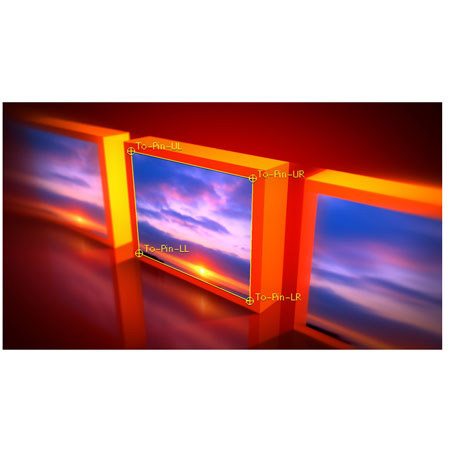
- Pin with Precision: It's tough to take video from a warped source, such as a billboard shot in perspective & add it to another video. But the dual warping tools in Warp's Advcane Corner Pin plug-in make it easy to take any video source, warped or not & put it into a new place with proper perspective
- Come to the Dark Side: Adding depth is easy with the Shadow tool. Three- point controls let you set the shadow's perspective, while fade controls create realistic falloff. A unique bend control lets you warp the shadow to create the illusion of shadows falling on two planes in 3D space.
- Reflect your World: Adding a simple reflection is easy in most tools, but making it look real can be a challenge. Reflection provides an easy-to-use setup control for defining a mirror reflection for any source video or image.
- Multi-mode Corner Pin: Handles both standard corner pinning and corner pinning from a distorted source or source in perspective, such as defining a billboard on the highway in perspective as a source for the corner pin mapping. The plug-in can handle any kind of 2D distortion you can imagine.
- Secondary Corner-Pin Transforms: Go beyond plain warping. Secondary controls let you animate the position of the corner pin output with offset, scale and rotation controls that make adjusting the final image a snap.
- High-Quality Corner-Pin Output: Size doesn't matter, because Warp can upscale sources to larger dimensions and uses adjustable supersampling controls when applying large sources to small destinations.
- Multi-Host Support: Supports After Effects, Premiere Pro, Final Cut Pro, Motion, and Avid AVX 2 systems. NOTE: Mocha for After Effects corner pin data is only supported in Adobe After Effects.
- 8-, 16-, and 32-bit Floating Point Support : Supports the maximum bit depth in all hosts to maximize quality, with float quality in After Effects, Final Cut Pro and Motion and 16-bit-per-channel output in Premiere Pro and Avid.
- Full Motion Blur Everywhere: Advanced rendering ensures that proper motion blur is applied to the output as the corner pin distorts or the shadow moves. Motion blur works in all host applications.
- Four Shadow Fade Types: Multiple fade modes create diffuse shadows or allow for greater blur as the shadow extends, just like a real shadow cast from a spotlight.
- Bend Controls for Shadows and Reflections: Provides a secondary distortion to the shadow or reflection to give the illusion that the shadow or reflection is bent or appears on a second surface.