


This item is no longer available.
Perfect broadcasting solution for professionals and beginners
If you are a professional producer of video materials, broadcasts or TV programs - you know that the highest quality and infinite creative possibilities can only be achieved with 3D technology.
If you are not familiar with a virtual 3D studio - we invite you to a world of new possibilities: with our solutions your video content will be unique and professional, and its creation process easy and fun.
Thanks to many years of our experience in designing and developing solutions for video production and processing market, we can present you with a virtual studio system that will meet your highest expectations in regards to 3D technology - enjoy RECKEEN 3D Studio.
3D Production
RECKEEN 3D Studio is a PC based system with an option of importing files in OBJ and FBX formats and objects from its own editors.
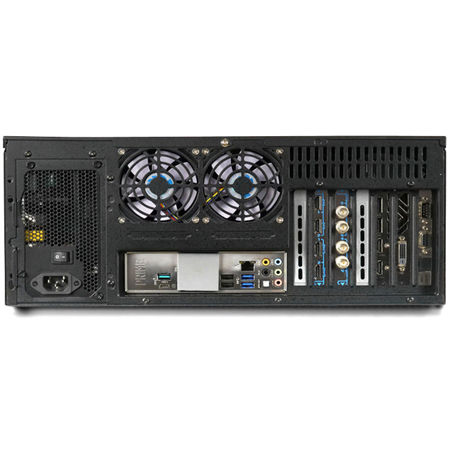
Up to two 4K camcordes or up to four Full HD (4x HDMI version) can be connected to the Reckeen workstation, their signals will be keyed independently in a high quality. This means, in your virtual studio you can get up to four talent shots taken by four cameras in different locations. In addition, you have four virtual cameras with full range of motion available: pan, tilt, zoom, dolly, truck, arc, pedestal, cant and so on. Their positioning and switching between them reflects the cameraman's natural movements. Up to 15 shots can be assigned to each of the cameras. By default, they are set by the virtual studio designer and defined in the project, but you can customize them to fit your needs.
Controlling virtual cameras is easy and convenient thanks to the specially designed VKey-100 keyboard with joystick.
Studio Editor Wizard
Scenography is one of the most influential elements of a virtual studio, its uniqueness will draw the audience's attention and emphasize the character of the video material. With RECKEEN 3D you get a ready-made designs package, but Studio Editor and Wizard 3D are also its integral parts and with their use you can prepare your very own designs, with supplied materials or starting from scratch, after your own ideas. The Wizard allows you to create stage designs quickly and efficiently on the basis of previously created elements, while in the 3D Editor you can personalize every detail you want.
3D Editor allows you to modify and expand the ready-made virtual studio projects - including those you've created yourself in the Wizard. Each scenography item can be moved, rotated or scaled. The elements can also be combined in unlimited ways and into more complex compositions, without worrying about their weight, type of material or combining methods. You can also define and configure additional studio lights.
Advanced features of the Studio Editor Wizard also allow you to design virtual 3D scenographies tailored to your individual needs and ideas. All you need is a short tutorial to be easily able to set the ambience of the studio, its size, textures to be used, colors, and equipment. You can implement unlimited number of ideas, and your video materials will always have a unique setting.
Still Editor
The Still Editor module allows you to create captions, text boards and news tickers. With an easy-to-use panel, suitable components can be downloaded from external files or created - even during the production and live editing.
You can create 3D objects you want to place in the virtual studio scenography in MS Paint 3D editor, that you get preinstalled with RECKEEN 3D Studio. The application allows you to implement all the ideas, from the most original and crazy ones to the simplest ones, like three-dimensional subtitles. And all those created objects can be easily and intuitively moved to a virtual studio, even during the live production.
Paint 3D gives you many possibilities:
• Make a sketch and turn it quickly into a three-dimensional object,
• use the ready-made solids, build objects with them, paint them, change their sizes - and many more,
• apply realistic textures, such as wood, grass or others, to the objects you create,
• create clippings of your favorite images or photos, use them as stickers, or apply them to 3D models.
• show the 3D objects you've created at www.Remix3D.com. You'll also discover thousands of other users' creations you can use there.
You want a car to appear in your studio? It's very easy - create it from scratch or use an existing design! Transfer the objects to Reckeen 3D Studio and enjoy the results of your work!
System Features
Tally
Tally output allows you to connect the LEDs signaling the active camera operation on the studio set.
NDI
NewTek's innovative Network Device Interface technology, is a royalty free standard enabling IP video workflows across Ethernet networks and represents the most prolific IP-based workflow in the industry.
NDI is a trademark of NewTek, Inc.
Microsoft Paint 3D
You can create 3D objects you want to place in the virtual studio scenography in MS Paint 3D editor, that you get preinstalled with Reckeen 3D Studio.
Style: White or Black
You can launch the application in 2 different color schemes: light or dark.
Switcher / Videomixer
Production Switcher works like an actual switcher, it supports up to 12 media sources for the program and for the preview.
4 Cameras Input
Up to two 4K camcordes or up to four Full HD (4x HDMI version)
HDMI
Up to 2160P 30 or Full HD
2 x DSK
DSK allows you to place additional overlays on the screen, such as news tickers, station's logo, or other graphic panels.
3D Studio Editor
3D Studio Editor allows you to modify and expand the ready-made virtual studio projects - including those you've created yourself in the Wizard.
3D Wizard
You can create your own set design in five steps.
Text Editor
Still editor is an additional module for creating text panels, complementary to the 3D & Lite production module.
Import from 3D
Reckeen 3D Studio system supports .OBJ and .FBX formats, and it is in compliance with them.
PBR
PBR (Physical Based Rendering) - scenography, architecture or equipment elements visible on the screen reflect properties of their real-world counterparts.
Real Time Presenter Shadows
Reckeen 3D Studio system's engine renders talent / presenter's shadows in real-time.
Shadows
For each item of equipment, RECKEEN 3D Studio system's engine renders shadows in real-time.
Lights
You can find the following types of lights in Reckeen 3D Studio: Ambient, Directional, Point and Spot.
Reflections
RECKEEN 3D Studio system renders real-time reflections from flat glossy surfaces. These reflections change in accordance with altering position of the virtual camera.
Chroma Key
Reckeen 3D Studio & Lite offers 3 types of keys (Chroma key, Simple chroma key and Luma key), you can enable up to four keys at the same time!
Audio Control
RECKEEN 3D Studio & Lite comes with a sound mixer that allows you to set the sound levels for each of the available inputs.
Mic in
RECKEEN 3D Studio & Lite system supports two types of microphones - dynamic and condenser with + 48V phantom.
Audio link
External connector allowing you to connect additional audio input / output.
Record
Thanks to Capture function you can record to a file on your hard drive.
Online Shop
Under construction
Object library
The 3D Editor and Wizard Editor's library contains a huge number of ready-made 3D studio components and equipment divided into different categories.
Multiview
In addition to the available previews of the prepared video material (PRV) and of the broadcast (PRG), Multiview enables you to configure and preview all the media from the media tray, which can be accessed on a separate monitor.
Single view
You can carry out production using a single monitor. It is recommended to distribute the Single view into 3 different monitors connected to the Reckeen system.
Global illum
Ambient - a type of light that fills an entire studio and illuminates all the objects evenly. Ambient light does not come from any particular direction and it falls on all the elements of 3D scene, helping you lighten or darken them.
Audio follow
this feature allows you to mute the sound of a chosen channel up until a video signal associated with the given sound source appears on the vision.
Transitions
Reckeen system supports basic transitions such as: Cut , Fade and FTB - Fade to Black.
Virtual Camera
Reckeen system allows you to select one of four virtual cameras (virtual cameramen) and save up to 15 virtual camera shots for each camera.
Scene
With advanced arranging features, Reckeen system allows you to create in real time fully realistic 3D scenes with elements that reflect their real-world counterparts' behavior.
Keyboard
The Reckeen system can be fully operated with a PC keyboard and a mouse.
H.264
The application uses the H.264 codec to compress and encode video sequences.
4Kp30
4K technology is a new standard for video images.
In combination with excellent sound quality, picture 4K becomes a source of extremely realistic experience.
The Reckeen system allows you to work in 4K resolution.
This means operating the system's up to two inputs and output in 2160p format, i.e. with a resolution of 3840 x2160.
The chroma and luma key also work in 4K






