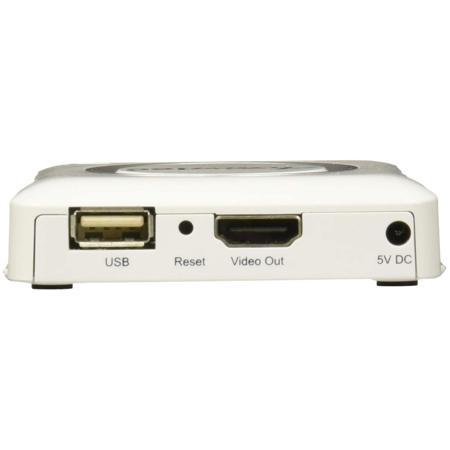
ScreenBeam 750 Miracast Wireless Display Receiver with Central Management System Software, White

SKU: SCBWD750W

This item is no longer available.

Overview
Compare
Specs
Protection
Q&A

Questions & Answers

FAQ

What devices are compatible with the 750 Miracast Wireless Display Receiver?

The 750 Miracast Wireless Display Receiver is optimized for Windows 10, Windows 8.1, and Android 4.2+ devices that support the Wi-Fi Miracast standard. For non-Miracast devices, ScreenBeam offers the ScreenBeam USB Transmitter and software for Windows 7/8 systems.

Does the 750 Miracast Wireless Display Receiver require an internet connection to work?

No, the 750 Miracast Wireless Display Receiver connects directly to computers, tablets, and mobile devices, moving heavy video traffic off the network and saving valuable bandwidth.

What is the Central Management System (CMS) software included with the 750 Miracast Wireless Display Receiver?

The Central Management System (CMS) software provides enterprise-class security and manageability. It facilitates remote management of receivers, making it an ideal solution for small-to-medium deployments in school districts and businesses.

Can the 750 Miracast Wireless Display Receiver be used in a classroom setting?

Yes, the 750 Miracast Wireless Display Receiver is specifically designed for educators, modernizing classrooms with the latest Miracast wireless display technology for better collaboration and productivity.

What is the benefit of using the 750 Miracast Wireless Display Receiver in a business setting?

The 750 Miracast Wireless Display Receiver enhances productivity and collaboration in conference rooms by enabling real mobility and interactivity. It allows professionals to wirelessly connect their devices to the display, eliminating the need for cables and enabling presentations from anywhere in the room.

Reviews about this item

Review Summary

Select a plan in the Add Protection section above and purchase with this product by clicking “Add to Cart”.

image-protection

TRUSTED PROTECTION PLANS, EXCEPTIONAL SERVICE.

Invest In Your Gear and Peace Of Mind!

Accidents happen where life happens. Protect your favorite Adorama products and purchase a protection plan to stay covered from accidental damage, mechanical or electrical failure, and more.

Repair or Replacement

Repair or Replacement

If we can’t fix it, we’ll replace it at no additional cost.

Accidental Damage

Accidental Damage

Protect your product from drops, spills, and more.

Peace of Mind

Peace of Mind

Enjoy your gear without fear. We have you covered!

Malfunction Protection

Malfunction Protection

When regular use of your product over time results in mechanical or electrical failure.

Zero Deductible

Zero Deductible

We will never charge you a deductible after the purchase of a plan.

Customer-Focused Support

Customer-Focused Support

Our claims process is simple & easy and our customer service team is happy to help.

Adorama Protect powered by Extend is available for purchase to customers in the United States. Not available for purchase Internationally or in U.S. Territories.

ScreenBeam 750 Specifications

Hardware

Hardware

Jump to...
  • Video

    H.264 compression
    HDMI up to full 1080p @ 30 fps resolution

  • Audio

    Supports LPCM

  • A/V Interface

    HDMI Type-A female connector
    VGA via adapter (included)

  • Wireless

    802.11n Dual-band
    WPA2-AES 128-bit, WPS virtual PBC

  • Content Protection

    HDCP 2.x

  • Power Input

    Input: 5V/2A
    Consumption: Less than 5W

HDMI-to-VGA Adapter (Model #YZ-050)

Jump to...
  • HDMI-to-VGA Adapter (Model #YZ-050)

    Supports VGA output, 10-bit resolution up to 165MHz pixel rate of up to (1080p and UXGA)
    Supports LPCM
    Supports VGA output: 480I/P, 576I/P, 720P, 1080I/P, 640 x480, 800 x600, 1024 x768, 1280 x720, 1280 x768, 1280 x800, 1280 x960, 1360 x768, 1366 x768, and 1920 x1080
    Does not support protected content playback

Compatibility/Requirements

Jump to...
  • Requirements

    HDTV or Projector with available HDMI or VGA port

  • System Requirements

    Windows 10 & 8.1 (with Miracast wireless display support)
    Windows 7/8 with ScreenBeam USB Transmitter (sold separately)

  • Devices Supported/Compatibility

    Windows 10/8.1 laptops, tablets, and 2-in-1s with wireless display support
    Surface & Surface Pro 3 & 4
    Windows 7/8 with ScreenBeam USB Transmitter
    Android mobile devices with wireless display support

  • Regulatory and compliance

    SBWD100B:
    FCC, IC, UL, CE, SRRC, C-Tick, RoHS and WEEE
    Certified for all major regions (North America, EU/EMEA, APAC, Australia, Russia and South America)

  • Certification

    Certified Wi-Fi Miracast (pending)

  • UPC Code

    789286809087

About ScreenBeam 750

With the sleek and modern 750 Miracast Wireless Display Receiver, effortlessly mirror your Windows and Android devices directly onto your display, eliminating the need for cumbersome apps or wires. This high-tech receiver is specifically designed for educators and business professionals seeking a seamless, trouble-free wireless presenting experience.

The ScreenBeam 750 harnesses the power of the latest Miracast wireless display technology, revolutionizing classrooms and meeting spaces by fostering better collaboration and productivity. The swift connection between a Miracast enabled device and room display eliminates the need for wires, allowing teachers and presenters the freedom to drive content from anywhere in the room.

This compact, user-friendly device comes with a Central Management System (CMS) software, providing enterprise-class security and manageability that IT departments require. The CMS software facilitates remote management of receivers, making it an ideal solution for small-to-medium deployments in school districts aiming for higher student engagement, collaboration, and interactivity.

The ScreenBeam 750 offers a wireless advantage for conference rooms, enhancing productivity and collaboration by enabling real mobility and interactivity. Busy professionals can effortlessly connect their modern devices wirelessly to the display, eliminating the need to scramble for the right cable or shuffle seats to sit near the projector during crucial meetings.

The ScreenBeam 750 connects directly to computers, tablets, and mobile devices, effectively moving heavy video traffic off the network, thereby saving valuable bandwidth. The dedicated connection ensures users won't have to worry about crashing, lag times, choppy or freezing video, saving precious time.

Optimized for Windows 10, Windows 8.1, and Android 4.2+ devices that support the Wi-Fi Miracast standard, the ScreenBeam 750 is compatible with a wide range of devices. For non-Miracast devices, ScreenBeam offers the ScreenBeam USB Transmitter and software for Windows 7/8 systems. Experience the robust performance of the ScreenBeam 750, delivering professional display quality and very low latency.


ScreenBeam 750 Features

  • Miracast standard creates P2P wireless connection
  • Drive content from anywhere in the room
  • Switch presenters seamlessly
  • Start meetings on time, no setup delays
  • Let students present work from desks
  • Improve collaboration and interactivity
  • Display any content, apps, videos, websites, and more
  • Small platform makes it easy to take screen mirroring anywhere
  • Simple, no cables or apps to install
  • Eliminate cable cost and clutter

Product Documents

User Manual

Key Features

  • Wire-free screen mirroring with native Miracast support for Windows & Android devices
  • Central Management System (CMS) software for easy multi-receiver management
  • Enhances classrooms and meeting spaces with advanced wireless display technology
  • Direct device connection saves network bandwidth and ensures stable video quality
  • Optimized for seamless integration with Windows 10, Windows 8.1, and Android 4.2+ devices
  • Additional ScreenBeam USB Transmitter available for non-Miracast Windows 7/8 systems

What's in the box:

  • ScreenBeam 750 Miracast Wireless Display Receiver (White)
  • Power Supply
  • HDMI Cable
  • HDMI-to-VGA Dongle and 3.5mm Audio Cable
  • CMS Network Dongle (USB-to-Ethernet or USB-to-Wireless)
  • Regulatory Flyer
  • Quick Setup Guide
  • ScreenBeam 1 Year Limited Warranty




