
This item is no longer available.
Review Summary
Accidents happen where life happens. Protect your favorite Adorama products and purchase a protection plan to stay covered from accidental damage, mechanical or electrical failure, and more.
If we can’t fix it, we’ll replace it at no additional cost.
Protect your product from drops, spills, and more.
Enjoy your gear without fear. We have you covered!
When regular use of your product over time results in mechanical or electrical failure.
We will never charge you a deductible after the purchase of a plan.
Our claims process is simple & easy and our customer service team is happy to help.
Adorama Protect powered by Extend is available for purchase to customers in the United States. Not available for purchase Internationally or in U.S. Territories.
Browse our FAQ
PS176
DisplayPort Standard Version 1.2
Up to 3840x2160 at 60Hz, 4K UHD
Input: USB Type-C, Male
Output: 20-pin, DisplayPort, Female
USB-C with DisplayPort Alternate mode
32 to 140 deg. F (0 to 60 deg. C)
14 to 158 deg. F (-10 to 70 deg. C)
10% to 90% RH (non-condensing)
FCC, CE, RoHS
USB Type-C port with DisplayPort video signal
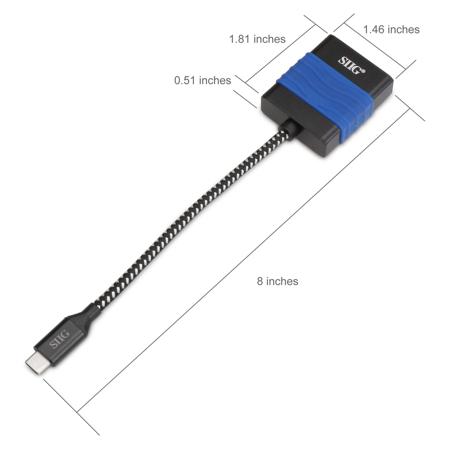
Housing (LxHxD): 1.81 x 1.46 x 0.51" (4.60 x 3.71 x 1.30cm)
Total Length: 8" (20.32cm)
Embedded USB Cable Length: 5.91" (15.01cm)
1.28 oz (36.29g)
662774040387
Easily add a DisplayPort connection via DisplayPort enabled USB Type-C port.
Supports both audio and video signals with resolutions of 720p HD, 1080p Full HD and up to 3840x2160 at 60Hz 4K UHD
Triple display modes (Mirror, Extend, Primary) supports various applications such as presentation or entertainment
Plug-n-Play, no driver installation and no external power adapter required
USB Type-C interface with reversible connection design supports non-directional plug-in connection
Compact and lightweight design makes this USB Type-C video adapter the perfect on-the-go accessory
USB-C with Thunderbolt technology and DisplayPort video signal compatible with computers such as 2016 MacBook Pro, 2015 MacBook, Google Chromebook Pixel and more
Note:
The USB-C source connection must contain DisplayPort video/audio signal, aka DisplayPort Alternate/DisplayPort Alt mode, in order for the audio and video signals to pass through to the DisplayPort adapter






