


This item is no longer available.
We are proud to present the ATEM CCU that let you take full camera control in a sweet looking hardware panel. The controller offer both ease of operation and multi-functionality with the user friendly buttons. With the launch of the Blackmagic Studio Camera, BMD entered yet another domain in live production. The Studio Camera series and the URSA Mini offers DaVinci Resolve primary color corrector and with the integrated CCU in the Software Panel you're able to remotely control color, cameras settings and lens control.
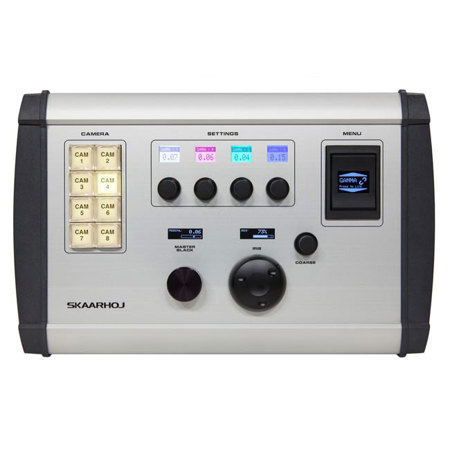
But we have great news - you are no longer limited to tweak your cameras in the software. We proudly present the ATEM CCU - it's full remote camera control from a dedicated control surface. The control surface lets you adjust multiple parameters simultaneously. The master black and iris adjustment are controlled by multi turn dials and the illuminated buttons and displays provides high visibility even in dark locations. The OLED menu rocker switch let you toggle between all the settings you need to adjust and refine for each camera's image
CCU operation with a real hardware interface
You are no longer limited to the software.
Adjust camera parameters and color correction
The 4 knobs with related displays let you easily and fast change settings.
Master black and iris at center stage
The two most important settings are located in the center of the controller for easy access.
Camera Selector
By default the ATEM CCU selects between CAM 1-8 on the camera selector. Alternatively you can configure the ATEM CCU to select between the 8 cameras on MultiViewer 1 or MultiViewer 2, by selecting this option in the web interface. If a selected camera is on preview on the ATEM Switcher the button will light up green. If the selected camera is on program the button will blink red. In UniSketch OS you can enable autoroute to a specific ATEM AUX channel or any other device capable of video routing. This is a great feature if you have a engineering monitor to match your cameras.
By pressing and holding buttons on the camera selector you can control multiple cameras at the same time. In this mode cameras will be adjusted relatively from their original position. All shading parameters can be adjusted in this mode.
ATEM CCU
Select this option if you want to relay CCU information to Blackmagic Cameras by the use of an ATEM Switcher. In short the ATEM CCU connects to an ATEM Switcher via IP and the CCU information to the cameras are transmitted via the ATEM Switcher. If you have control of your cameras via the ATEM Software Control Panel then this option will work for you.
Camera Support
Any camera that supports CCU control over the return SDI feed will work. This includes the Micro Studio Camera 4K, Studio Cameras and the URSA Mini (+ Pro).
Camera Control via ATEM
The ATEM CCU connects either directly to the ATEM Switcher via Ethernet or via a network switch/hub. Once connected our ATEM CCU communicates with the ATEM Switcher which, then relays CCU shading information to the cameras. You need an SDI return feed to the cameras you want to control (for instance a AUX channel) to relay the CCU data. This setup is similar to using the ATEM Software Control Panel. The ATEM Software Control Panel and the ATEM CCU are in sync, so when changing shading parameters these will be reflected both places.