

This item is no longer available.
Control your Blackmagic URSA Mini (+ Pro) and the Studio Camera series wirelessly. Send CCU data via SDI or WiFi, whatever you prefer.
Get full wireless control for your live multi camera production. The URSA Mini (+Pro) and the Studio Camera Series from Blackmagic Design offers great remote control setting such as iris, focus and zoom (on supported lenses) together with full DaVinci primary color corrector. The WIFI-B4 Link allows you to do all these great things wirelessly - no more cables!
CCU data over WiFi
The WIFI-B4 Link receives CCU data over WiFi, if connected. The source of this information must be a SKAARHOJ UniSketch OS based controller set up to send commands to a given WIFI-B4 Link device. Any received data for CCU will be converted to SDI Camera Control commands on the SDI output (first received package will enable override mode until power off) as well as forwarded to the analog B4 Lens (iris values).
CCU data over SDI
The WIFI-B4 Link receives CCU data over SDI too using a Blackmagic Arduino Shield. Incoming CCU data is simply forwarded on the SDI output (pass through) and iris values for the camera number selected on the Cam # switch is used to generate an analog control voltage for iris on the Hirose 12 B4 connector. The SDI carried CCU data can originate from any equipment supporting Blackmagics camera control protocol, including ATEM switchers or a SKAARHOJ ATEM CCU, RCP/RCP Mini and our Link IO products with the Blackmagic Arduino Shield integrated.
Selector Switch camera ID and more
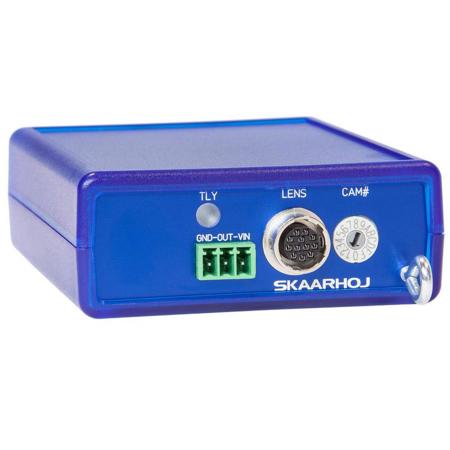
The camera selector switch determines the camera ID for the Hirose connector only and not the camera ID on the SDI out. This is set on the main controller (see Controlling the WIFI-B4 Link section). The camera ID is set for any case with selection from 1-9. If the selector is set in positions A-F special functions are activated instead. You can change the switch selector using a small screw driver. Notice you B4 Lens may need to be set up for external control with a switch.
• Selector switch 0 = Deactivated
• Selector switch 1-9 = Camera 1-9
• Selector switch A = Creates momentary access point to set up the network parameters
• Selector switch B = Deactivated
• Selector switch C = Deactivated
• Selector switch D = Runs test program where the lens iris will close and open in a cycle that will prove that it works
• Selector switch E = Reset calibration
• Selector switch F = Calibration mode (will determine when iris is fully closed/open and save settings, given the factory default values, are not appropriate for your particular lens
WiFi Setup ssid and password
The WIFI-B4 Link has a WiFi client built in which must connect to a WiFi network you have provided. This network must be connected to a SKAARHOJ controller that can send data to the WIFI-B4 Link. To set up the WiFi parameters such as SSID and password, place the camera selector in position "A" and power cycle the device. Now it will create an open Access Point with the SSID "WIFI-B4 Link". Connect to this network, open a webbrowser and go to 192.168.10.99. Here you will find a web interface where you can configure the parameters. Save, move the camera selector switch away from position "A" and power cycle the device.
Controlling the WIFI-B4 Link with WiFi
In order to control the WIFI-B4 Link you need a UniSketch OS based SKAARHOJ controller with the Device Core "BMDCamCtrl" installed. The IP settings for the device core must correspond with the IP address you have set for the WIFI-B4 Link. Remember the IP address for the WIFI-B4 Link and the main controller used for sending commands must not be the same!
For sending a command to the WIFI-B4 Link you assign a hardware interface component (such as a joystick) to a BMDCamCtrl action on the main controller.
A Note about WiFi setting up a wireless network
It's highly recommended to consider the robustness of the WIFI-B4 Link solution in relation to your venue: Will the WIFI network perform sufficiently well during a live show (with a room full of audience with wifi enabled mobile devices) as it did during your test? Experiences with mobile usage (cable cameras) show that it may work just fine, but could also be challenging. You are encouraged to consider means such as directional antennas etc.
The WIFI-B4 Link work over standard WiFi, but for the best user experience please ensure you have a stable and powerful wireless network. Use a wireless access point on a low congested channel and place it in line of sight with the WIFI-B4 Link.
Set the channel to auto, but if you experience interference then manually select and set the channel. Use a WiFi troubleshooting and optimization tool to help you select channel and access point placement.
To minimize poor performance, use a network dedicated to the WIFI-B4 Link. Avoid using a network where you stream or download data. We do not recommend expanding the range of your network by connecting a wireless network to another wireless network.
GPI Output short to GND
This output will short the middle pin (out) to GND when tally is on (red tally) for the selected camera (according to incoming data on either SDI or WiFi)