

This item is no longer available.
Connect To Your Peripherals and Power Your Computer...With One Cable
Sonnet's Echo 11 Thunderbolt 3 Dock connects your peripherals to your computer through a single cable. Simply plug in your devices-such as a printer, keyboard, mouse, cable modem, hard drive, optical drive, USB license dongle, headphones or powered speakers, phone, tablet, and (up to) two 4K displays-to the dock with their supplied cables, and then connect your computer with the included Thunderbolt 3 (40Gbps) cable. The Echo 11 dock even charges compatible computers through the same cable. When it's time to take your computer and go, just unplug the Thunderbolt cable to disconnect from everything at once!
Thunderbolt Certified for Mac and Windows
The Echo 11 Thunderbolt 3 Dock works with Mac and Windows computers with Thunderbolt 3 ports.
Leave Your Charger In the Backpack
For users whose notebooks and laptops accept charging over Thunderbolt(5), the Echo 11 dock also provides up to 87W of Power Delivery through the included Thunderbolt 3 cable used to connect the dock to the computer. These computers fall into four power requirement categories: 30W (example: Dell XPS 12), 45W (example: Dell XPS 13), 60W (example: MacBook Pro 13-inch), and 87W (example: MacBook Pro 15-inch)-the Echo 11 charges them at the maximum power they will accept so you can leave your computer's power adapter packed away!
40Gbps Thunderbolt 3-The USB-C That Does It All
The Echo 11 Dock includes two Thunderbolt 3 ports; one for connection to your computer, the other to daisy chain up five additional Thunderbolt peripheral devices to your computer! The Echo 11 includes 10Gbps USB 3.1 Gen 2 support, meaning you can connect another USB device to the second Thunderbolt port using the proper cable or adapter. The Dock's Thunderbolt 3 peripheral port can also provide up to 15 watts of bus power to devices requiring extra power for even the most demanding bus-powered USB 3.1 or Thunderbolt devices.
Connect a 4K Display or Two
The Echo 11 dock features an HDMI 2.0 port that supports a 4K @ 60Hz (or lower resolution) monitor. To connect an additional display, you can plug in a Thunderbolt 3 monitor to the dock's second Thunderbolt 3 port or at the end of a Thunderbolt 3 device daisy chain. Or, you may connect other display types (HDMI, DisplayPort, etc.) by using a Thunderbolt 3 or USB-C video adapter (sold separately).
Display Connection
• Thunderbolt 3 - Thunderbolt 3 cable
• DisplayPort - USB-C to DisplayPort cable or adapter
• Mini DisplayPort - USB-C to mini DisplayPort cable or adapter
• HDMI - USB-C to HDMI cable or adapter (with Thunderbolt 3 support)
• DVI - USB-C to DVI cable or adapter (with Thunderbolt 3 support)
• Dual-Link DVI - USB-C to HDMI adapter + HDMI to Dual-Link DVI adapter
• VGA - USB-C to VGA cable or adapter (with Thunderbolt 3 support)
• USB-C/DisplayPort - USB-C cable with 4K video support
Backward-Compatible with Older Macs
The Echo 11 Thunderbolt 3 Dock is also compatible with Macs with Thunderbolt 2 or Thunderbolt ports when used with the bi-directional Apple Thunderbolt 3 (USB-C) to Thunderbolt 2 Adapter and a Thunderbolt cable (both sold separately).
Connection Condenser
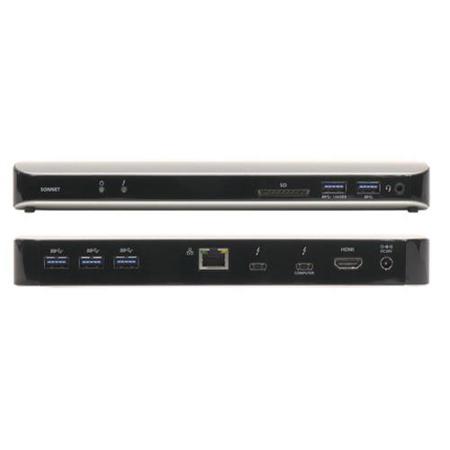
With its eleven ports, the Echo 11 Thunderbolt 3 Dock is a handy hub to plug in your peripherals and connect them all to your computer through a single Thunderbolt 3 cable. Through that same cable, the Dock provides enough power (87W) to charge any compatible computer at maximum power. You can even connect two 4K @ 60Hz displays to expand your view and productivity!
Features
Connects Your Peripherals with One Cable
Plug in peripherals to the dock with their cables, connect the dock to your computer with the included Thunderbolt 3 cable
Eleven Interfaces
Five USB 3.0, two Thunderbolt 3, Gigabit Ethernet, audio, and HDMI 2.0 ports; SD card slot
macOS and Windows Compatible
Works with any Thunderbolt 3 Mac or Windows computer
Computer Charging Port
Main Thunderbolt 3 port provides power to computers that accept charging over Thunderbolt 3, supporting them at the maximum power they will accept; leave your computer's power adapter packed away!
USB Charging Port
Front panel USB port can charge an iOS device, or other device that charges via USB, even while the computer is off or disconnected
40Gbps Thunderbolt 3 Interface
Fastest interface available, supports daisy chain connection of additional devices
Supports Up to Two 4K Displays
Connect one display to the HDMI 2.0 port, another to the second Thunderbolt 3 port or at the end of the Thunderbolt 3 device chain
Wide Range of Second Display Connection Options
Select from a variety of inexpensive Thunderbolt 3 or USB-C to popular display interfaces such as HDMI, DVI, etc.
SD Card Slot
Reads SD, SDHC, and SDXC memory cards
Backward Compatible with Thunderbolt 2 and Thunderbolt Macs
When used with an Apple Thunderbolt 3 (USB-C) to Thunderbolt 2 Adapter






