


+3
more
more

This item is no longer available.
High-speed Data Transfers
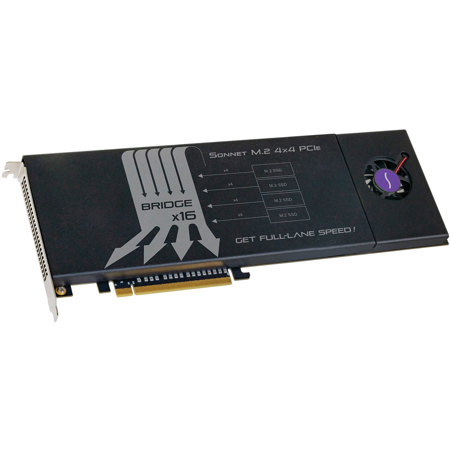
If you need to add internal storage to your computer setup and high-speed data transfers are critical to your work, don't look to 2.5" SATA SSDs-you need an NVMe SSD-based upgrade. Today's NVMe PCIe SSDs offer tremendous performance, easily outclassing 2.5" SATA SSDs. Sonnet's M.2 4x4 PCIe card enables you to mount four M.2 NVMe PCIe SSDs onto a single x16 card slot-it can transform the way you work.
With the Sonnet M.2 4x4 PCIe card installed in your Mac Pro tower; Windows PC desktop or server; or Thunderbolt to PCIe card expansion system with an available x16 PCIe slot, you can use it for instant-access media storage or as a high-performance scratch disk. Mac users can even install macOS on one SSD to create an incredibly fast boot drive. However you use it, this card's performance is impressive.
Performance Oriented
Sonnet's M.2 4x4 PCIe card is a full-height, full-length PCIe 3.0 card with a 16-lane (x16) interface. Featuring a unique Sonnet-designed x16 PCIe bridge, the card devotes four lanes of PCIe 3.0 bandwidth to each SSD you install. When installed in a Windows PC's PCIe 3.0 slot with four SSDs formatted in a RAID 0 configuration, the card is capable of 8,500 MB/s transfers. Aggregate transfer speeds from four non-RAIDed SSDs of up to 12,000 MB/s are possible!
Thunderbolt Port Connect Four SSDs Through One Cable
Got a Thunderbolt connection, but no PCIe card slot Sonnet's M.2 4x4 PCIe card is ideal for use in one of our Echo Express III-D, III-R, or xMac Thunderbolt to PCIe card expansion systems-the combo enables you to add up to four SSDs to any Mac with Thunderbolt 2 or Thunderbolt 3 ports, or Windows PC with Thunderbolt 3 ports.
Simple and S.M.A.R.T
Integrating a Sonnet M.2 4x4 PCIe card into your system is easy-just insert it into a x16 PCIe slot and then start your computer-NVMe compliance ensures the necessary drivers are installed automatically. macOS 10.14.4+ and Windows 10 compatible; the Sonnet M.2 4x4 PCIe uses the operating system's built-in drive formatting utilities to format the SSDs. Drive health monitoring is supported through S.M.A.R.T. (Self-Monitoring, Analysis and Reporting Technology) data reporting, too.
Features
Adds Ultra-Fast SSDs to Your System
Mounts four M.2 SSDs (sold separately) in your Mac Pro's, desktop PC's, or Thunderbolt expansion chassis' x16 PCIe slot
High-Performance PCIe Interface
PCI Express 3.0 x16 host bus interface for high-performance applications
Superior Performance
Concurrent data transfers speeds up to 12,000 MB/sec
Great Way to Add Up to 8TB of M.2 SSD Storage to Computers with Thunderbolt
Perfect for use in Sonnet's Echo Express III-D, Echo Express III-R, xMac mini Server, xMac Pro Server, and Thunderbolt expansion systems
RAID Support
Supports macOS and Windows RAID features
macOS Boot Support
Supports booting from JBOD (non-RAIDed) attached SSDs
NVMe Compliant SSDs
Typically no drivers required
S.M.A.R.T. Support
Supports S.M.A.R.T. data reporting
Rugged Construction
Aluminum enclosure withstands heavy use
Thunderbolt Certified for Mac & Windows