
This item is no longer available.
Net-log - Network Audio Logger
The Net-Log has been specifically designed for long-term recording and archival by the use of a dedicated hardware recording platform with a simple network connection for audio playback. Playback software on a network connected PC streams the audio to the desktop where it can be played out or saved as a file.
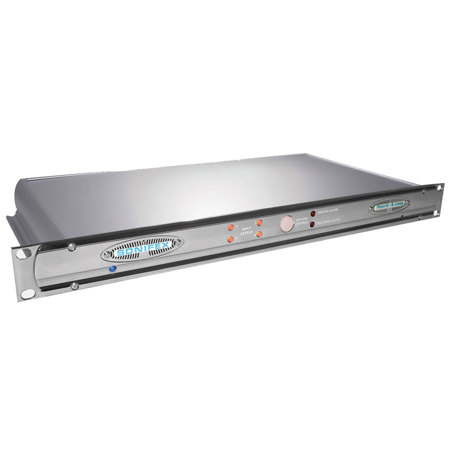
The Sonifex Net-Log is a 4 channel audio logger which can record weeks of programming on a large internal hard-disk. The unit was designed as dedicated hardware for reliability reasons, i.e. there's no PC motherboard in this machine. Although PC based systems are great for playback, they generally aren't robust enough for continuous recording 24/7/365. The Net-Log was designed from the ground up to offer :
• High reliability for continuous operation
• High quality audio (mpeg compressed)
• Compatibility with existing broadcast & Windows based systems (bwf files can be saved)
• Automatic operation with very simple to use software
All audio created by Net-Log is Windows Media Player compatible so files can be emailed to colleagues and customers and played out on any PC with a sound system.
There are many applications for Net-Log, from radio stations recording their broadcasts for regulatory purposes, to small call centres, law firms and security companies using them for monitoring. Net-Logs have been installed in court rooms & police interview rooms for audio surveillance.
Radio Broadcast Logging
Where logging is required by the authorities, Net-Log provides a perfect, simple to use, elegant solution providing playback of requested recordings within seconds. But even if logging isn't regulatory, Net-Log can still deliver audio to the desktop of anyone at a radio station - you don't need to go to the racks-room, or central technical area to play out a recording previously made. So it has the following advantages :
• From their desktop, the sales team can check to make sure that advertising was played on time and can create audio files to email to customers.
• Program controllers can snoop on their presenters, checking performance and checking that scheduled music was played.
• Station managers can check up on their competition and compare it with the sound of their own station.
• The production team have much easier access to recorded audio from past radio shows for the preparation of future stings & trailers.
Net-Log records in mpeg layer 2, the standard for radio broadcasting, so that you can be sure that audio files created using Net-Log are compatible with almost every mpeg based automation system available. File downloads can be made in mp2, mp3 or linear .wav format, and broadcast wave format (bwf) files are supported as standard, ensuring tight integration with your playout systems.
Hardware Description
Net-Log is a 1U rack-mount unit which has 4 mono record inputs on 3 pin XLR sockets with potentiometer gain controls and LED level indicators for each input. These accept 2 stereo, or 4 mono audio streams which are encoded in mpeg layer 2 format and written to a large internal IDE hard disk drive. The size of the drive is continuously being increased as technology improves and Net-Log can support sizes up to 2048GB.
Net-Log has 2 serial ports on 9 pin D-types which are used to program the IP address of the machine and to upload new software. Additionally, there is a 15 pin D-type connector used for remote input recording control and for alarm outputs (hard disk failure and archiving warning).
A 10Mbps RJ45 network port is used to connect Net-Log to your PC network and audio is streamed using TCP/IP. Audio can be streamed simultaneously to one, or many, PCs, as well as simultaneously archiving audio data to an IP server automatically in the background. All the Net-Log configurations and operational features are controlled from a connected PC using the Net-Log-Win software.
• Net-Log-Win Software
Net-Log-Win Application
There are 4 main screens in Net-Log-Win which control and configure the connected Net-Log(s) : Recording, Playback, Archiving and Options. Access to these screens can be password protected and users can be configured either to View or Edit each screen. In the top part of the screen, a drop down list allows you to select which Net-Log you wish to connect to and the alarm states are also shown.
The Options screen is the place where you configure the settings of the connected Net-Log. The Options Archive screen in Net-Log-Win is used to configure the IP address and directory of the archiving destination and also to define archives to be written either as the cuts were recorded, or in files of a certain duration, e.g. hourly
Recording
Unlike normal hard-disk recording systems which stop when the disk is full, on reaching the "end" of the recording data space Net-Log begins to overwrite the oldest recordings, meaning that you always have access to the last recordings made, up to the size of the hard-disk. Additionally, it allows simultaneous recording and playback, so that you don't have to stop the unit recording in order to search and play. Each channel can be given a service name for reference when searching for audio.
Recording can be controlled in 5 different ways :
• Using on-screen buttons in the Manual Record screen.
• Using the Program Record screen to start & stop recording at different times, using up to 20 programs. Programs can be saved to disk.
• Using a remote input on the 15 way D-type connector.
• Automatically on voice/sound level, ideal for recording telephone conversations, configured in the Options Record screen.
• By Crestron and Televic board room controllers, via an RS232 serial connection. The controllers are mainly used in meeting rooms and allowing Net-Log to more easily be used for recording in this environment.
In the event of needing to record directly from the Net-Log, there is an emergency Record Control on the front panel of the machine.
Net-Log-Win Playback
Net-Log-Win software for MS-Windows 7/8 and 10 is used to listen to audio recorded at a previous time and date, or for copying audio to a file, e.g. to email to a client or colleague.
In the Play screens, simply select a Net-Log and the required channel service name and a list of all the recordings made are displayed, sorted by recorded date and time. There are 4 ways to play audio :
• Using the Play Stream screen, selected audio is played out on your PC sound system within seconds.
• Using the Play Download screen, you can select a recording's date, time and duration and a file is downloaded from the Net-Log and created on your local PC. You can then use separate applications to email the audio file, edit it, or save it to CD, or DVD. Files can be saved as .mp2, .mp3 or linear .wav.
• Using the Play Program screen, you can select a number of recordings, made at the same time over a number of days of the week and save them off to a single directory, e.g. for storing commercials from a particular customer. Files can be saved as .mp2, .mp3 or linear .wav.
• Using the Play File screen, you can open any previously saved audio file for playback. You can also play .mp3 and linear .wav files this way.
Additionally, a separate free player is available within Net-Log-Win to play any audio file created from a Net-Log
Archiving
You can use the Archiving function to automatically create long-term backups of the recordings by streaming audio to a separate server disk for archival purposes.
For each recorded channel, you can define an IP address and directory to save files to and Net-Log can create files on that directory either in the same way that they are recorded, or in files of a certain length, e.g. of 1 hour duration.
The Net-Log Auto-Archive utility is run on the server that you are archiving to. It has the following features :
• Simultaneous connection to multiple Net-Logs.
• Automatic log-in, archive and log-out process.
• Status display of Net-Logs on-screen in an easy to understand format.
• Status reports, error reports and archive alarm information can be emailed automatically at regular intervals.
• Can be used to check the status of Net-Logs even when archiving is not used or required.






