2025-11-20T19:00:00
Rated 5 out of 5
This product is the best!!!
I use my Samsung monitor for everything as in sending and receiving emails, streaming movies,an to run my business. I'd have to honestly say that Samsung out did every other monitor I've tried. Regret not going with Samsung sooner.
Ajhowell
Originally posted at

2025-10-03T20:00:00
Rated 5 out of 5
Super crystal clear visual n high quality sound
I use it for my my online college my zoom meetings with my autistic son's teachers for my job to buy sell and trade materials jobs and music and movies n gaming
Skipdaripper
Originally posted at
2025-09-30T20:00:00
Rated 5 out of 5
This monitor is a great monitor with lots of featu
I use my monitor for every day computer use and watching Netflix and youtube
gibbojr2
Originally posted at
2025-09-27T20:00:00
Rated 5 out of 5
Computer Monitor
I use the monitor the play pc video games and edit video
Alexander
Originally posted at
2025-09-19T20:00:00
Rated 2 out of 5
This product climbs and sees me performing extra e
Gaming and social talk. I believe a distance learning opportunity creates a judgemental mind but also doesn't approve the personal space desired.
Tnprettyboy
Originally posted at
2025-09-15T20:00:00
Rated 5 out of 5
This product has wonder features
I mainly use my monitor for playing video games at a high resolution
Zachary
Originally posted at
2025-09-14T20:00:00
Rated 5 out of 5
GAMECHANGER
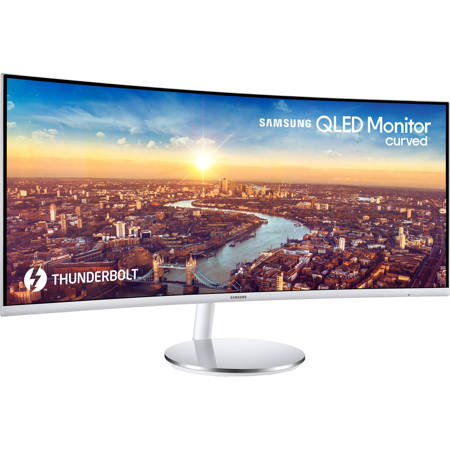
As a research scientist, I rely on technology that can keep up with demanding projects, and the Samsung ViewFinity CJ79 34" WQHD QLED Ultra Wide Curved Monitor has quickly become one of the most valuable tools in my daily work.
The ultra-wide curved screen makes multitasking effortless. I can have multiple windows open at once-research articles, coding environments, and data visualizations-without constantly switching back and forth. This has made my workflow far smoother and more efficient.
The picture quality is outstanding. The QLED panel delivers sharp detail and rich colors, which is especially helpful when I'm reviewing medical images or working with complex charts. The curved design also feels natural and reduces eye strain during long hours at the desk.
I also appreciate the Thunderbolt 3 connectivity, which allows me to connect my laptop and transfer large files quickly with a single cable. It keeps my workspace clean and clutter-free, while still giving me powerful performance.
The 100Hz refresh rate makes everything feel fluid, whether I'm scrolling through data, presenting slides, or simply taking a break to enjoy a movie.
Overall, this monitor has elevated my productivity and made my workdays much more comfortable. For anyone who needs a reliable, high-quality display for serious work-or simply wants a fantastic viewing experience-I highly recommend this!
Samsung17
Originally posted at
2025-09-11T20:00:00
Rated 5 out of 5
The picture is super clear and for movies it's gre
I use mine for gaming and also for watching movies with my family
Morenaclara
Originally posted at
2025-09-06T20:00:00
Rated 5 out of 5
Amazing monitor
Quilty fantastic, Sounds superb. The best I ever had.
BayMay
Originally posted at
2025-09-05T20:00:00
Rated 5 out of 5
This is everything you would expect in quality.
I use this for streaming and for movies and videos.
Homefi
Originally posted at
2025-08-28T20:00:00
Rated 5 out of 5
Like the resolution
I like to play games with friends on it. As well as showing all our vacation pictures and videos..
Stevel1013
Originally posted at
2024-10-15T20:00:00
Rated 5 out of 5
Great compatibility
I use my monitor for school and gaming the Thunderbolt makes it convenient for my laptop and it has another port for PS5 so I can switch without any issues
Jaz111
Originally posted at
2024-10-14T20:00:00
Rated 5 out of 5
Love the functionality of this monitor!
I bought this for work. I love that not only is it large, but I can easily place separate screens side by side and navigate back and forth. The sound quality of the speakers is excellent as well. Teams meetings go so much better since I bought this monitor!
Mtnjunky14
Originally posted at
2024-10-12T20:00:00
Rated 5 out of 5
Incredible Display for Work and Entertainment
I've been using the Samsung CJ791 Ultra Wide Curved Monitor for both work and entertainment, and it's been a fantastic experience. The 34" ultra-wide screen offers a large workspace, allowing me to comfortably manage multiple windows side by side. The Thunderbolt 3 connectivity is a game-changer, making data transfer and charging my devices much faster and more efficient.
The color accuracy and brightness are impressive, which is essential for design tasks, and the 100Hz refresh rate ensures smooth performance during gaming sessions. The curvature of the monitor adds an immersive touch, especially for gaming and movie watching. Overall, the build quality is excellent, and the design is sleek, fitting perfectly into my home office setup. Highly recommended for professionals and gamers alike!
SamLovesSung
Originally posted at
2024-06-23T20:00:00
Rated 4 out of 5
Great Monitor
I use this monitor for work as an IT Specialist, it is very convenient having the ultra wide screen.
The only issue I have is I feel that the base could be a little smaller, it feels a bit oversized
itguy003
Originally posted at
2024-06-19T20:00:00
Rated 3 out of 5
Great monitor but lacks for Gaming
Overall the monitor functions and runs pretty well. But it's not the best monitor to use for gaming. The hzs don't match up to 120 and above which henders my gaming by a bit. But the looks and angle work well if your using it for movies or rendering. I say when it comes to gaming choose a different monitor which is something I wish I did in the beginning. Being this is my first monitor however I did enjoy my experience.
RonicProxy
Originally posted at
2024-06-01T20:00:00
Rated 5 out of 5
Excellent monitor
Best for the price. Slim and looks good. Supports type-c connection
Ssshop
Originally posted at
2024-04-13T20:00:00
Rated 4 out of 5
Great value for the money!
Being a relatively inexpensive 1440p gaming monitor, I was excited to try out ultrawide and QLED, and it's great! I am pleased with the richness of the colors and how good the contrast is for an LCD. I have no problems with the product, BUT there is no HDR support, and if I were to buy it at the retail price, I would have been disappointed.
However, I have no complaints about the hardware itself, and the viewing/gaming experience is spectacular!
SammieG
Originally posted at
2024-04-04T20:00:00
Rated 4 out of 5
Great value for less than retail price!
I'm an avid gamer and content consumer and for a long time I've been interested in QLED and recently I wanted to try out ultra-wide for my second ever personal monitor (my first was a VA 1080p basic LCD panel) and I am in love with the display! The resolution is much better for upclose content consumption, the display is bright enough and fast enough for high comfort, and the colors are naturally richer and deeper as advertised (and warmer which made the overall picture too warm for me so turning up the blue vibrancy by 5 to 10 notches balances out perfectly for me).
It's overall a perfect monitor for a younger PC user like me whether I game, work, or watch videos, however I wish that it supports HDR. I would be somewhat disappointed if I paid full price, but again, I'm new at using monitors and it's more than good enough to justify spending the money!
MegabotSG
Originally posted at
2024-04-03T20:00:00
Rated 4 out of 5
Added another 1
Good multi-functional monitors. Having the ability to PIP enhances multi-tasking. Aesthetics and charging ports puts this monitor in the upper tiers for home and small business use. I have two or my primary work stations and three for my Flight sim setup.
MADD1
Originally posted at
2024-03-18T20:00:00
Rated 4 out of 5
The thunderbolt is amazing
The main reason for me buying this monitor was due the the color of the back and the size of the screen. The crisp white with silver edging went perfect with my gaming PC, as well as the slim border to enhance the experience. The performance has been amazing. It's quick and vibrant color. The only thing I've found annoying is the button for the settings and on off, it requires a double tap to turn on. Then to turn off its tap down tap again. I'd recommend a separate button for power and menu.
Button
Originally posted at
2024-02-16T19:00:00
Rated 1 out of 5
STAY AWAY BAD MONITOR EVEN WORSE CUSTOMER SERVICE
I typically don't write reviews, but felt compelled to make the next person aware to avoid this monitor and more so my experience with dealing with Samsung. This is the second monitor that I have purchased from Samsung in which the plastic bezels have started to crack in the corners of the monitor (See the first 4 pics). Let me preface this by saying I do like and own several Samsung televisions and the wrote off the issue with the first monitor as being a one off. What is more frustrating than the cracks in the bezels is the way I was treated when I trying to remedy the issues. Initially when I reached out to Samsung they issued a ticket number for the incident and I was asked to provided pictures of the issues, which was very reasonable request. I was able to send pictures of the product information and the cracking directly to the Samsung rep by text, which was also very convenient. I was then told by the Samsung that a technician would need to review the picture, also seemed reasonable. I then got a quick response from Samsung that the case had been closed. I reached back out to the Samsung rep , and the technician had determined that these cracks are part of the design, which I then called back and had to explain they are not and the Samsung rep and I were able to figure out the technician actually had used the different (incorrect) model of Samsung monitor for comparison. After second review with correct model of monitor the Samsung agreed this was defect and issued a return label for me to send back the monitor for repair. That was also coinvent as I just had to take it to a UPS store and they would actually pack and ship the monitor back to Samsung. I shipped the monitor back and about 10 days later it was received notification that it have been received at the repair center and I was told the repair was going to be $329 (happens to be the cost of buying this monitor new). I reached out to the customer service and was told the technician had determined the product was damaged which voided the warranty, and after heated conversation was then given another number to call and follow up with the service center itself. I called the number I was given for the service center it was a fax number. I then went back through the information and called another 888 number for the service center and explained the cracks develop over time and like I stated before I had the same issue with another monitor, and I sent in the monitor for repair only after it had already been reviewed by a technician that this was not damage. I was told this was determined to be damage and the warranty was voided so the repair would cost $329. I then asked for the monitor to be sent back and after my experience I would not longer purchase Samsung monitors both personally or professionally. I was then told the return information would be provided shortly and transferred to Samsung automate survey (which I did not complete). I happened to use my office land and I think after they realized who I was I immediately got a call from a third Samsung representative offering to waive the cost of the repair and the monitor would be returned in 3-7 business days, but the damage had been done in terms of my opinion of Samsung customer service and impression of Samsung monitor quality. I am cautiously optimistic that it will come back repaired but it would not be worth the hassle when there are so many other lower cost and equivalent monitor options than Samsung.
***UPDATE***
I got an email from Samsung that the monitor was being returned unrepaired. When reached back out to Samsung and after a back and for 45 minutes I was told I was being transferred to a supervisor and actually was sent to a Technical Support Rep. The technical support person explained that the one time accommodation was made to cover the cost of the repair, however, it was not communicated properly to the service center and they had mistakenly sent the monitor back. The representative said that I when I receive the unrepaired returned monitor to call back and they would issue a new ticket and then I would be able to send the monitor back for repair. Within the week the monitor came back, but it was substantially damage (see the last 6 pics). The corner of the screen was shattered, there were large pieces missing, and new damage on the top of the monitor. I immediately called Samsung and again after another hour on the phone sent them the pictures of the damage and was told by the Samsung supervisor that the monitor is out of warranty due to physical damage and would not be able to be repaired or replaced, furthermore the monitor should not have been sent to the repair center (which I did not understand as the original Samsung rep is the one who issued the return label for me to have it packed and shipped by UPS). I was then told that even though they had damaged the monitor to the point that it was not working there was nothing they could do, but they opened another ticket and stated they would get back to me in 48hrs. This makes no sense, the pictures are worth 1000 words, I sent them a monitor with a defective plastic bezel and they destroyed it and sent it back to me and told me it was unrepairable. I wish I would have never bought this, let this be a lesson to anyone buying Samsung products about how they treat their customer after the purchase.
asg_01
Originally posted at
2024-01-11T19:00:00
Rated 5 out of 5
Completely Satisfied with This Monitor
My father bought this for me over a year ago, and to this day it still works! Quality is excellent; I can easily plug in my headphones, though I needed to buy a headphone mic splitter to be able to plug it into the monitor, screen works amazingly even after turning it on, playing video games, and turning it off when I'm done, and audio is clear and loud enough for me to hear! If I can't hear anything without my headphones, I can just turn up the volume or turn down the volume if it's too loud! It also never shuts off randomly and anyone can easily plug their gaming laptop or PC into the monitor without any problems at all. Since it is a widescreen monitor, you have to turn your head to look at a different spot in the screen, but for me, I'm totally fine with that! I am completely satisfied with my monitor!!
Ciara
Originally posted at
2024-01-10T19:00:00
Rated 5 out of 5
Wow! A fantastic monitor with a great picture
I mainly use this monitor for work - sometimes personal. This replaced two 24" monitors and what a beautiful site to have no gap in the middle anymore. And the curved nature of the monitor reduced the amount of head turning I need to do which is helpful for me personally.
The screen is crisp, clear, and clean. It comes with a lot of options to change the look (e.g. brightness, color depth, energy saving, eye saver, etc.). Nothing was mentioned in the description but there are speakers in this monitor! The annoying thing, though, is you control the volume via the multi dial in the back corner which to me is not convenient. But the speakers sound good and may eliminate my Creative Pebbles for more desk space.
I have played games (e.g. Torchlight 3) and it was awesome full screen. But the screen is big enough to have an area for chatting, your game screen, etc. I am not an avid gamer so for what I do the monitor was very responsive.
For work, this monitor is amazing! I cannot believe how much easier it is to do things with one large monitor screen. Especially copying and pasting between apps. And if needed, I can open an app full screen - I am a scheduler so files with a lot of columns can be viewed with less scrolling.
Overall, this is a monitor I highly recommend!
jaroclay
Originally posted at
2024-01-08T19:00:00
Rated 5 out of 5
Simplified pc set up
I use this monitor primarily for my work pc in my home office. I was able to get rid of my external speakers and power block and it gives a great picture. With Displayport 1.1 i was able to add another monitor. Ideally it would have maybe one or two more usb and or one more monitor input option, but i was able to use it quite handily and simplify my setup.
Bequia
Originally posted at
2024-01-07T19:00:00
Rated 5 out of 5
Excellent Monitor
This monitor has been perfect for working from home and displaying the programs I use, the wide field allows me to have multiple windows displayed and still allows me to have them at a reasonable size to view them. The display is perfect definition wise and lightening . I've had it for about four months now and it's definitely been worth the purchase
Stannley77
Originally posted at
2024-01-03T19:00:00
Rated 5 out of 5
Why did I wait
I had been on the fence about buying this monitor for work from home. Why did I wait? This monitor is great! The picture in picture and wide screen capability make working from home easier than working in the office.
WorkHomeLife
Originally posted at
2024-01-03T19:00:00
Rated 5 out of 5
Excellent monitor
I mainly use the Monitor for work. I live the wide screen when I can out two windows side by side without another monitor. I also like the single cable to take care of all of the connections I need.
Kevchin
Originally posted at
2024-01-03T19:00:00
Rated 5 out of 5
Great monitor!
It helped me eliminate the need for two monitors on my limited desk space. But still just like having two but without the break in the middle.
Very happy with it.
Merks000
Originally posted at
2023-12-04T19:00:00
Rated 5 out of 5
As good at gaming as it is at business displays!
I bought this almost a year ago and I kept my gaming monitor as well since this one was for business, but my experience is that this monitor is as good with AAA gaming as it is with Microsoft Office! I'm sure if I really studied the pixels during fast action scenes, I may be able to see that my ASUS gaming monitor is better, but after many hours of play, I see no difference in visual quality. Some older games don't always like the wide screen, but most just put black frame bars on the left and right of the game display, using the game's highest preset resolution option with no distortion.
RIVERDOG64
Originally posted at