+1
more
more

This item is no longer available.
Reclaim your space
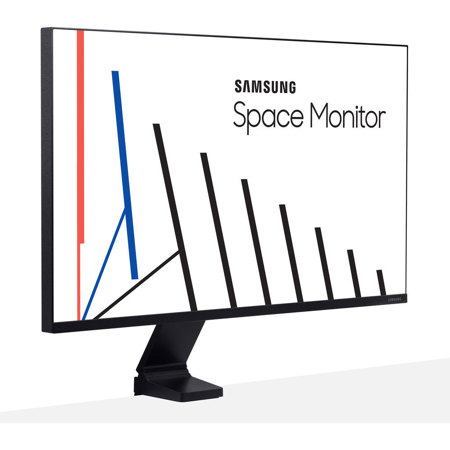
The Samsung Space Monitor is designed to let you reclaim your work space. Occupying a minimum of desk space and leaving work areas clear when not in use, the Samsung Space Monitor is the ideal solution wherever space is at a premium.
Free up more space
The Samsung Space Monitor provides up to 40 percent more usable desk surface area than a conventional monitor.
Space-saving design
When not in use, the Samsung Space Monitor pushes back to sit flat against a back wall to leave your entire work surface clear. When it's time for use, simply pull the Samsung Space Monitor towards you and adjust to your preferred viewing position.
Concealed cables
The Samsung Space Monitor arm stand neatly conceals its power/HDMI Y-cable in recessed channels to prevent tangling and keep your work space clear and free from clutter.
Stylish design
With its slim panel featuring a 3-sided bezel-less screen, the Samsung Space Monitor offers an understated stylish solution for any workplace or home interior.
4K UHD resolution
With 4x the pixels of Full HD, the 32" Samsung Space Monitor delivers more screen space and amazingly life-like 4K UHD images. View documents and webpages with less scrolling, work more comfortably with multiple windows and toolbars and enjoy your photos, videos and games in stunning 4K quality.
Height-adjustable arm stand
The Samsung Space Monitor's zero-level height adjustable arm stand allows easy positioning of the screen for optimal comfort and convenience. Its adjustment span allows viewing from a height of 7.2 inches (184.7mm) above the desktop (32-inch screen) all the way down to surface level.
Adjustable eye level
The Samsung Space Monitor can be quickly and easily raised or lowered to the optimal viewing height of any user, making it a versatile solution for use at home or in public spaces such as libraries.
Easy installation
The Samsung Space Monitor's arm stand features an integrated clamp for quick and easy installation. Adjustable up to 3.54 inches (90 mm), the clamp allows the Samsung Space Monitor to be securely attached to desks and tables with a wide range of thicknesses.
Robust hinge
The Samsung Space Monitor's arm stand employs a robust hinge that ensures consistent and reliable performance. Developed using Samsung technology and tested to withstand thousands of movements, the durable hinge assures smooth and precise screen positioning time after time.
Multi-tasking
PBP (Picture-by-Picture)
Picture-by-Picture (PBP) lets you display to two sources onscreen at their native resolution.
PIP (Picture-in-Picture)
Optimize your multi-tasking further with Picture-in-Picture (PIP), which lets you resize the second source to up to 25% of the screen and position it anywhere.
Easy Setting Box
Instantly arrange your windows for optimal multi-tasking with Samsung's screen-splitting Easy Setting Box software.