
This item is no longer available.
Review Summary
2021-04-05T20:00:00
i purchased mine in february 2018 and have thoroughly enjoyed its many features and light weight. always found it reliable, until about a year ago when i began experiencing intermittent crashes. i've run through all the steps recommended to alleviate the issue, all but "recovery." samsung support had me do a hard-reset, but that provided relief for a week or two, then the crashes (most in the morning) began again. the chromebook always boots up automatically after crashing, then often crashes again a few minutes later. after an hour or two stops it often stops, only to begin again the next day. i'm considering buying a new chromebook.
GerRegan

2019-10-28T20:00:00
I've had this Computer for almost 3 years. It is a Great Computer, I have now 4 cracks in my screen and it still holds up. The pen is low quality but the computer is great.
Luv2Shop
2019-05-22T20:00:00
Glitches: Some people were experiencing many issues with the chromebook, which was much more frequent than I thought. This can easily be fixed by going to Chrome, typing chrome://flags, and in the search bar, type in "Debugging keyboard shortcuts." Here, you enable the setting, and after the chromebook restarts, press Shift+Search+T to turn off the touchscreen feature. This does solve the issue, but prohibits the use of the touchscreen features after that. This can be toggled on and off by using this key shortcut. Design: The chromebook feels very rugged and well-designed, with an amazing screen. The 3:2 aspect ration is undoubtedly a wonderful feature to have by having more screen real estate. However, the screen does get covered in fingerprints after a while of using the touchscreen, so be aware of this. The main con about this certain chromebook is the lack of proper I/O ports, with only 2 USB-C ports and 1 headphone jack. Other chromebooks made from Samsung has more variety in ports, with the Samsung Chromebook 3 having an HDI port and a reasonable amount of USB-A ports. Although USB-C is a nice touch, it lacks any proper connection to a mouse and keyboard, requiring a dongle to connect. The battery life is good, with 4 hours of constant use with max brightness and a dozen tabs open. The RAM is a bummer, restricting any heavy workload to be worked on smoothly. If you doing extensive work, then the chromebook can noticeably heat up at times, which can feel very uncomfortable when typing on the keyboard. The heat from the battery is tolerable, but feels abnormal, especially when regarding that the chromebook does not have any fans.
thelambsauce

2019-05-08T20:00:00
I love this laptop especially in lte what I found useful about this laptop is how lightweight and versatile it is.
Jahlexis
2019-03-26T20:00:00
it crashes every 5 seconds, and no i am not exaggerating... when i draw i literally have to draw a line and save the line which i had drawn and then draw another line then save again. A drawing that should have taken me two days took two weeks... when I had finished I didn't want to draw for a while...It's so fustrating... I'm starting art school next month and I don't want to have this problem when I'm working on a project... so I'm going to get another computer...
sunshinesdaily
2019-03-15T20:00:00
I bought this a little over a year ago from bestbuy and the after an update the touchscreen just stops working with your fingers. After some searching Ive found that a lot of people have this issue. The manufacture warranty was only good for six months from the date i purchased it somehow. DO NOT BUY!!!
Sailor J.
2019-02-18T19:00:00
The laptop worked great at first, but less than a year later it has been a waste of money.
vanesssa
2019-01-30T19:00:00
ive had this chromebook for just about 2 years now. already completely broken. it freezes every 10 mins, it frequently crashes, and naturally - samsung wont fix it since its out of warranty. keep in mind this $500 chromebook lasted all of 2 years. i actually really liked this chromebook when i first got it. it could be a great product but it has no longetivity. $500 should last multiple years.
jgt91
2019-01-24T19:00:00
I got one for christmas and is the best note book I could have going back to school after winter break and having a maneuverable laptop makes life easyer in the class room
Dat1
2019-01-13T19:00:00
Lasted less than 1 year. Computer looks great and I loved it initially. The screen stopped working intermittently because of what seemed to me to be a faulty connection between the computer and the screen. I don't actually know what the issue was or how Samsung fixed it ,but they did so under warranty. The screen broke again within a few months where the touchscreen would flip out and jump all over the place. Resizing windows and selecting things I don't want selected. Unusable! Now it's out of warranty even though it's most likely the result of faulty refurb parts used to repair it. There is no way to get it repaired even if I want to pay for it.
3WHughes
2019-01-12T19:00:00
I bought the Chromebook preordered with some little minor app issues but of course the product was newly introduced so it was expected. However, these suggestions of compatibility with S Note App, an ejected Chromebook Pen warning, and some more reliable hinges could make the Chromebook more exceptional. Price is not so bad, although it could be a little less considering the expectation is similar to the Samsung Galaxy Note phones.
HomieDaClaon84
2019-01-02T19:00:00
2 keys on keyboard stopped working randomly. Google search reveals this is a common problem. Sent it in under warranty and was told I have to pay 159 dollars for repair.
Oldsamsung c.
2019-01-02T19:00:00
It is the best laptop that I have bought !! la mejor compra!!
Amesari
2018-12-17T19:00:00
Full disclosure, I am a Samsung employee and got this on discount from the employee store. That said, this Chromebook is junk! I love my Samsung TVs, and my Samsung washer & dryer are great, but I will never buy another Chromebook from Samsung again. Pretty much every day, the screen will go crazy and start zooming in and out randomly, making it impossible to use until the random zooming stops and you can reset the screen to 100%. Rebooting and factory resetting the Chromebook didn't help, so this is probably a hardware issue. This started happening in month 3 or 4, and has continued basically every day for a year. My daughter is so frustrated trying to get her homework done that she would use anything else if we had an alternative for her, but unfortunately we're stuck with this nearly uses piece of junk. Sorry Samsung this one is a definite loser.
MattMlr
2018-12-13T19:00:00
The Chromebook Plus glitches like crazy when moving the screen. As in adjusting by opening or closing a little bit. Having several tabs open, if you move the screen even slightly, it auto activates the various tabs randomly. This also makes using apps impossible since when you touch the screen, it moves it a bit, then it will glitch and switch apps or tabs. Extremely frustrating
Rbbiggs
2018-12-12T19:00:00
I have owned this laptop for one year, already had one repair, and I'm packing it to send it in again. So far my experience with this machine has been frustrating.
Nate L.
2018-12-09T19:00:00
It isn't really great if you are on the move a lot because it's super sensitive.
Hayley28
2018-11-08T19:00:00
I purchased this product 6 months ago and it is only getting worst. It gets really hot screen goes crazy or stay stuck you can't do anything then it shuts down and restarts waste of my money
Lumiella
2018-10-26T20:00:00
Good: - Snappy - Great screen - Good enough for basic browsing etc. - Its a device you may hate in beginning but you'll eventually like/adapt (below) - Good battery, charging options via USB C - A good looking machine you can carry to the coffee shop Bad: - Terrible i mean terrible placement of some keys, limited spacing between keys, backspace key etc. (its like if you bought a spare 3rd party keyboard for tablet) - Price - much ado for nothing So i own the far superior ASUS 302CA user as well, price wise the Samsung is not worth the same money as the Asus at 450$. If you are buying full price buy the Asus. If you get the Samsung on sale (i got it for 200$) i'd say its a fair machine worth the price.
aisla
2018-10-17T20:00:00
It dents easily and the screen moves sometimes when you don't want it to. At first my touchscreen worked but now it doesn't anymore. Some of the keys don't work. My friends have had to send it back to the company more than 3 times! Dont get this device.
Iras
2018-10-14T20:00:00
It t doesn't work. The keys don't type and it dances.
Me09
2018-08-13T20:00:00
i bought it for my daughter and she was really happy with it.
cesar v.
2018-08-12T20:00:00
I got about two weeks ago and using a week now and I love it
Hazenn54
2018-08-11T20:00:00
I am very happy with my Purchase so glad I did. Thank you so much!!
SassieLiza
2018-08-11T20:00:00
The Chromebook is great my only issue is sometimes the touch screen goes crazy like a ghost is messing with it. Do you guys have a solution for this?
LumiStar
2018-08-08T20:00:00
Not having a USB, HDMI port is the worst. I hate having to spend more money on connectors because it makes my laptop difficult to transport. Also, I've had this chromebook less than 6 months and one of the few ports is already not working.
JLP33
2018-07-29T20:00:00
Just wow at the price range! This could be the better choice fotlr the students as a daily driver for taking notes, watching movies, playing games and music!
WALKAN
2018-05-06T20:00:00
So I've had this since December 2017 and it's now May 7th 2018 I wanted to get out of using laptops and hybrids..... This changed that for me. I am a huge fan of the OS and being able to make the switch from other OSs was a gift sent from the tech gods. When I'm on it (a lot more than I thought I would be honestly) I never need to pick up my phone and it connects to my TV's, Phone's (in a way, most connections and mirror services I have through third party applications), and both of my 'smart speakers' flawlessly. I do also have wireless ear buds with AI and they connect just as well. I have just gotten them so I have not yet tried the ai with them but I am sure it will be flawless The only reason why I chose this instead of another product with this OS is because for the price it is the best value. It's definitely up there on the chart with competing products as far as features and functionality goes but I did notice that it starts getting glitchy with too many applications or pages open. Also being able to use my phone as a hot spot I always take this with me no matter where I go.
Wrst
2018-04-11T20:00:00
It’s fast and great. Ready to connect. Keeps everything organized
Coco0318
2018-03-17T20:00:00
Bluetooth never stays connected with any chromebook products once you update. This is my 4th chromebook and same problem on all 4, and all different brands!. There is no help online, and of course the resetting and powerwashing turning off and on don't work.
Zhandi
Where performance and portability meet
The Samsung Chromebook Plus adapts to whatever you're doing. Use it like a laptop to reply to emails or to work on a paper. When you need a break, flip the screen so you can play games or catch Upon your latest book.
Built-in Pen
Make your ideas personal and your notes clear with the built-in pen. Whether you're doodling, sketching or personalizing a photo - the built-in pen will help you get every detail just right. You can even use the pen to take a screenshot, magnify or unlock the screen.
Built for the Google Play Store
There's always time for entertainment on Google Play. Kick back with your favorite games, music, movies, books and more. The Samsung Chromebook Plus can run many of the same apps you use everyday on your phone or tablet.
Millions of apps
Enjoy millions of apps on the Google Play Store, including entertainment, productivity, popular games and the latest apps to help you do what you love on the Samsung Chromebook Plus.
Thin and lightweight
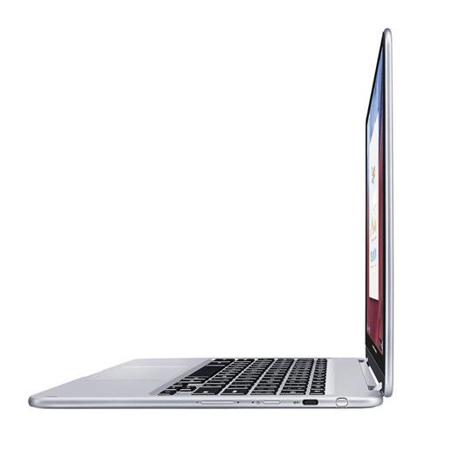
The sleek, metal body of the Samsung Chromebook Plus is comfortable to carry as a tablet and easy to fit in your bag while you're on the go. Plus, it doesn't skimp on Chromebook features with a full-size keyboard and trackpad. So you can play a game, chat with your friends comfortably or watch a movie from anywhere.
Display brilliance
Game, work and binge-watch your favorite shows on Samsung's best Chromebook screen yet-a stunning Quad HD display made of durable Gorilla Glass 3 looks great up close and from afar. And, with a 3:2 aspect ratio, you'll enjoy both the widescreen viewing and the portrait tablet experience.
Be more productive
Multitasking is becoming a way of life. Samsung Chromebook Plus keeps you on top of it. Play games while you're editing work, watching a video or searching the web.