2020-11-13T19:00:00
Rated 2 out of 5
Not so good
Have this a yew tears. Tried it with RAID but behaved oddly and got slow right from the beginning. Switched to JBOD and works good - when it works. As with others, it disconnects now and then - so far not in the middle of a backup.
Mike00
Originally posted at

2020-07-23T20:00:00
Rated 5 out of 5
Excellent as system backup
I have had one for aver a year and it works well. I only use it for system backup so it's only on for a few hours about once a month. It does have a noisy fan. Next version should have a larger diameter lower RPM fan to keep the noise down.
Mike M.
Originally posted at
2018-09-23T20:00:00
Rated 1 out of 5
Not Working
I bought this enclosure to had 2 internal drive after I downsized my case on the plus size it was very easy to fit the drives, Once booted up {and set To Jbod} my computer sees the drives in device manager but nothing is happening they don't appear in file manger or even in disk manager
DeadDave
Originally posted at
2018-08-26T20:00:00
Rated 4 out of 5
Compact, speedy, and easy to use.
Undo one screw to access the insides. Press one button to change the RAID settings. It's THAT easy to use. Comes with both types of data cables, which I tried out and work just fine. Also used a USB-C to eSATA cable from Startech, and throughput to the box was just as it should be. Strangely I need to comment on how happy I am about the power brick. The AC side is a simple 2-prong cable instead of a big brick, so no fighting for power-strip/outlet space! The DC side cable is a really decent length too. The overall size of this device means it can be on the desktop yet out of the way, or you can easily place it on top of a tower PC out of the way. So using this with my newer XPS tower (which SUCK for only having internal bays), I've got tons more storage I can switch around, or even boot into. :) The only two critiques I have are: 1. Fan is a bit noisy for such a small thing. 2. I'd like to see some plastic 3.5 to 2.5 adapters included. Just my own two cents there. I used the box with 3.5" drives and tried all the modes and it was great. Then I had to fabricate my own drive adapters to use SSDs in a more permanent use case. With so many SSD options out there in the 2.5 size... including adapters by default would have put me over the edge to buy these for several uses! I received this product in exchange for an unbiased review.
Nick_132
Originally posted at
2018-08-15T20:00:00
Rated 4 out of 5
Noisier than expected
I am happy with the ease of setup and the overall functionality however the fan is extremely loud for the size of the unit. The enclosure is very light weight even with both drive bays filled, however the drives don't feel very securely mounted and may be contributing to the overall noise. Not my favourite product but it certain performs as expected if you can overlook the noise issue. I received this product in exchange for an unbiased review.
ShawnO_8
Originally posted at
2018-08-14T20:00:00
I used this with RAID and eSata connection with Windows 10. I did not experience the problems referenced in other reviews. I did notice that it was a bit loud for my quiet office.
nivek
Originally posted at
2018-08-14T20:00:00
Rated 5 out of 5
Great simple storage
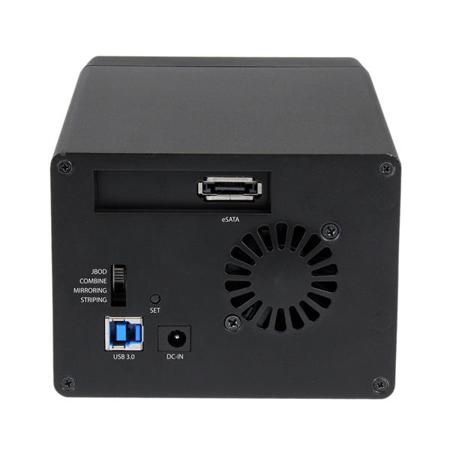
I’ve had a few of these kinds of desktop storage devices over the years, they are usually big, heavy and cumbersome. This unit is none of those. It’s not much bigger than two 3.5in drives stacked on top of each other, the drives just slide in from the front without a carrier, and setting up the RAID is done by sliding a switch on the back and holding the “Set Raid” button while turning it on. Simple! The unit is only as noisy as the HDDs you put into it. There is a small fan inside that you can hear when there aren’t any drives in it, but once you load it you can’t hear it at all. I like the look of the unit with the LEDs on the front showing power and activity, and I tried several large file transfers which were fast as I needed them to be with USB3. Nice to have the ESATA but I haven’t tried it yet. Build quality is good, with large rubber feet to minimize vibrations. For the List price, I think this unit provides good value for what it does. I received this product in exchange for an unbiased review
Andrew11
Originally posted at
2018-08-05T20:00:00
Rated 2 out of 5
Needs work to be a contender
This product is not what I would call one of Startech.com's better products. The unit I received has a very very loud fan. Now I am not sure how loud this is supposed to be but I find the noise excessive. Drives install easy enough but they do not screw in, lock down or any type of security. The drives rattle a bit when you move the unit. I think some of the noise i hear is vibration from the drives! I dont think this will be good for the drives long term. The setup was easy, I tried using the combine feature and it worked without a hitch. Just move the switch to the drive setting you want, Hold in the set button and turn it on. Voila. I then formatted the drive for use with Apple and again no issues at all. I have viewed other comments about disconnects but I have not experienced this under OSX. The device works...the build quality is almost there..but the noise from fans, vibrations, is just too much. I received this product in exchange for an unbiased review.
macphoto1970_001
Originally posted at
2018-05-16T20:00:00
I am using JBOD, not RAID. With the USB cable Win10 will recognize and write to both of the HDD that I have in this enclosure (4TB and 6TB). However, the unit will shut itself off after a period of inactivity, so large copy operations should be monitored in case a file being open will pause the copy operation (e.g. Outlook .pst file if email client is open). I read in a review that this doesn't happen with the eSATA cable, however, with eSATA Win10 will only recognize one of the two drives I have installed. Enclosure has great potential but falls short.
campingintherain
Originally posted at
2017-09-13T20:00:00
Rated 2 out of 5
Good speed when it's not disconnecting
Seemed to work well but disconnects from the computer (Windows 10) once a day or more (and you then need to power cycle it to reconnect). Finally one of my drives was reporting errors so I tried moving data to another drive on the computer itself. It was a 6GB drive and the during the transfer it kept disconnecting until I finally got fed up and removed the drive from the enclosure. Put it in a different brand enclosure and the transfer is going well now. I may try to upgrade the firmware, but the download doesn't have any details about what's been fixed, and basically I don't trust this enclosure anymore.
nrshap
Originally posted at