


more

This item is no longer available.
Review Summary
2024-01-25T19:00:00
I bought this about 3 months ago and it worked great and helped me connect my monitors at first?. but suddenly it stopped responding and doesn't even get recognized by my pc. Very disappointed with the product had high hopes for it to have longevity.
Tech11

2023-05-16T20:00:00
I've been using this adaptor for almost 2 years. I'm running 2 Samsung curved screens in addition to my Macbook Pro screen. It's perfect. Every time I update the OS I typically have to download new drivers, but StarTech keeps them up to date so I've been very happy.
Cyber_Pastor_Q

2022-01-24T19:00:00
After using this adapter with my MacBook Air m1 for a month, my adapter suddenly stopped working. I tried installing the latest drivers, plugging it into different monitors and computers but software only recognises the monitor and doesn?t display anything on it. I am beyond disappointed because when it worked it worked sufficiently for my needs, but I just can?t leave a good review if the product that i paid 140? for stops working after a month.
TimHrovat

2021-11-28T19:00:00
I bought this since my laptop's max output through HDMI is only 1080p. So this worked for some minutes, then it just stopped. Tried again installing all the drivers available and again it worked... for an hour. Now it just doesn't recognize the device.
DanUve

2021-10-05T20:00:00
I purhcased this item less than 3 months ago and now it is dead. Using with a M1 Mac Mini and unfortunately I can not use it any longer.
Brad

2021-09-08T20:00:00
I just bought this and its not working. The install files say Ubuntu 18 - 20. Does this mean that Ubuntu 21 is not supported?
JonSmit

2021-08-31T20:00:00
This is a great product except if you need the Windows 10 "night light" feature supported. Then it just ignores the night light setting on Windows and displays at full blue light intensity.
fitzyy

2021-06-09T20:00:00
I have a MacBook pro A1286 - 2011 duall boot but for linux is not working out, the I have instaled in another DELL i5 2520M a ubuntu version and either not working. Could I get any help with it?
Bacana

2019-06-03T20:00:00
This Adapter Works with USB 2 ports as well and surprisingly you can get 4K resolution plus audio from it even when you connect it to a USB 2 port !! Unbelievable ! Wonderful Product .
Amir

Accidents happen where life happens. Protect your favorite Adorama products and purchase a protection plan to stay covered from accidental damage, mechanical or electrical failure, and more.
If we can’t fix it, we’ll replace it at no additional cost.
Protect your product from drops, spills, and more.
Enjoy your gear without fear. We have you covered!
When regular use of your product over time results in mechanical or electrical failure.
We will never charge you a deductible after the purchase of a plan.
Our claims process is simple & easy and our customer service team is happy to help.
Adorama Protect powered by Extend is available for purchase to customers in the United States. Not available for purchase Internationally or in U.S. Territories.
Browse our FAQ
HDMI
DisplayLink - DL5500
HDMI
1
No
Yes, 2-channel stereo
4K x 2K at 30Hz
Widescreen(16/32 bit):
3840x2160, 2048x1152, 1920x1200, 1920x1080, 1680x1050, 1366x768, 1280x800, 1280x768, 1280x720
Standard(16/32 bit):
1600x1200, 1400x1050, 1280x1024, 1024x768, 800x600, 640X480
Yes
1x USB Type-A (9 pin) USB 3.0 Male
1x HDMI (19 pin) Female
Yes
Windows 10 (32/64), 8/8.1 (32/64), 7 (32/64), Vista(32/64), XP(32/64), 2000 (Aero 3D interface supported)
Apple OSX El Capitan (10.11), Yosemite (10.10), Mavericks (10.9) Mountain Lion (10.8), Lion (10.7), Snow Leopard (10.6)
CPU: Quad Core 2.4GHz or Higher (i5 recommended)
RAM: 4GB or higher
USB-Powered
<85% RH Non-Condensing
0 to 40 deg. C / 32 to 104 deg. F
-10 to 80 deg. C / 14 to 176 deg. F
2.5" / 63.50mm
Plastic
RoHS Compliant
CE
FC
0.6 x 7.9 x 1.8" / 15.24 x 200.66 x 45.72mm
2.3oz / 65.18g
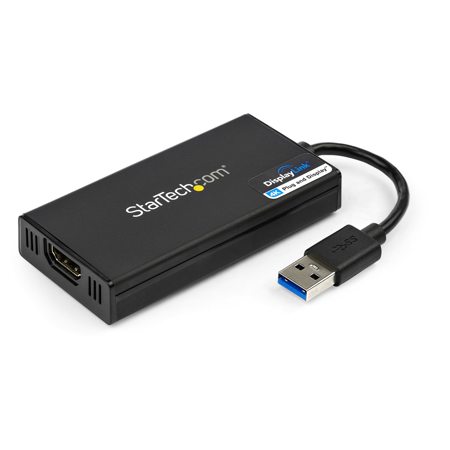
Want to add 4K Ultra HD video to your computer system Now, you can enjoy the picture quality of Ultra HD video, even if your system doesn't natively support 4K video output. With an additional 4K monitor connected to your computer, you can extend or mirror your desktop for increased productivity. DisplayLink 4K Plug-and-Display certification ensures automatic driver installation, so you'll be ready to enjoy your Ultra HD display in no time.
This USB video adapter uses a DisplayLink family chipset. If you're connecting this device to a computer along with additional USB video adapters or docking stations, please avoid using devices with a Trigger or Fresco family chipset.
Add Ultra HD 4K video support to your computer system through an available USB 3.0 port
Astonishing picture quality with support for resolutions up to 4K
DisplayLink 4K Plug-and-Display certified - automatic driver installation and updates
USB 3.0 host connection provides maximum bandwidth for 4K Ultra HD output
USB-powered performance - no additional power supply required
Ultra HD Multi-tasking
Now you can connect a 4K HDTV, monitor or projector to your computer, even if your laptop or desktop video card doesn't natively support 4K output. The USB32HD4K USB to HDMI 4K adapter lets you extend or mirror your primary display onto an Ultra HD monitor or television, giving you the additional screen space you need to simplify multi-tasking and maximize your productivity.
Astonishing 4K Picture Quality
At four times the resolution of high-definition 1080p, you'll be amazed at the picture quality of a 4K monitor or television; the USB32HD4K lets you harness the impressive bandwidth capability of a USB 3.0 connection to deliver the astonishing quality of Ultra HD to your 4K display. Plus, the adapter is backward compatible with 1080p displays, which makes it a great accessory for home, office or other workspace applications.
DisplayLink 4K Plug-and-Display Certified
Installation has never been easier. When you connect this DisplayLink 4K Plug-and-Display certified adapter to a web-enabled Windows 7, Windows 8 or Windows 10 computer, it automatically downloads and installs the most up-to-date drivers for you, so you won't have to. The USB32HD4K is backed by a StarTech 2-year warranty and free lifetime technical support.
Applications
Connect a 4K television, monitor or projector to your computer system
View large or multiple spreadsheets across multiple displays
Increase productivity by running multiple applications on different displays; check your email on one display while editing a document on the other
Advantage
Enable 4K video output from your computer system to an HDMI television. The USB 3.0 to HDMI 4K adapter allows your system to output 4K video even if your system is not capable of outputting Ultra HD resolutions
Now you can add an additional 4K television, by simply plugging the USB32HD4K into a USB 3.0 port
Get up and running faster, with automatic software & driver installation on computers running Windows 10, 8 or 7 with an active Internet connection






