
This item is no longer available.
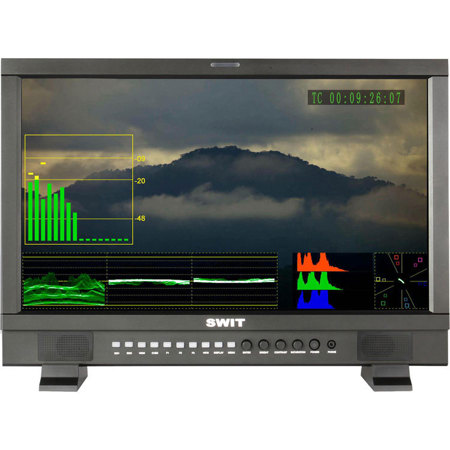
21.5-inch 1920x1080 LCD - With LED backlight
The S-1222F adopts a 21.5-inch LCD panel, with Full HD 1920x1080 resolution and LED backlight, 1000:1 contrast. The viewing angle is Horizontal: 178deg. / Vertical: 178deg.
· 21.5-inch LCD Panel with LED backlight
· 1920x1080 resolution, 1000:1 contrast
· H/V 178deg. viewing angle
· Underscan / Overscan, safe area
· HD/SD-SDI, HDMI, CVBS input
· Build-in HDMI to SDI conversion output
· Waveform (Y/Cb/Cr/R/G/B), with full scale
· Vector scope, RGB histogram
· Peaking focus assist (red/blue switch)
· Embedded audio meter (SDI-16, HDMI-8)
· TSL UMD and Text-Tally display
· SDI timecode display
· False color, Blue only, Zebra, colorbar
· 3-color TALLY light
· Customer editable video TITLE
· Magnetic attached LCD protective glass
· V-mount / Gold mount battery plate optional
Accurate Color Reproduction
S-1222F can be used on site camera monitoring and broadcast studio technical monitoring. The LCD monitor offers accurate color reproduction for broadcast application.
Color Calibration - R/G/B Gain and Bias adjustable
The color temperature might get changed after years and users can enter the menu to adjust the RGB Gain and Bias to calibrate the colors at any time.
Multi-format Input/Output - SDI / HDMI / CVBS / HDMI->SDI
S-1222F studio/field monitor supports:
· HD/SD-SDI input x 2
· HD/SD-SDI loop output x 2
· HDMI input x 1
· HDMI loop output x 1
· HDMI input converted to SDI output x 1
· CVBS input x 1
Build-in HDMI to SDI Conversion
The build-in conversion is used to broadcast and deliver the HDMI camera video. It's same format conversion and supports the following HDMI formats: 480i, 576i, 720p (60 / 59.94 / 50), 1080i (60 / 59.94 / 50), 1080p (30 / 29.97 / 25 / 24 / 23.98)
Video Analysis Assistant Pattern - Waveform / Vector scope / Histogram
S-1222F supports Waveforms display under both SDI and HDMI, including Y, Cb, Cr, R, G, B channels and full scale display of each channel. The Vector scope and R/G/B histogram can be switched on/off independently to the waveforms.
Embedded Audio Monitoring - HDSDI: 16-Ch; SDSDI/HDMI: 8-ch
The monitor displays SDI and HDMI embedded audio level meters and supports full 16-ch meters under HDSDI input; 8-ch meters under SDSDI and HDMI input. The audio meter is green and will turn yellow when exceeds -20dB and turn red when exceeds -9dB. The ch-1 and ch-2 embedded audio can be output via 3.5mm headphone socket and speaker.
Focus Assist
Under focus assist mode, the in-focused subject will be sketched out by red or blue lines. The focus assist is also available during the image zoom-in. UMD and Text-Tally Display - TSL 3.1 / 4.0 Protocol
S-1222F supports UMD and Text-Tally display of TSL 3.1/4.0 protocol, with 1-126 TSL address selection and Max 8 letters displayed. The UMD/TALLY signal inputs via DB9(RS485) port on the rear panel of the monitor.
Safe Area and Scale Marker
You can select the scale of safe area frame from 80%, 85%, 90% and 95% in the menu system. And under HD input, the monitor can display multiple scale markers from 4:3, 13:9, 14:9, 15:9, 1.85:1 and 2.35:1, to help the composition the image of multi-purpose production.
LCD protective glass - Organic glass, Magnetic attached
The organic glass A-PG22 is a specially designed accessory to protect the 21.5-inch LCD screen during transportation or stock. It's attached on the monitor housing frame by magnet, easy to uninstall.
Multiple Power Sources - V-mount, Gold mount, Main/Backup DC-IN
The monitor provides 2x 4-pin XLR sockets of DC 11-17V power input, for main and backup DC input and can be fixed on V-mount or Gold mount battery plates for field using.
3-color TALLY Light - DB-9 input signal
There are front TALLY lights for each screen, with 3 colors display and controlled via DB9 ports on the rear panel.
Installation
S-1222F monitor provides the standard 10x10cm VESA bracket installation and you can mount the monitor onto 19-inch rack by the optional rack brackets A-RK22, 9U height occupied. For desktop using, the monitor provides the stand feet and a rotatable desktop VESA bracket A-VS22 is available for option.
Waveforms - Available for both SDI and HDMI
The waveform is a pattern to measure and display the brightness and its distribution (in false color) of every column of the input video, separates the Y, Cb, Cr, R, G, B channels, parade display or full scale display. The waveform graticule marks the Luma value percentages. The Luma is pure black to pure white from bottom to the top and the 100% full lines stands for the broadcast standard highest Luma value, while the real highest Luma value (pure white) is marked as 108% dash line on the top. The waveform pattern between 100% and 108% lines are considered as over exposed according to the broadcast standard.
The waveforms are real-time displayed, one-button switch on or off. There're totally 8 display modes of waveforms and menu system can memorize the resent used mode to switch on, also you can change other modes easily in the waveform menu.
Vector Scope - Available for both SDI and HDMI
The vector scope pattern is to visualize the chrominance of input video signal by the distribution of color in the image on a circular scale. It represents saturation as distance from the center of the circle and hue as the angle, in standard position around it. So you can see how saturated the image is and where the pixels in the image land on the color spectrum. The vector scope pattern is divided into 6 districts and stands for Red, Magenta, Blue, Cyan, Green and Yellow in different directions. The larger box stands for the color in 100% colorbar and the smaller box stands for 75% colorbar.
R/G/B Histogram - Available for both SDI and HDMI
The histogram is a bar graph that shows the distribution of R / G / B values in the image. Similar as the Luma waveform pattern, the histogram is takes broadcast standard safety highest value as 100% and 107% as the real highest value. The R / G / B distributions between 100% and 107% are considered as ineffective values in broadcast standard.
SDI Timecode Display
Under SDI input, the monitor can display the embedded SMPTE timecode (VITC1, VITC2 or LTC), which is used extensively for synchronization and for logging and identifying material in recorded media.
Real Time 2-step Zoom-in
The first step zoom-in function is specially designed for Canon DSLR, to cut the black bar around the HDMI output video and enlarge the center effective recorded video to full screen. The second step zoom-in is to enlarge the video 4 times, to check the image details and help to focus. The zoom-in function is real time operation, available when preview, recording or play back.
Peaking Focus Assist
The peaking focus assist function is to sketch out the sharpest edges of the image, for cameramen to check if the subjects are in focus. You can switch the outline color between blue and red according to different tone of the subjects. The peaking focus assist is also available during video zoom-in.
False Color
The false color is used to aid in the setting of camera exposure. Under false color mode, there's a color chart on the bottom of screen for reference. The over exposed subjects (above 101 IRE) on the monitor will display as RED and the underexposed subjects will display as BLUE. For correct exposed subjects, it will display as green and pink.
Zebra Stripes
Like most professional cameras have, the zebra stripes are a warning to the over exposed areas of the image. When Luma value is over 90%, it is considered overexposed and displays the moving warning lines onto the over exposed areas.
Blue Only
Blue only is an assistant function to adjust camera color settings. Under the blue only mode, only the blue pixels are used to generate the image, because hue and saturation can be adjusted more quickly and accurately in this environment.