Orders placed during Passover Holiday (Wed 4/1 after 4PM ET – Thurs 4/9) will ship Fri 4/10. View our holiday shipping schedule.
This item is no longer available.
Review Summary
Accidents happen where life happens. Protect your favorite Adorama products and purchase a protection plan to stay covered from accidental damage, mechanical or electrical failure, and more.
If we can’t fix it, we’ll replace it at no additional cost.
Protect your product from drops, spills, and more.
Enjoy your gear without fear. We have you covered!
When regular use of your product over time results in mechanical or electrical failure.
We will never charge you a deductible after the purchase of a plan.
Our claims process is simple & easy and our customer service team is happy to help.
Adorama Protect powered by Extend is available for purchase to customers in the United States. Not available for purchase Internationally or in U.S. Territories.
Browse our FAQ
Marvell Armada 3700 88F3720
64-bit
Dual Core 800 MHz
Yes
256 MB DDR3L
1
3.5" SATA HDD
2.5" SATA HDD (with optional 2.5" Disk Holder)
14 TB (14 TB drive x 1) (Capacity may vary by RAID types)
108 TB
No
1
2
EXT4
EXT4
EXT3
FAT
NTFS
HFS+
exFAT Access is purchased separately in Package Center.
1x (60 x 60mm)
Full-Speed Mode
Cool Mode
Quiet Mode
Low-Power Mode
Yes
16.9 dB(A)
Yes
Yes
36W
100V to 240V AC
50/60 Hz, Single Phase
10.04 W (Access)
5.01 W (HDD Hibernation)
34.26 BTU/hr (Access)
17.09 BTU/hr (HDD Hibernation)
32 Degree F to 104 Degree F (0 Degree C to 40 Degree C)
-5 Degree F to 140 Degree F (-20 Degree C to 60 Degree C)
5% to 95% RH
FCC,CE,BSMI,EAC,VCCI,CCC,RCM,KC
CalDAV
iSCSI
Telnet
SSH
SNMP
VPN (PPTP, OpenVPN, L2TP)
Domain users login via SMB/NFS/AFP/FTP/File Station, LDAP integration
HDD Hibernation
S.M.A.R.T.
Dynamic Bad Sector Mapping
Firewall, encrypted shared folder, SMB encryption, FTP over SSL/TLS, SFTP, rsync over SSH, login auto block, Let's Encrypt support, HTTPS (Customizable cipher suite)
Windows 7 and 10
Mac OS X 10.11 onward
Chrome
Firefox
Internet Explorer 10 onwards
Safari 10 onwards
Safari (iOS 10 onwards)
Chrome (Android 6.0 onwards)
English, German, French, Italian, Spanish, Danish, Norwegian, Swedish, Dutch, Russian, Polish, Hungarian, Brazilian Portuguese, European Portuguese, Turkish, Czech, Thai, Japanese, Traditional Chinese, Simplified Chinese
1
10
10
Yes
Basic
CIFS/AFP/NFS/FTP/WebDAV
50 (CIFS/AFP/FTP)
Yes (ACL) Integration)
Yes
512
128
256
2
Yes
50
50 (Concurrently)
20
Yes
No
No
5 (including 2 Free License)
150 FPS @ 720p (1280x720)
120 FPS @ 1080p (1920 x1080)
60 FPS @ 3M (2048x1536)
30 FPS @ 5M (2591x1944)
15 FPS @ 4K (3840x2160)
150 FPS @ 720p (1280x720)
150 FPS @ 1080p (1920 x1080)
90 FPS @ 3M (2048x1536)
60 FPS @ 5M (2591x1944)
30 FPS @ 4K (3840x2160)
40 FPS @ 720p (1280x720)
10 FPS @ 1080p (1920 x1080)
10 FPS @ 3M (2048x1536)
6 FPS @ 5M (2591x1944)
10,000 (applies to files indexed or hosted by Synology Drive. For file access through other standard protocols, refer to the File Services section above)
Concurrent for PC Clients: 5 (the number of connections that can be maintained when the recommended number of hosted files was reached)
Group 2
10
RoHS Compliant
6.53 x 2.79 x 8.81" (166 x 71 x 224mm)
1.54 lb (700g)
846504003006
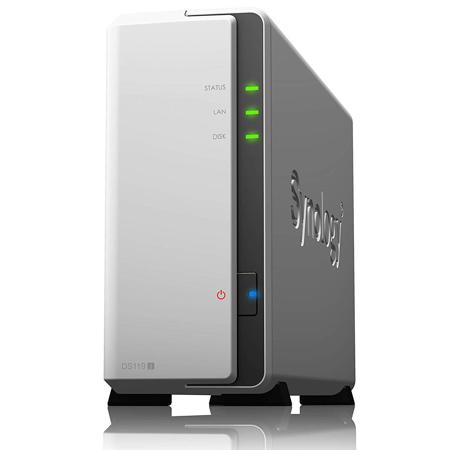
DiskStation DS119j
A versatile and easy-to-use 1-bay NAS for personal cloud storage
An Ideal First NAS for Everyone
DS119j is an ideal entry-level network-attached storage solution for personal users. Fast yet power-saving, DS119j brings an intuitive file management experience with great data transmission speed and extremely low power consumption.
Fast Performance
Over 108 MBps sequential reading and writing
Eco- Friendly
5.01w in HDD hibernation/10.04w in access
Easy File Access with QuickConnect
Access files on your Synology NAS over the Internet without the hassle of setting up port forwarding rules, DDNS, or other complicated network settings. QuickConnect allows you to connect via a secure, customizable address, so that you can instantly access media and work files on any Internet-connected device with no additional charge.
Synchronize Files Across Your Devices
Cloud Station Suite provides real-time data synchronization across all your devices and other Synology NAS. "Intelliversioning" keeps the most important file versions to better utilize storage space.
Seamless Integration with Your Mobile Device
Synology mobile applications are designed to allow quick and secure access to your data wherever you are.
Surveillance Station
Complete surveillance solution for recording, monitoring, and management.
Desktop Backup
Simplified backup solution for your Mac, PC, and mobile devices.
File Server/Management
Powerful built-in file management and sharing services.
DSM UI
Award-winning operating system with an intuitive user interface and powerful capabilities.
Security
Comprehensive built-in security tools are constantly updated to tackle evolving threats and protect your devices.
Multimedia
Complete multimedia solution for management, streaming, and playback.