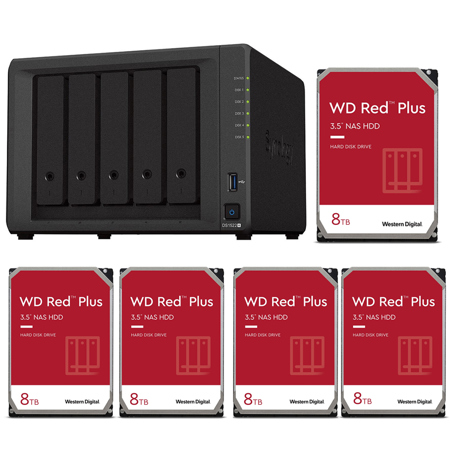
Synology DiskStation DS1522+ 5-Bay NAS Enclosure, Bundle with 5x WD Red Plus 8TB 3.5" SATA III Internal NAS Hard Drive
SKU: SYDS15228B
This item is no longer available.
Recommended Alternatives
Share:
Overview
Compare
Specs
Protection







About Synology DiskStation DS1522+
FEATURED REVIEWS
So Far - Excellent!
Bought this to upgrade and expand from a 12 year old Synology that's been running fine (with a few expected drive replacements). So far, LOVE this thing! If you're not an expert on the ins and outs of good NAS configuration I recommend checking out some great content providers on YouTube to learn the best methods to set it up right. Once it is setup, this thing works great! There are cheaper solutions, and doing it DIY could make for a little more horsepower - BUT if you want solid, simple, ...
View full Review
Easy to use and the right size for our family
Synology has good software and the NAS is easy to use. I use it for personal data, and really like the peace of mind knowing things are backed up. The drive bays weren't quite as nice as an older 1515 I own, but it's still definitely worth the purchase. Five days gives a lot of flexibility and you can always expand later.
Flexible Data Management for Homes and Small Business
The 5-bay Synology DiskStation DS1522+ is easy to scale and expand as your needs change, with optional support for up to 15 drives, 10GbE networking, and NVMe SSD caching. Powered by Synology DiskStation Manager (DSM), it offers a flexible all-in-one solution for data sharing, synchronization, backup, and surveillance.
Throughput
Over 736/796 MB/s sequential read/write
Memory
8 GB DDR4 ECC (max. 32 GB)
Connectivity
Four built-in 1GbE ports with easy 10GbE option
Scalability
Up to 15 drive bays with 2 DX517 expansion units
Everything You Need for Your Home Office
Choose from dozens of applications for small businesses and make the DS1522+ your go-to device for everyday data protection, file management, media sharing, and camera surveillance.
Flexible Networking Options
Leverage built-in connectivity to integrate the DS1522+ into any network environment, or expand its capabilities by adding plug-and-play modules.
Failover and Network Balancing
Four built-in Gigabit ports with support for automatic network failover and load balancing deliver fast and dependable performance out of the box.
Easy Upgrade To 10GbE
Add an E10G22-T1-Mini Network Upgrade Module through the easily accessible slot to instantly enable faster networking.
Store, Share, and Protect
Manage all your documents, photos, and other files, back up applications and devices, or protect your assets with professional video surveillance.
File Server
Store and access files from all your devices, and protect them with smart versioning. Sort, manage, share, and sync your data across locations.
Access Files From Anywhere
A Private Cloud for All Your Devices
Store, sync, and access data from any device, wherever you are with Synology's private cloud solution. Sync data between different platforms and devices, and access your files through mobile apps, desktop clients, and a browser-based interface. Leverage smart versioning to back up important data via desktop and mobile applications.
Dependable and Secure Network Storage
Use shared folders on your Synology device as reliable storage available from anywhere on your local network over all common protocols (SMB/NFS/WebDAV/FTP). Protect your files against accidental changes and removal or even malware attacks with built-in snapshot technology and other backup options.
Manage and Share Files
Sort, Manage, and Share Your Files
Rely on our file, photo, and multimedia management apps to sort your data by metadata, filters, and labels. Safely share files and folders with family, colleagues, or business customers thanks to granular access and sharing permissions. Create convenient sharing links and secure shared files with expiration dates and individual passwords. Let friends or clients review photos remotely and give easy feedback through star ratings.
Sync Files and Folders Between Sites
Benefit from two efficient ways to keep files and folders synchronized between different locations - such as your home and your business, or teams in different countries. Sync folders one or two-way between Synology devices using Synology Drive ShareSync, a free site-to-site solution. Or choose to leverage our secure data centers to store your data in the cloud, while keeping a cache of frequently accessed or manually pinned files on your DS1522+ with Synology Hybrid Share. Such hybrid cloud storage lets you access data at LAN speeds without being limited by your local storage size or bandwidth.
Multi-Layered Backup
Back up files, folders, physical devices, VMs, and SaaS applications with free solutions, and protect your NAS with built-in technologies.
Back Up All Your Devices
Protect Full Endpoints, Servers, And Vms
Securely back up Windows clients and servers, Linux endpoints, VMware and Hyper-V virtual machines, and other Synology devices. Leverage built-in deduplication technology to greatly reduce backup sizes and multi-versioning restore systems to a time point of your choice.
Make Local Backups of Your Cloud Apps
Protect business Microsoft 365 and Google Workspace accounts by maintaining complete offline copies of your crucial information and configurations with Active Backup for Microsoft 365 and Active Backup for Google Workspace.
Back Up Documents and Multimedia
Set up backup tasks to protect important folders on your PC and macOS device with Synology Drive. On your mobile device, automatically save another copy of the photos and videos you take, and easily organize and share them through Synology Photos.
Protect Your Synology System
Back Up Your NAS to Multiple Destinations
Protecting the data on your Synology system, and your server itself, means storing frequent emergency copies to multiple locations. Built-in tools in Synology DSM let you efficiently back up files, folders, or your entire system from your device to remote servers, external drives, or Synology and third-party cloud storage, with space-saving deduplication technology reducing total backup sizes, and customizable backup and retention schedules for maximum flexibility.
High-Frequency Protection with Snapshots
Take point-in-time snapshots of shared folders and LUNs at intervals of down to 5 minutes to protect against data loss, accidental deletion, or malware attacks. Set a custom retention schedule and roll back files and VMs to a version that is unaffected.
Smart Surveillance
Transform your Synology device into a full-featured video management system for a wide range of compatible IP cameras.
Full-Featured Surveillance
Wide Compatibility
Connect up to 40 IP cameras from a selection of over 8,300 validated models thanks to wide camera compatibility and ONVIF support in Synology Surveillance Station.
Secure and Private
Footage stored locally can be protected from unauthorized access by industry-standard AES-256 encryption.
24/7 Everywhere Access
Monitor live streams or watch recordings from web browser, desktop client, or the DS cam mobile app.
Easy to Deploy And Intuitive to Operate
Assisted Camera Deployment
Automatically locate cameras within a set IP range, and configure units in batch by importing spreadsheets or by replicating settings to new cameras.
Multi-Location Alerts
Stay on top of your deployment by previewing triggered events directly on multi-floor or even multi-location maps, with online map integration for Google Maps and OpenStreetMap.
Video Analytics
Take advantage of intelligent monitoring features such as motion detection, no idle zone, foreign object detection, and anomaly detection to cater the most common surveillance scenarios.
Performance Backed By Synology Drives
Leverage high sustained performance and reliability with enterprise-grade drives with built-in data protection designed for Synology systems.
SATA
3.5" HDD HAT5300
2.5" SSD SAT5200
NVMe
M.2 SSD SNV3400
Get More with DiskStation Manager
Take advantage of a host of native productivity, management, and security solutions available in the web-based Synology DSM operating system.
Central Management System
Conveniently manage your fleet of Synology NAS from a centralized console.
Security
Shield your Synology NAS from the most sophisticated threats with industry-leading security solutions.
Synology High Availability
Seamless transition between clustered servers in the event of a server failure to minimize the impact on applications.
More Ways to Harness Your NAS
Storage for Content
Creators Synology NAS brings speed, simplicity, and security to all your creative projects.
Complete Endpoint Protection
Follow the 3-2-1 backup strategy and keep your data safe with Synology's backup packages.
Ransomware Prevention and Protection
Minimize the threat posed by increasingly sophisticated ransomware and other malware with Synology solutions.
Synology DiskStation DS1522+ Features
- Up to 736/796 MB/s sequential read/write throughput makes file operations quick and efficient
- Leverage built-in file and photo management, data protection, virtualization, and surveillance solutions
- Four 1GbE ports for simple integration into existing environments with optional 10GbE connectivity to tackle more specialized, bandwidth-heavy applications
- Add up to 10 extra drive bays with 2 DX517 expansion units for a maximum of 15 storage drives