Orders placed during Passover Holiday (Wed 4/1 after 4PM ET – Thurs 4/9) will ship Fri 4/10. View our holiday shipping schedule.
This item is no longer available.
Review Summary
2025-02-24T08:45:15
Excellent NAS. I only wish it had a faster processor with more PCIe lanes.
Paul A.
2024-06-11T20:34:05
The best investment for all my storage needs!!
fMiguel M.
2024-04-05T10:30:56
no more cloud use, private storage peace of mind. I should have switched years ago
JIE L.
2024-03-25T09:25:52
This is my third Synology NAS. Great multi-use unit with 3 arrays. Pulled drives from an older array, and this one picked them up right away. Added Samsung SSDs for general storage and Toshiba HDDs for surveillance. The SSDs are not on the supported list, but work with no issues, and report SMART data. My older HDD array had no issues. I transferred the data from it to the new SSD array, and reformatted the old array for BTRFS. The older array is being used to back up the new SSD array, and for immutable storage. Eventually, a new NAS will take on that role, and these drives will be retired so the SSD array can grow. I'm down to 1 NAS at the moment, which is not ideal. I prefer to have a backup NAS to my primary in addition to cloud storage. As I talk about my workflow below keep in mind the future state will include my arrays on separate NAS units in separate buildings. My current work flow is to export my RAW files to the SSD array and cull them in Lightroom. I delete bad and redundant files. While doing this, I also mark the files I plan to edit. These files are then exported to an immutable storage folder. This is my final line of defense. I have my full RAWs on the SSD. This is where I make my edits and save edited versions the customer. My RAWs and edited customer files are backed up to my HDD array, and also to the cloud. Only at this point do I format my camera media. The idea is I should only ever need what is on the SSD array. If that fails, the HDD array has full backups of everything. If that fails could has backups of that. The immutable storage is to keep ransomware from ever being an issue. It will eventually get it's own place to live as well once I have another NAS. I also use the NAS to backup my PCs and my wife's PCs. I am setting her up to use the NAS for her graphic design gigs as well rather than just using the NAS as backup. Surveillance works well, and I have this paired with several Synology cameras. I love these cameras. The AI with alerting set up is really good. It's like having a person watching the cameras at all times and letting me know when someone is on the property. I did take one star off of the NAS. That has to do with Container Manager (Docker). I had an image that froze up and was sending constant alerts that it was restarting. There was no way to kill that container, or remove it without removing Container Manager itself, which meant shutting down all my containers. That was a huge hassle. It is resolved now, but it was more work than it should have been. Other than that, the NAS has been great. I'm making good use of the 4 Ethernet ports on the back. I have 2 bonded for my PCs to access. 1 is unused, and the 4th is dedicated to my camera VLAN. I keep my cameras on their own VLAN with NO Internet access. Less of an issue now that I have switched to NDAA/TAA cameras, but it is still a good policy. My IoT devices are on a different VLAN too, and cannot see my NAS. Don't trust them. Don't want them to see anything they are not supposed to, but I digress. This NAS has a lot of great features I plan to use as my business expands. LDAP, VM server, web server for my wife to test sites on, and others. It is a great box that I expect to serve me well into the future.
GEORGE G.
2023-06-27T03:56:14
Great transaction Great product
GUSTAVO Z.
2023-04-17T04:30:21
This is my fourth Synology RAID. They are dead simple to set up. I crossed my eight drives from a very old Synology. I had played with the first one so much it was pretty flaky, so I started this one off clean and copied all my data over. I upgraded it by adding a 2.5G ethernet card connected to a 2.5G backbone in my home network. A great combination!
JEFFREY M.
2022-07-10T10:30:06
If you are, like me, used to the DSM Operating system interface that Synology has developed then you are likely not just shopping across brands for the most powerful NAS. Because Synology is a big wimpy at times. BUT their software is great and their hardware nothing to sneer at albeit not leading edge. The DS1821+ Has strong expansion options. I added 2 x sn700 nvme cache modules. And 2x 32gb ecc memory and it recognizes it all and runs excellent. What took days on my DS1517 now takes mere minutes. My DSM is always available whereas I used to get tons of time outs. I also added 1 DS517 expansion module and a 10GbE. Mellanox ConnectX3 low profile card. Zero issues. Note that Synology lists compatible hardware but it doesn?t means that if things aren?t on the list it?s not compatible. They simply didn?t test it. Overall this machine w 320$ in extra upgrades (2x nvme and 2 x 32 gb ram) is top end speed. I recommend 2x16gb and save yourself some money. I used basic ecc and it works despite they claiming non-ecc is needed (non-ecc is junky). Great buy for years to come. High speed and expandable power specs.
RICK W.
2022-04-08T10:07:12
The Synology is great!!! I love it and Adorama did a great job consulting me!
JULIAN G.
2022-02-22T07:41:44
Great for home storage / server usage
PETER C.
2022-01-28T07:56:53
Love it. Moved from WD1821+ with no regret.
Sam S.
2022-01-24T09:08:07
I couldn?t be happier about this NAS. Synology makes it so easy to set up and manage their product. In addition, I can run docker and Plex on the NAS just fine. I did opt to get a RAM upgrade because I plan on using docker for a testing environment. This product has been flawless since picking it up last month. I should have upgraded sooner. I have setup several NAS for other photographers and after setting up their Synology NAS units, I just had to get my own. I prefer Synology to their competitors.
Stephen M.
2021-10-29T09:35:35
Works as expected and would recommend.
JESSIE S.
2021-04-21T14:42:19
Synology DS1821+ I?ve got it in a temporary location right now. I have to make space in my server area, but I don?t want to disrupt that until I?ve got the new box set up. From a performance point of view: Everything from logging in to execution of various programs has thus far been noticeably faster than my DS916+, DS1513+, or my old DS412+. I?m so impressed with the AMD Ryzen processor in this machine. The machine is still brand new (not even a week old) so I haven?t put it through all the paces yet. I?ve had to wait for storage devices, the consistency check & building my array on it to complete before I can do anything. I went with array 1: 5 x 6TB drives, Hot Swap: 1 12TB, and Array 2 is 2 x 8TB drives. I also added 16GB of memory, so I have a total 20GB memory. I don?t know if I will need the m.2 cache yet. But it?s nice to know that upgrade is available any time. As soon as the consistency check is done, I?ll start on the 10.2 TB migration using the migration tool. Then I can see how it works in day-to-day usage. I?m sure it will remain a noticeable step above any of my prior Synology boxes. Now just to get DSM 7.0 on it.
DANIEL Q.
2021-04-05T04:25:42
Very nice. Purchased this as an upgrade to my older Diskstation 1813+ Setup is a breeze, and performances is great.
ROY H.
Accidents happen where life happens. Protect your favorite Adorama products and purchase a protection plan to stay covered from accidental damage, mechanical or electrical failure, and more.
If we can’t fix it, we’ll replace it at no additional cost.
Protect your product from drops, spills, and more.
Enjoy your gear without fear. We have you covered!
When regular use of your product over time results in mechanical or electrical failure.
We will never charge you a deductible after the purchase of a plan.
Our claims process is simple & easy and our customer service team is happy to help.
Adorama Protect powered by Extend is available for purchase to customers in the United States. Not available for purchase Internationally or in U.S. Territories.
Browse our FAQ
AMD Ryzen V1500B
64-bit
4-core 2.2 GHz
Yes
4 GB DDR4 ECC SODIMM
4 GB
2
32 GB (2x 16 GB)
8
18 (2x DX517)
2 (NVMe)
3.5" SATA HDD
2.5" SATA HDD
2.5" SATA SSD
M.2 2280 NVMe SSD
108 TB
Yes
4 (with Link Aggregation / Failover support)
4
2
1x Gen3 x8 Slot (x4 link)
Btrfs
EXT4
Btrfs
EXT4
EXT3
FAT
NTFS
HFS+
exFAT
0 Degree C to 40 Degree C (32 Degree F to 104 Degree F)
-20 Degree C to 60 Degree C (-5 Degree F to 140 Degree F)
5% to 95% RH
FCC
CE
BSMI
EAC
CCC
KC
VCCI
RCM
RoHS Compliant
120 mm x 120 mm x 2 pcs
Full-Speed Mode
Cool Mode
Quiet Mode
Yes
Yes
Yes
22.2 dB(A)
Yes
Yes
250 W
100 V to 240 V AC
50/60 Hz, Single Phase
59.8 W (Access)
26.18 W (HDD Hibernation)
204.05 BTU/hr (Access)
89.33 BTU/hr (HDD Hibernation)
6.5 x 13.5 x 9.5" (166 x 343 x 243mm)
13.2 lbs (6kg)
64
128
256
Yes
Yes
Yes
Synology Hybrid RAID
Basic
JBOD
RAID 0
RAID 1
RAID 5
RAID 6
RAID 10
Basic to RAID 1
Basic to RAID 5
RAID 1 to RAID 5
RAID 5 to RAID 6
Synology Hybrid RAID
RAID 1
RAID 5
RAID 6
RAID 10
Synology Hybrid RAID
JBOD
RAID 5
RAID 6
Synology Hybrid RAID
RAID 1
RAID 5
RAID 6
RAID 10
CIFS/AFP/NFS/FTP/WebDAV
1000
2000 (with RAM expansion)
Yes
Yes
2048
256
512
16
Yes
800
Yes
Yes
Yes
Yes
Yes
SMB1 (CIFS), SMB2, SMB3, NFSv3, NFSv4, NFSv4.1, NFS Kerberized sessions, iSCSI, HTTP, HTTPs, FTP, SNMP, LDAP, CalDAV
Google Chrome
Firefox
Microsoft Edge
Internet Explorer 10 onwards
Safari 10 onwards
Safari (iOS 10 onwards)
Google Chrome (Android 6.0 onwards)
Brazilian Portuguese, Czech, Danish, Dutch, English, French, German, Hungarian, Italian, Japanese, Korean, Norwegian, Polish, Portuguese, Russian, Simplified Chinese, Spanish, Swedish, Thai, Traditional Chinese ,Turkish
Yes
Yes
1500
Yes
80
Yes
5 (Licenses required for additional accounts)
150
1,484,000 e-mails per day, approx. 45GB
Yes
Yes
Yes
Yes
Yes
1024
65536
40 (including 2 Free License)
1200 FPS @ 720p (1280x720)
1050 FPS @ 1080p (1920x1080)
600 FPS @ 3M (2048x1536)
440 FPS @ 5M (2591x1944)
320 FPS @ 4K (3840x2160)
1200 FPS @ 720p (1280x720)
1200 FPS @ 1080p (1920x1080)
1120 FPS @ 3M (2048x1536)
600 FPS @ 5M (2591x1944)
480 FPS @ 4K (3840x2160)
1,000,000 (applies to files indexed or hosted by Synology Drive. For file access through other standard protocols, refer to the File Services section above)
550 (the number of connections that can be maintained when the recommended number of hosted files was reached)
1800
Yes
8
8
30
192223245006
The best upgradeable pro-Sumer SMB NAS.
By RICK W.
If you are, like me, used to the DSM Operating system interface that Synology has developed then you are likely not just shopping across brands for the most powerful NAS. Because Synology is a big wimpy at times. BUT their software is great and their hardware nothing to sneer at albeit not leading edge. The DS1821+ Has strong expansion options. I added 2 x sn700 nvme cache modules. And 2x 32gb ecc memory and it recognizes it all and runs excellent. What took days on my DS1517 now takes me...
View full Review
Excellent NAS
By Paul A.
Excellent NAS. I only wish it had a faster processor with more PCIe lanes.
Designed for scalability and performance
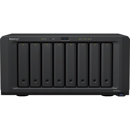
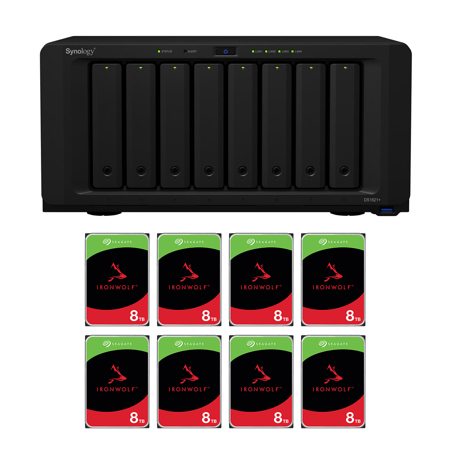
The 8-bay Synology DS1821+ is aimed at IT enthusiast and SMB customers looking for a powerful and scalable storage solution, its business-grade backup solutions keep users safe and protected from potential data loss, while major improvements to compute capabilities and throughput means workloads are finished faster than ever before.
CPU: AMD Ryzen Quad-core 2.2GHz
Cache Acceleration: Dual M.2 2280 slots for NVMe Cache
Performance: 113K 4K random read IOPS1
Scalability: Expand up to 18 drives with two DX517 expansion units
A Powerhouse On All Fronts
The DS1821+ can handle demanding application workloads and a greater number of concurrent users. Experience faster file indexing in Synology Drive, photo organization in Moments, and more responsive web services.
Turbocharge and Supersize It
networking or for higher storage capacity.
2x M.2 NVMe
Enable ultra-fast NVMe cache to accelerate HDD arrays by 20X or more.
10GbE support
Add in faster SFP+ or RJ-45 networking to turbocharge existing workflows.
Storage Expansion
Supports two DX517 expansion units for a total of 18 bays.
Ultimate File Management and Sharing
File Station is a web-based, fast and secure management tool built to allow easy, drag-and-drop operations without requiring any complex setup on Mac or PC. Advanced search and filtering tools allow for easy organization and file sharing. For complete compatibility, DS1821+ supports the following protocols: AFP, FTP, iSCSI, NFS, SMB, and WebDAV.
Fully Certified Storage Virtualization Solutions
Synology iSCSI storage fully supports most virtualization solutions to enhance work efficiency with easy management interface. VMware vSphere 6 and VAAI integration helps offload storage operations and optimizes computation efficiency. Windows Offloaded Data Transfer (ODX) speeds up data transfer and migration rate. OpenStack Cinder support turns your Synology NAS into a block-based storage component.
Ultimate Backup Solution
DS1821+ integrates various backup applications into an intuitive user interface, offering durable storage technologies to safeguard your valuable data on any device.
Active Backup for Business
Centralize backup tasks for VMware, Windows, and file servers. Restore whatever you want fast and reliably when needed.
Hyper Backup
Comprehensively back up your data to a local shared folder, an external device, another Synology NAS, an rsync server, or a public cloud to ensure data safety.
Synology Drive
Safeguard your computer with Synology Drive Client. Effortlessly perform real-time data backups and point-in-time file recovery.
Active Backup for Microsoft 365 / G Suite
Protect corporate data stored on the cloud. On-premise backup solution with a centralized dashboard. Optimize storage efficiency with single instancing and block-level deduplication technology.
Engineered for reliability, backed by Synology
DS1821+ is designed to reliably store your data and is backed by Synology's three-year hardware warranty. An optional two-year extended warranty is available in select regions for up to five years of coverage.
Powered by Synology DSM
Central Management System
Manage multiple Synology NAS servers simultaneously on a centralized interface to increase business efficiency.
Synology MailPlus
Secure, reliable, and private mail server solution with an intuitive and modern mail client.
Synology High Availability
Seamless transition between clustered servers in the event of a server failure to minimize the impact on applications.
Security
Comprehensive built-in security tools are constantly updated to protect your devices against evolving threats.
Synology Drive
A versatile solution for file management and synchronization.
Surveillance Station
Intelligent and comprehensive surveillance solution to record and monitor your environment.
Works Best with Synology Solid-State Drives
Engineered to handle intensive 24/7 workloads, Synology SSDs are designed to provide consistent high-performance.