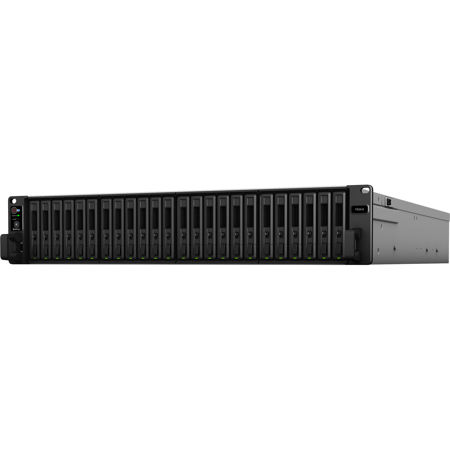
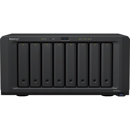
Synology FlashStation FS3410 24-Bay NAS Enclosure, Diskless
SKU: SYFS3410
This item is no longer available.
Recommended Alternatives
Share:
Overview
Compare
Specs
Protection
About Synology FlashStation FS3410
Harness All-Flash Storage to Speed Up Business Workflows
With 24 all-flash bays in a 2U rackmount enclosure, the Synology FlashStation FS3410 is the ideal solution for SMBs, enterprise offices, and data centers requiring high sustained I/O performance for applications such as video post-production, virtual machines (VMs), enterprise email servers, and online transaction processing.
Storage
Supports 24 x 2.5" SATA SSDs
Throughput
Over 356,500/129,400 iSCSI 4K random read/write IOPS
Memory
16 GB DDR4 ECC RDIMM, up to 128 GB
Expandability
Optional 25/40GbE through PCIe 3.0 expansion
Powerful Flash Storage Server
Combine all-flash performance with Synology systems' ease of use and reliability. The FS3410 is designed to tackle scenarios that require high throughput and low latency.
Built for High Reliability
The FS3410 is built to keep mission-critical data and services always accessible, enabling businesses to continue to perform even when disaster strikes.
Out-Of-Band (OOB) Management
Simplify troubleshooting by managing powered-down devices remotely and accessing critical logs through a dedicated interface.
Dual Power Supply
Redundant PSU units reduce the possibility of power disruptions on a single distribution channel or PDU adversely impacting data and service availability.
Failover Cluster
Pair two FS3410 units with Synology High Availability to enable automatic minute-level failover in the event of server failure or to minimize downtime when performing system updates or upgrades.
Dual Power Supply
Powerful Networking Options
The FS3410 supports a wide range of networking interfaces, protocols, and configurations, whether you need fast sequential transfer, support for simultaneous connections, or high network redundancy.
Built-in Fast Connectivity
Two 10GbE RJ-45 ports and four Gigabit Ethernet ports allow for rapid transfer speeds right out of the box.
Support for 10/25/40GbE
Add up to 2 x 10/25/40GbE network interface cards using the 2 x PCIe 3.0 slots to enable lightning fast networking in minutes.
Failover and Network Balancing
Bond multiple network interfaces with Link Aggregation to enable automatic network failover and load balancing.
Powerful Networking Options
Versatile Data Storage
The FS3410 fits perfectly in file server, block storage, or light application server roles that require high availability, reliability, and leading-edge storage technology.
Complete SAN VM Storage Solution
Efficient and Reliable SAN VM Storage
SAN management is a breeze thanks to SAN Manager, which provides LUN management, global monitoring, iSCSI configuration and disk space optimization from a single, intuitive interface.
Deploy and facilitate storage operations in various virtualization environments with full certification for VMware vSphere, Microsoft Hyper-V, Citrix XenServer, and a Kubernetes CSI driver for integrated volume management.
Synology High Availability provides automatic minute-level failover of stored VMs by pairing up two FS3410 units to create a high-availability cluster.
Maximize Space Efficiency
VM and container storage on all-flash arrays can take advantage of volume-wide data deduplication, which removes identical data to optimize storage use.
VM Backup and Protection
Reliable VM Backups at No Extra Cost
Back up unlimited VMware vSphere and Microsoft Hyper-V virtual machines from physical servers using Active Backup for Business. When unexpected interruptions occur or in upgrade testing environments quickly migrate them to Virtual Machine Manager (VMM).
Block-Level LUN Snapshots and Backups
Leverage Snapshot Replication for point-in-time snapshots of LUNs and shared folders with an RPO as low as 5 minutes. Replications can be managed in vCenter Site Recovery Manager and can be directly recovered via VMware vCenter Server for a simplified recovery process.
Use Hyper Backup for full data LUN and shared folder backups to a local or remote Synology system.
High-Performance File Serving & Syncing
Leverage FS3410's blistering speeds to provide low-latency access to massive files. Enhance the collaborative process with powerful and user friendly cross-site syncing capabilities.
Lightning-Fast Access to Large Files
Built to Handle Demanding Workflows
Fast network capability paired with all-flash performance means that the FS3410 is capable of taking on data and network-intensive workloads with multiple users accessing large files via SMB or NFS such as video post-production, BIM, and large-scale CAD projects.
Speedy and Efficient Collaboration
Secure Site-to-Site File And Folder Syncing
Make sure branches have quick access to data teams use to collaborate by syncing folders one or two way using Synology Drive ShareSync.
Efficient Cross-Site Syncing Through the Cloud
Using Synology Hybrid Share, store large sets of data on the cloud and leverage the powerful bandwidth of our data centers to stream requested files to local NAS deployed at branch offices, no matter their size.
Frequently used files are kept on the local NAS to provide access at LAN speeds, with the option to pin them manually to prevent removal from the cache.
Business Application Platform
Host cost-efficient business solutions, either through containers, virtual machines, or Synology DiskStation Manager (DSM)'s own solutions, including a powerful free backup suite, a versatile mail server, and a surveillance VMS with transparent licensing.
Enabling Effective Collaboration
Synology Drive
Host your own private cloud on the safety of your NAS with 100% data ownership and no subscription fees.
Synology Office
Collaborate in real time on documents, spreadsheets, and slides for greater synergy and productivity.
Synology MailPlus
Set up a private and secure mail server that can be merged with existing IT infrastructure and platforms.
Containerization and Virtualization-Ready
Docker
Docker on Synology DSM provides a virtualization environment that allows you to implement lightweight containers running thousands of applications.
Synology Virtual Machine Manager
Synology Virtual Machine Manager (VMM) is a hypervisor for Windows and Linux VMs or Virtual DSM, a virtualized version of DSM.
Get more with DiskStation Manager
Take advantage of a host of native productivity, management, and security solutions available in the web-based Synology DSM operating system.
Data Protection
Keep your business safe from data loss and minimize service downtime.
User Management
Manage user accounts and devices throughout your business with powerful directory services.
Security
Shield your Synology NAS from the most sophisticated threats with industry-leading security solutions.
File Management
Manage, sync, and share files from multiple devices through a centralized platform.
System Administration
Manage the health of your deployments and centrally administer updates with ease.
Public Cloud Integration
Back up and synchronize data easily between public cloud accounts and your NAS.
Backed by Synology drives
Leverage high sustained performance and reliability with enterprise-grade drives designed specifically for Synology systems. Gain access to advanced features such as volume-wide data deduplication, lifetime analytics, and automatic firmware upgrades.
SATA
2.5" SSD SAT5200 Series
Synology FlashStation FS3410 Features
- Over 356,500/129,400 iSCSI 4K random read/write IOPS to handle intensive I/O operations efficiently
- Certified support for VMware vSphere, Microsoft Hyper-V, Citrix XenServer, and OpenStack with Kubernetes CSI driver
- Built-in Gigabit and 10GbE ports for fast connectivity out of the box, with 25/40GbE upgrade available through network interface cards
- Hardware and software solutions for high availability and shorter recovery time objectives