Orders placed during Passover Holiday (Wed 4/1 after 4PM ET – Thurs 4/9) will ship Fri 4/10. View our holiday shipping schedule.

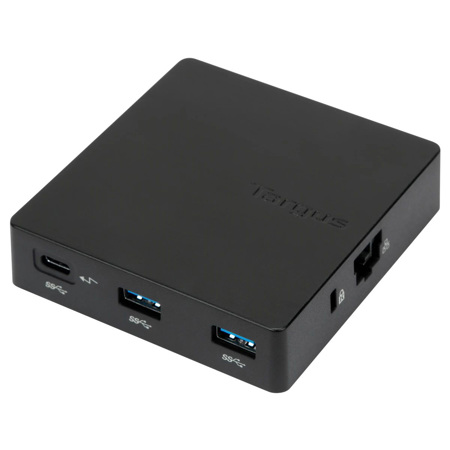
Targus USB-C Travel Dock with Power Pass-Through, Black

SKU: TGDK412USZ

This item is no longer available.

Overview
Compare
Specs
Protection

Reviews about this item

Review Summary

2023-04-16T20:00:00

Rated 1 out of 5

Not compatible with mac book m1 for dual monitor

This does not work to connect MacBook m1 machine to connect to dual monitor. you can use max 1 monitor at a time even if you are connecting one HDMI port through this dock and other usb3 directly to monitor. It worked fine on intel macbook pro. No help from support too.

vkg

2020-11-04T19:00:00

Rated 5 out of 5

Great for dual monitor display connection

This dock allows me to connect my Lenovo thinkpad to 2 Dell monitors while still charging my laptop. It works perfectly.

Sarah

2020-10-19T20:00:00

Rated 1 out of 5

DO NOT USE THE PASS THROUGH CHARGING FEATURE!

Be SUPER careful with this thing. I have a modern MacBook and that computer draws/needs 85 watts of power. This hub only supports 60 watts. I apparently COOKED mine - even though there are NO warnings on this site, somehow, we're supposed to know the wattage draw of our laptop chargers. Support wouldn't replace/warranty this so I'm out the money.

EJC

2020-07-22T20:00:00

Rated 4 out of 5

Targus Travel Dock

Small, light weight unit. I needed a dual monitor and this only worked for a single monitor so I sent back. I would have otherwise kept it because it worked.

WC

2020-01-01T19:00:00

Rated 1 out of 5

Poor support for mac

I am using the DOCK412EUZ and my experience is anything but good. From the day 1 the mini display doesn't work, despite installing the drivers. The product description never mentions that it supports only one display.

ARK

2018-08-13T20:00:00

Rated 3 out of 5

Not good for 3 monitors!

The docking station functioned perfectly until I started adding in 2+ monitors. I had to purchase adapters for each monitor to plug into the docking station. Having to do this DRASTICALLY hurt my XPS 9365 2-in-1's performance. Now looking at purchasing another docking station but this time it will be a Dell that can handle the performance for 3 external monitors in extended display mode.

OhSage1

Select a plan in the Add Protection section above and purchase with this product by clicking “Add to Cart”.

image-protection

TRUSTED PROTECTION PLANS, EXCEPTIONAL SERVICE.

Invest In Your Gear and Peace Of Mind!

Accidents happen where life happens. Protect your favorite Adorama products and purchase a protection plan to stay covered from accidental damage, mechanical or electrical failure, and more.

Repair or Replacement

Repair or Replacement

If we can’t fix it, we’ll replace it at no additional cost.

Accidental Damage

Accidental Damage

Protect your product from drops, spills, and more.

Peace of Mind

Peace of Mind

Enjoy your gear without fear. We have you covered!

Malfunction Protection

Malfunction Protection

When regular use of your product over time results in mechanical or electrical failure.

Zero Deductible

Zero Deductible

We will never charge you a deductible after the purchase of a plan.

Customer-Focused Support

Customer-Focused Support

Our claims process is simple & easy and our customer service team is happy to help.

Adorama Protect powered by Extend is available for purchase to customers in the United States. Not available for purchase Internationally or in U.S. Territories.

Targus USB-C Dock Specifications

  • Color

    Black

  • Connection Technology

    Multi-Function DisplayPort Alt-Mode

  • Works With

    Windows, Mac, Android, Linux Ubuntu, Chrome, Dex

  • Ethernet

    Yes

  • Max Host Power

    60W

  • Output Voltages

    Pass-thru

  • Power Source

    Pass-thru

  • HDMI

    1

  • DisplayPort

    0

  • Mini Display Port

    1

  • VGA

    1

  • DVI-D

    0

  • DVI-I

    0

  • Total USB A Ports

    2

  • USB-C / USB 3.2 G2

    1

  • Thunderbolt

    0

  • Audio

    0

  • Lock Slot Compatibility

    Kensington T-Bar

  • TAA Compliant

    Yes

  • Dimensions (W x H x D)

    3.74 x 3.58 x 0.90" (9.5 x 9.09 x 2.29cm)

  • Weight

    3.2 oz (91g)

  • UPC Code

    092636324629

About Targus USB-C Dock

FEATURED REVIEWS

Great for dual monitor display connection

By Sarah

This dock allows me to connect my Lenovo thinkpad to 2 Dell monitors while still charging my laptop. It works perfectly.

Make your mobile life easier with the USB-C Travel Dock with Power Pass-Through. Expand your laptop into a workstation by plugging in peripherals into the two USB-A ports, or easily connect to conference room displays when you set up for the big presentation. And since its Gigabit Ethernet port connects you to wire-speed Internet, you can forgo a spotty WiFi connection.

It helps to boost your productivity with connections typically found in a full-size docking station, like VGA and HDMI video ports to connect most projectors and HDTVs, a Gigabit Ethernet port for secure, fast Internet access. You can connect to a laptop or monitor, wireless keyboard, or mouse into the dock. It also passes power from your power adapter to the host computer (which is great if your laptop has only one USB-C port!). It has pro cable management, too - just place the cable into its designated slot and forgo it getting tangled or creating a mess in your bag.

Travel-Friendly Design
Enjoy essential connectivity ports packed into a compact dock. An integrated USB power cable folds neatly into the dock.

VGA, Mini DisplayPort, and HDMI Ports
Connect to projectors and HDTVs for stress-free presentations at your home office or for on-site presentations.

Gigabit Ethernet Port
Get wire-speed Internet without worrying about passwords or spotty WiFi.

All About Ports
Plug in external hard drives, mice, card readers, or other data storage devices.

Enterprise Software Suite: A Targus Exclusive
Enhance security and improve user experience with the Targus Enterprise Software Suite DOCK412USZ.

• Wi-Fi Auto Switch: auto enables/disables Wi-Fi functionality when the dock's Ethernet connection is active, reducing unnecessary network traffic and enabling faster connection speeds

• MAC Address Cloning: auto replaces the MAC address of the connected Targus Ethernet network adapter with any (Wired Ethernet, Wireless Ethernet, Bluetooth) MAC address of the local host, supporting device-based authentication methods

Targus USB-C Dock Features

  • USB-C DisplayPort Alt-Mode host connection (compatible with Thunderbolt 3)
  • VGA, Mini DisplayPort, and HDMI output video ports support projectors and HDTVs
  • Cable tucks away out of sight for easy transport
  • 2x USB-A ports work with peripherals
  • 1x Gigabit Ethernet
  • Power Delivery up to 60W

Product Documents

User Manual

Key Features

  • USB-C DisplayPort Alt-Mode host connection (compatible with Thunderbolt 3)
  • VGA, Mini DisplayPort, and HDMI output video ports support projectors and HDTVs
  • Cable tucks away out of sight for easy transport
  • 2x USB-A ports work with peripherals
  • 1x Gigabit Ethernet
  • Power Delivery up to 60W

What's in the box:

  • Targus USB-C Travel Dock with Power Pass-Through (Black)
  • Quick Start Guide
  • Targus 3 Year Limited Warranty






