


This item is no longer available.
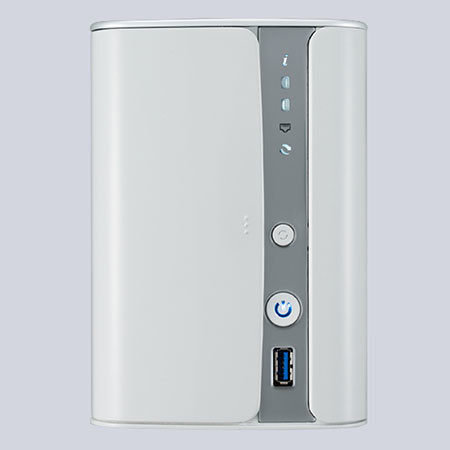
The Thecus N2520 2-Bay NAS Server is designed to offer a revolutionary experience to the NAS industry. It utilizes the latest Intel Atom processor with 1GB RAM. In addition, super speed USB 3.0 fosters quick transfers, HDMI output is convenient for multimedia playback and McAfee Antivirus protection keeps your NAS operating smoothly. Innovative technologies have been utilized to develop the N2520 NAS to improve user experience and satisfaction.
The N2520 is suitable for any user who manages daily data backups and personal cloud to multimedia playback purposes. The easy 5-minute installation contributes to the phrase plug-and-play in addition to the easy remote NAS access via DDNS. Furthermore, the client utility known as Intelligent NAS offers a revolutionary experience to manage your Thecus NAS without the need of a Web browser. As networking storage technology is evolving quickly, energy efficiency is always a consideration; the Thecus N2520 paired with the latest Intel Atom SoC chip offers the best performance while conserving energy. Last but not least, ThecusOS 6 and Auto Flashback Photo Gallery are remarkable updates which add to the user experience.
Intel Atom CE Media Processor CE5315
Performance without compromise - The Intel Atom CE media processor CE5315 is designed to manage multitasking like multimedia playback and data backup without affecting performance. This changes the user experience as NAS appliances are becoming optional to mandatory. Furthermore, the new Intel Atom processor provides performance and efficiency with its System-on-Chip (SoC) platform. A multi-user NAS environment with web hosting, data backup, data encryption, application serving, RAID 0, 1, JBOD volumes and multimedia playback.
ThecusOS 6
OS for a Better Management Experience - Includes auto firmware and module update. Users will not have to go online to check whether they have the latest firmware and modules, a quick look at the UI and the simple press of a button is all you will need to keep your NAS updated. Most importantly, ThecusOS 6 has gone under a complete make-over, which promotes a faster, smoother and more fluid transition during NAS management.
Energy Efficient x86 SoC NAS
Utilizes the latest Intel Atom processor built on a System-on-Chip, SoC platform. What this means is that the chip offers a myriad of works built into one; such as processor, graphics, memory and so on. This technology paired with the Thecus N2520 allows good energy efficiency. The N2520 has power consumption of up to 9W idle/14W load and over 50% power savings. Furthermore, noise levels are kept to a minimum at 20dB. The Intel SoC promotes energy efficient characteristics.
5 Minutes Complete Installation
The N2520 is easy enough for anyone to set up. Overlook the several steps which usually are associated with setting up NAS appliances. Simply plug the power supply, insert the Ethernet cable, boot up the N2520 and set up will be completed within 5 minutes. This feature makes this a plug-and-play NAS.
Quick NAS Accessibility using Client Utility
Access your NAS without the need to go through web browsers. The client utility that is packaged in the N2520 offers ease of use. This utility will directly be installed on your computer and auto-Samba your NAS, thus automatically giving you access to designated folders. Browse all of your photos, see statistics about your stored data, monitor your NAS (copy/download/log activity), personalize, manage and share files, all this in one easy-to-use application.
Easy Connection through DDNS
Have easy access to your NAS via Dynamic DNS (DDNS), this allows users to allocate and access their NAS files via the Internet remotely. Since IP digits are often difficult to remember, domain names are utilized to make NAS management much more convenient. When the IP address is changed, the DDNS server will automatically adjust the IP address to make sure that remote access is always available. In short, DDNS provides convenient remote Internet access to your Thecus N2520 by utilizing domain names instead of IP digits.
Personal Cloud
The Thecus N2520 can easily be set up as your personal cloud; you now have the ability to access all your files stored in your NAS via mobile device or devices synced to the NAS network. The N2520 is able to store up to 8TB of storage capacity, which provides a large amount of cloud storage. In addition, cloud service providers such as Drop box, Elephant Drive and Amazon S3 are fully compatible. Whether you are backing up sensitive data to your personal cloud, to streaming movies and music from your NAS, the N2520 offers easy personal cloud access.
HDMI Output for Multimedia Playback
with the easy-to-use local display module, simply plug a screen via HDMI connection, you won't require a computer anymore to monitor your NAS. Local display via HDMI makes things that much more convenient, directly attach keyboard and mouse or sync mobile device to start data management. Suitable for small/medium business and home users who need to show presentations or home users who wish to display multimedia on their HDTV. Whether it is music, photos, or videos the N2520 is capable to display multiple formats via HDMI multimedia playback.
Auto Flashback Photo Gallery
When the user utilizes the client utility, they will be presented with a feature of photos from the past, hence flashback. For example, if the current date is Feb xx, xxxx; Auto Flashback Gallery will automatically display photos of the same date but different year. If a photo of that date is absent, other photos will simply take its place.
Powerful Client Utility
Thecus developed a unique way to access your NAS without the need to go through web browsers. The client utility is better known as Intelligent NAS, it is a utility that is packaged in the N2520 to offer ease of use. This powerful utility will directly be installed on your computer and auto-Samba your NAS, thus automatically giving you access to designated folders.
Data Guard
Data Guard backup solution is the ultimate software as it provides both local and remote parts. Currently, data is backed up across RAID volumes, external USB drives and eSATA. In addition, Data Guard uses innovative technology to sync data across the network to other NAS and servers. More importantly, Thecus Data Guard is the total backup solution which makes managing NAS user-friendly and convenient.
Data Burn NAS data can now be burned directly to CD, DVD and Blu-ray discs with Data Burn, this hassle-free module makes burning data to a disk effortless. In addition, burning ISO image file is also supported. Whether you're managing audio, media or essential files; Data Burn copies information fast while significantly reducing waiting time. The process of burning file to disk is now easy and smooth with Data Burn module.
Antivirus
Thecus hardware helps prevent failures. But sometimes you have to protect the NAS against itself. Adding an antivirus to the already comprehensive software bundle will provide the necessary software protection by scanning the files on your NAS and defending it against possible threats. McAfee is the world's largest dedicated security technology company and shares Thecus' spirit of dedication and quality. By establishing a strong partnership with them, Thecus will allow users the benefit of McAfee's powerful software on their NAS entirely for free.
USB 3.0 Connectivity
Whether connecting digital cameras and smart phones, backing up large external hard drives, or extending the capacity of your NAS, USB 3.0 will make sure it's done in no time at up to 5Gb/s. Backwards compatibility adds the connectivity of a world full of USB 2.0 and USB 1.1 devices to get the good combination of speed and universal access.
Acronis True Image Backup Software
Back up all your data with One-click Protection or pick and choose only your most important files. Acronis sports a slick interface, user-friendly design and comprehensive features to keep your data safe
iOS/Android Connectivity
In the modern world, nothing is as important as reaching your data from anywhere. With T-OnTheGo and the Thecus Dashboard, you can manage your NAS and upload to and download/stream from your NAS using an iOS or Android device on the go.
User Quota
Divide the massive storage of a Thecus NAS among multiple users. Whether there are two users or 100, user quotas make it easy to divide up and manage disk space.