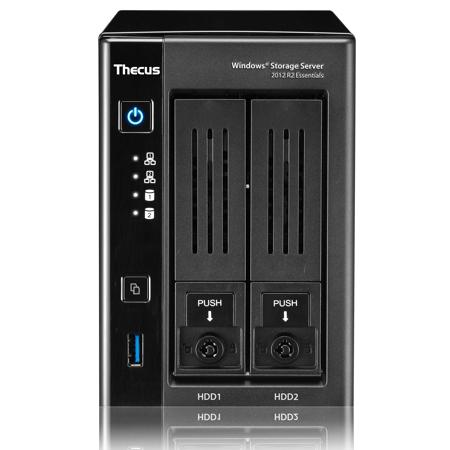
Thecus W2810PRO 2-Bay Tower NAS Enclosure, Intel Celeron N3160 Quad-Core, 4GB DDR3 RAM, 60GB SSD, Windows Storage Server 2012 R2 Essentials, No HDD
SKU: THW2810PRO
This item is no longer available.
Share:
Overview
Compare
Specs
Protection
About Thecus W2810PRO
Enhanced Boot Drive: Embedded SSD
To ensure the best performance possible, each WSS 2012 R2 Essentials copy is pre-installed on an embedded solid state drive. These boot drives are independent from the drive bays and allow for seamless setup and integration.
• Affordable Easy-to-Use Cloud Ready Storage
• Top Storage for 1-50 Employee Business
• Office 365 & Microsoft Azure: Cloud Service Integration
• Active Directory Domain Services: Scalable, Secure User Management
• Data Deduplication: Performance Optimization
• Enhanced Boot Drive: Embedded SSD
• Windows License Included
• Intel Celeron N3160 Quad-Core Processor
• 4GB DDR3 RAM
Windows Storage Server 2012 R2 Essentials
Windows Storage Server 2012 R2 Essentials is the latest version of Windows Storage Server that is designed for small businesses that want to leverage cloud services in a NAS appliance. It enables cross-premise functionality, providing small businesses with robust on-premises solution for file and print, client backup and restore, secure remote access and identity management services, combined with optional off-premise services supported by Microsoft.
Critical Data protection
File History
File History periodically (every hour by default) scans the file system for changes and creates a copy on the server. It simplifies the recovery of files, accidently deleted or overwritten, without the need for an administrator's assistance.
Client Computer Backups
Configured to run daily on each PC that's connected to the Essentials environment, client computer backup stores your backup data centrally on the server. This type of automatic protection enables you to restore individual files and folders or an entire PC, as you would do when replacing a faulty hard drive or upgrading from an older hard disk drive.
Server Backup
You can add a hard disk drive to the server, either internally or externally and designate it as a backup destination as opposed to server storage. Windows Storage Server 2012 R2 Essentials will then use this drive to back up all the data stored on the server, including both the operating system files and your business data.
NTFS Online Scan and Repair (CHKDSK)
CHKDSK in Windows Storage Server 2012 R2 Essentials introduces a new approach that prioritizes volume availability and allows for the detection of corruption while the volume remains online with data available.
Robust Windows Server Security
Flexible anti-virus support and complete disk protection with BitLocker Drive Encryption for robust data protection.
Scalability Improvements
Storage Spaces
Storage Spaces delivers Software Defined Storage (SDS). Easily group multiple hard drives into a storage pool and protect data in the pool, without the need to understand RAID. Storage Spaces enables cost-effective, highly available, scalable and flexible storage solutions for business-critical deployments.
Data Deduplication
Controls data growth by removing duplicate data. Allows the server to efficiently store, transfer and backup less data.
Integration with Office 365
Windows Storage Server 2012 R2 Essentials provides the option to integrate with Office 365 or a third-party Hosted Exchange provider. Administrators need only create a user's account once - an associated mailbox can be automatically created at the same time. The Essentials server syncs passwords with Office 365, helping end users enjoy a seamless sign-on experience whether they are accessing local or cloud-based resources.
Centralized management
Essentials Administrative Dashboard
The Dashboard is the command and control center for Windows Storage Server 2012 R2 Essentials. Designed with a streamlined look and feel and enhanced with improved functionality, the Dashboard is used to perform all the management and maintenance tasks you need to control how your server behaves on your network.
Connecting Your Clients with Launchpad
The Launchpad is a small application that provides authenticated users with access to key features of the server, including shared files and media, add-ins and Remote Web Access. The Launchpad also provides real-time information and notifications about the health of the computer.
Printer Server Support
Print Services enables you to share printers on a network, as well as to centralize print server and network printer management tasks. It also enables you to migrate print servers and deploy printer connections using a Group Policy.
Health Monitoring
Health status notifies you of issues or problems related to computer backups, server storage, low disk space and more. Health reports can be automatically generated on a scheduled basis and emailed directly to local administrators or external partners.
No Windows Server CALs Required
No Windows Server Client Access Licenses (CALs) required benefits users the ability to access the services of the server without a permit. With this, business users will not have to go through the trouble of obtaining authorization of per-user or per-device. With no CALs required, users are able to access data on demand, without the troubles of CALs.
Directory Services
Windows Storage Server 2012 R2 Essentials offers an affordable server solution that can be used as the primary infrastructure server in multi-server environments.
User Groups Management
You can create user groups and add user accounts to them. User account permissions can be managed through their user group memberships.
Secure and fast remote access
Remote Web Access (RWA)
RWA enables end users to work remotely from virtually anywhere using almost any device. A website for RWA delivers a highly secure way for users and administrators to use their web browser to access files and folders, client computers and the servers running in your environment.
Remote Domain Join
Windows Storage Server 2012 R2 Essentials turns setting up virtual private networking (VPN) into a painless wizard-driven process of just a few clicks and simplifies the management of VPN access for users. Client computers can leverage a VPN connection to remotely join the Windows Storage Server 2012 R2 Essentials environment without the need to come into the office.
My Server App
My Server app provides a modern and touch-friendly way for end users to access files and folders, as well as perform light administration tasks. The app runs on Windows and Windows RT desktops, laptops and tablet devices.
BranchCache
BranchCache can help you optimize Internet usage, improve performance of networked applications and reduce traffic on your wide-area network (WAN).
SMB Multi-channel
SMB Multichannel enables file servers to use multiple network connections simultaneously. It facilitates aggregation of network bandwidth and network fault tolerance when multiple paths are available between the SMB 3.0 client and the SMB 3.0 server.
Built-in HDMI Output
Turn your NAS into the ultimate multimedia hub! An inbuilt HDMI output allows you to connect your NAS directly to your TV for media streaming and easy device management.
USB 3.0 Connectivity
The next generation of connectivity is here with speeds 10x faster than USB 2.0. Whether connecting digital cameras and smart phones, backing up large external hard drives or extending the capacity of your NAS, USB 3.0 will make sure it's done in no time at up to 5 Gbit/s. Backwards compatibility adds the connectivity of a world full of USB 2.0 and USB 1.1 devices to get the best combination of speed and universal access.
P2P Connectivity
Pre-installed with the Ultimate Package from Orbweb, users will be able to easily transform their Windows NAS into their own personal cloud without network configuration. Enjoy an always accessible cloud experience, while keeping your data in your hands.
Thecus W2810PRO Features
- Top Storage for 1-50 Employee Business
- Office 365 & Microsoft Azure: Cloud Service Integration
- Active Directory Domain Services: Scalable, Secure User Management
- Data Deduplication: Performance Optimization
- Enhanced Boot Drive: Embedded SSD
- Windows License Included
- Intel Celeron N3160 Quad-Core Processor
- 4GB DDR3 RAM