+4
more
more

This item is no longer available.
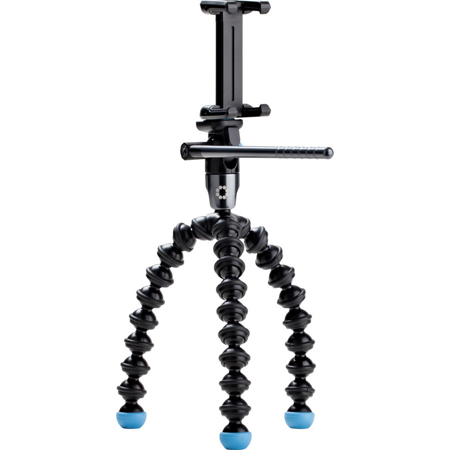
Two Great Products in One!
Unscrew the GripTight Mount and use the GorillaPod Video with your mini camcorder or point & shoot camera instead. GripTight Mount will work on any tripod, including all GorillaPods! It's also compatible with most phone cases and accessories!
How to Use GripTight Video
Attach GripTight Mount to GorillaPod Quick-Release Clip
Start screwing the quick-release clip into the bottom of the GripTight Mount. Use a coin to securely tighten down the screw. Make sure the quick-release clip is in line with the GripTight Mount's grip pads for fast and easy setup.
Stabilize Left & Right with Two Legs
Secure one leg to the left of your phone and then secure one leg to the right of your phone. By positioning one leg on each side, you prevent your phone from slipping sideways. The broader the stance of your GripTight GorillaPod Video, the sturdier it will be on uneven surfaces.
Prevent Slipping with Third Leg
Use the third tripod leg to provide stability for your phone by bending it into an angle and having it rest or push off the surface where you're setting up your shot. This leg position will counter-balance the weight of your phone, preventing it from slipping forwards or backwards.
Adjust Pan and Tilt Handle
Press the small blue button on the side of the videohead to adjust the angle of the pan and tilt handle so you can easily access it. You can lock the handle into eight different positions so you can use it in even the trickiest of setups. Press the blue button again to fold the handle flat for easy storage.
Secure on Vertical Poles
Wrap one leg around the front of the pole, wrap the second leg around the back of the pole and position the third leg in an arc directly below the phone with the foot of the tripod perpendicular the pole. This will prevent your phone from slipping down the pole. Be sure to align the omnidirectional ballhead with the horizon line to get a straight and level panning shot.
Get Smooth Pan & Tilt Shots Easily
To record the smoothest panning shots possible, use one hand to maneuver the pan & tilt handle and use the other hand to hold the GorillaPod in place. Either hold onto the silver part of the videohead or hold onto the GorillaPod legs to keep it sturdily in place while panning and tilting.
Magnetic Feet for Better Pan & Tilt
Use the magnetic feet to secure your GorillaPod on metal poles or railings. Securing the magnetic feet on a metal surface will also make it easier to achieve smooth pan and tilt.
Designer Tip: For less resistance when panning, warm up the pan and tilt head. Use the handle to spin the head around in a circle for 30 seconds and then set up your shot.
Fits Best selling smartphones - Adjustable grips fits all iPhones and most Android & Windows phones with or without a case
Internal String Spring - Mount expands to the size of your device & grips securely
Reliable Rubber Grip Pads - Secure phone in place, even when turned sideways!
180deg. Leveling Head - Capture footage in portrait or landscape mode easily
360deg. Pan & 135deg. Tilt - Use the handle to capture smooth video footage
Flexible & Wrappable Legs - Bend & rotate 360deg. giving you the flexibility to shoot anywhere!
Super Strong Magnetic Feet - Attached to any ferrous metal surface, like poles or fridges.