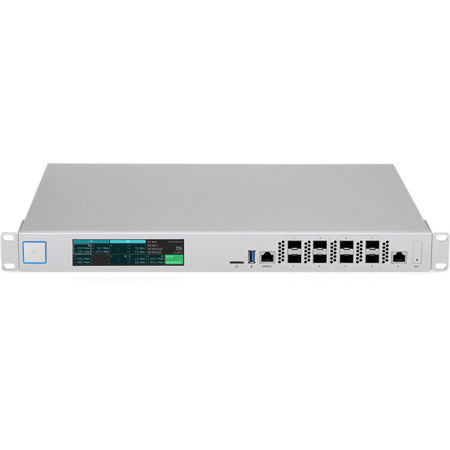
Ubiquiti Networks 8-Port 10 Gigabit SFP+ UniFi Security Gateway XG Router
SKU: UBGXG8
This item is no longer available.
Recommended Alternatives
Share:
Overview
Compare
Specs
Protection
About Ubiquiti Networks UniFi XG Gateway
Build your high-performance network with the UniFi Security Gateway XG. Combining robust security features and advanced routing technology, the Security Gateway XG delivers unprecedented network security and throughput in a cost-effective unit.
• Sophisticated Routing Features
• Hot-Swappable Modular Power Supplies
• Built-In Full Color LCD Touch Display
High-Capacity Performance
Featuring 10G SFP+ interfaces, the Security Gateway XG supports up to 50,000 clients and 10,000 APs for enterprise-level businesses, stadiums, hotels and large-scale deployments.
Powerful Firewall Performance
The UniFi Security Gateway XG offers advanced firewall policies to protect your network and its data.
UniFied Network Analytics and Visibility
From a single pane of glass, view network topology and configuration, real-time switch statistics and debugging metrics.
LCD Touchscreen Display
The built-in touchscreen display on the UniFi Security Gateway XG provides administrators with real-time device and network monitoring without the need for a separate UI device.
Convenient VLAN Support
The UniFi Security Gateway XG can create virtual network segments for security and network traffic management.
VPN Server for Secure Communications
A site-to-site VPN secures and encrypts private data communications traveling over the internet.
Automatic QoS
Top QoS priority is assigned to voice and video traffic for clear calls and lag-free, video streaming.
UniFi Controller
Easily accessible through any standard web browser and the UniFi mobile app (iOS or Android), the UniFi Controller software features an intuitive UI and support for the next generation of UniFi devices. Important network details are logically organized for a simplified, yet powerful, interface.
Packed with Features
Use the UniFi Controller to provision thousands of UniFi APs and UniFi Security Gateways, map out networks, quickly manage system traffic and provision additional UniFi devices.
Network Overview
A comprehensive overview of your Network Health is readily available in the new dashboard. Monitor your network's vitals and make on-the-fly adjustments as needed.
Predictive Maps
Upload a map of your location(s) or use Google Maps to represent the areas where your UniFi devices are located. Starting with v5.6, you can also use the predictive map feature to get a preview of coverage and to help you avoid dead spots.
Deep Packet Inspection
Ubiquiti's proprietary Deep Packet Inspection (DPI) engine includes the latest application identification signatures to track which applications (and IP addresses) are using the most bandwidth.
Detailed Analytics
Use the configurable reporting and analytics to monitor large user groups and expedite troubleshooting. Advanced search and sorting capabilities make network management more efficient.
Multi-Site Management
A single UniFi Controller running in the cloud can manage multiple sites: multiple, distributed deployments and multi-tenancy for managed service providers. Each site is logically separated and has its own configuration, maps, statistics, guest portal and administrator read/write and read-only accounts.
LAN/WLAN Groups
The UniFi Controller can manage flexible configurations of large deployments. Create multiple LAN and WLAN groups and assign them to the respective UniFi devices.
Hardware Overview
• (8) 10G SFP+ Ethernet Ports
• (1) Gigabit RJ45 Ethernet Port
• (2) Hot-Swappable Modular PSU Bays
• (1) 100W AC/DC Modular PSU
• 1U Rack-Mountable
• Bluetooth Management Interface
• Real-Time Intrusion Protection at over 1 Gbps Throughput
• 50 Gbps Routing Capability with Deep Packet Inspection
Built-In Touchscreen
The UniFi Security Gateway XG features a vivid built-in touchscreen display, to make managing your network even easier. The LCD touchscreen conveniently displays two different screens: the port display and the statistics display. The default port display shows information such as IP addresses, throughput speeds and number of clients, per port. The statistics display presents an overview of total throughput speeds and system details.