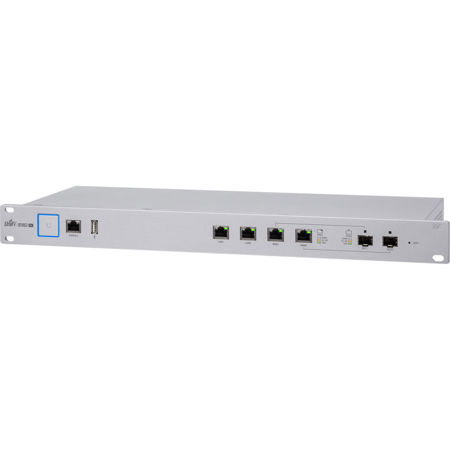
Ubiquiti Networks USG-PRO-4 Enterprise Gateway Router with 2 Combination SFP/RJ-45 Ports
SKU: UBIUSGPRO4US
This item is no longer available.
Share:
Overview
Compare
Specs
Protection







About Ubiquiti Networks USG-PRO-4
The USG-PRO-4 offers optional SFP ports for fiber connectivity to support backhaul applications.
• 2x 10/100/1000 RJ45 Ports
• 2x 10/100/1000 RJ45/SFP Combination Ports
• 1x RJ45 Serial Console Port
• Rack-Mounting Capability
• Layer 3 Forwarding Performance - Packet Size of 64 Bytes: 2,400,000 pps, Packet Size of 512 Bytes or Larger: 4 Gbps (Line Rate)
Affordable Enterprise Network Security
Ubiquiti Networks introduces the UniFi Security Gateway, which extends the UniFi Enterprise System to encompass routing and security for your network. The UniFi Security Gateway combines reliable security features with high-performance routing technology in a cost-effective unit. Rack-mountable form factor with fiber connectivity options and a dual-core, 1 GHz processor for maximum hardware-accelerated performance.
Powerful Firewall Performance
The UniFi Security Gateway offers advanced firewall policies to protect your network and its data.
Convenient VLAN Support
The UniFi Security Gateway can create virtual network segments for security and network traffic management.
VPN Server for Secure Communications
A site-to-site VPN secures and encrypts private data communications traveling over the Internet.
QoS for Enterprise VoIP and Video
Top QoS priority is assigned to voice and video traffic for clear calls and lag-free, video streaming. The UniFi Security Gateway is deployed in the same manner as UniFi Access Points for wireless networking. Use the intuitive UniFi Controller to conduct device detection, provisioning and management.
UniFi Controller
Introducing the new UniFi Controller software featuring a refreshed UI and support for the next generation of UniFi devices.
Improved User Experience
Redesigned to be more intuitive and easier to navigate, the new UI raises the bar for enterprise network management efficiency. Important network details are logically organized for a simplified, yet powerful, interface.
Packed with Features
Use the UniFi Controller to provision thousands of UniFi APs and UniFi Security Gateways, map out networks, quickly manage system traffic and provision additional UniFi devices.
Network Overview
A comprehensive overview of your Network Health is readily available in the new dashboard. Monitor your network's vitals and make on-the-fly adjustments as needed.
Detailed Analytics
Use the configurable reporting and analytics to monitor large user groups and expedite troubleshooting. Advanced search and sorting capabilities make network management more efficient.
Multi-Site Management
A single UniFi Controller running in the cloud can manage multiple sites: multiple, distributed deployments and multi-tenancy for managed service providers. Each site is logically separated and has its own configuration, maps, statistics, guest portal and administrator read/write and read-only accounts.
LAN/WLAN Groups
The UniFi Controller can manage flexible configurations of large deployments. Create multiple LAN and WLAN groups and assign them to the respective UniFi devices.
Dashboard
UniFi provides a visual representation of your network's status and delivers basic information about each network segment.
Maps
Upload a map of your location(s) or use Google Maps to represent the areas where your UniFi devices are located.
Device Configuration
The Devices screen displays a list of UniFi devices discovered by the UniFi Controller. You can access each managed device for device details and configuration.