


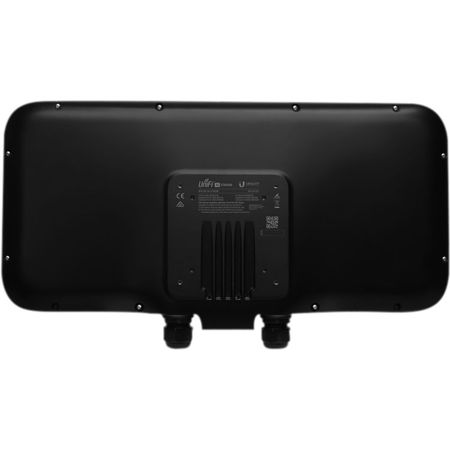
This item is no longer available.
Scalable Enterprise Wi-Fi Management
The UniFi Ecosystem enables the system integrator to effectively and efficiently create wireless network designs of any size, from small to large, with the potential for unlimited scalability. The built-in, dedicated security and monitoring radio of the UniFi Wi-Fi Base Station XG provides visibility into site performance, channel planning and local interferers, allowing the integrator to properly evaluate performance and quickly respond to changing interference and security threat landscapes.
Easily accessible through any standard web browser and the UniFi app (iOS or Android), the UniFi Controller software is a powerful software engine ideal for high-density client deployments requiring low latency and high uptime performance.
Powerful Hardware
The UniFi Wi-Fi Base Station XG features the latest in Wi-Fi 802.11ac Wave 2 MU-MIMO technology combined with dedicated security and Bluetooth radios.
Intuitive UniFi Controller Software
The system integrator can leverage the controller to easily configure and administer an enterprise Wi-Fi network.
Expandable
The system integrator can start with one and expand to thousands while maintaining a single unified management system.
Save Money and Save Time
UniFi comes bundled with a software controller that can be deployed on an on-site PC, Mac or Linux machine; in a private cloud; or using a public cloud service.
Extend Your Coverage
With the UniFi Controller software running in a NOC or in the cloud, administrators can manage multiple sites: multiple, distributed deployments and multi-tenancy for managed service providers.
UniFi Controller
Packed with Features
The UniFi Controller can provision thousands of UniFi APs, map out networks, quickly manage system traffic and add more UniFi APs.
View Your RF Environment
Use the RF environment functionality of the UniFi Wi-Fi Base Station XG to detect and troubleshoot nearby interference, analyze radio frequencies, choose optimal AP placement and configure settings.
Powerful RF Performance Features
Advanced RF performance and configuration features include spectral analysis, airtime fairness and band steering.
Detailed Analytics
The UniFi Controller provides configurable reporting and analytics to manage large user populations and expedite troubleshooting.
WLAN Groups
Manage flexible configurations of large deployments. Create multiple WLAN groups and assign them to an AP's radio. Each WLAN can be VLAN tagged. Dynamic VLAN tagging per Wi-Fi station (or RADIUS VLAN) is also supported.
Wireless Uplink
Wireless Uplink functionality enables wireless connectivity between APs for extended range. One wired UniFi AP uplink supports up to four wireless downlinks on a single operating band, allowing wireless adoption of devices in their default state and real-time changes to network topology.
Multi-Site Management
A single UniFi Controller running in the cloud can manage multiple sites: multiple, distributed deployments and multi-tenancy for managed service providers. Each site is logically separated and has its own configuration, maps, statistics, guest portal and administrator accounts.
Guest Portal/Hotspot Support
Easy customization and options for Guest Portals include authentication, Hotspot setup and the ability to use your own external portal server. Use UniFi's rate limiting for your Guest Portal/Hotspot package offerings. Apply different bandwidth rates (download/upload), limit total data usage and limit duration of use.
All UniFi APs include Hotspot functionality:
• Built-in support for billing integration using major credit cards
• Built-in support for voucher-based authentication
• Built-in Hotspot Manager for voucher creation, guest management and payment refunds
• Full customization and branding of Hotspot portal page
Dashboard
UniFi provides visual representation and status information about different aspects of your network.
RF Map
Monitor UniFi APs and analyze the surrounding RF environment.
Insights
UniFi displays the client types for a specific time period.
UniFi App
Manage your UniFi devices from your smartphone or tablet.
802.11ac Technology
Initial 802.11ac Wave 1 SU-MIMO (Single-User, Multiple Input, Multiple Output) technology allows an earlier-generation AP, such as the UniFi AC Pro AP, to communicate with only one client at a time. 802.11ac Wave 2 MU-MIMO (Multi-User, Multiple Input, Multiple Output) technology allows a Wave 2 AP, such as the UniFi Wi-Fi Base Station XG, to communicate with multiple clients at the same time - significantly increasing multi-user throughput and overall user experience.
MU-MIMO
Assuming the same conditions, a Wave 2 radio provides up to 75% improvement1 beyond a Wave 1 radio. This improvement increases wireless performance and/or serves more clients at the same performance level.
4x4 Spatial Streams
At any single time, a Wave 2 radio can communicate with the following MU-MIMO clients:
• Four 1x1 clients
• Two 2x2 clients
• One 2x2 client and two 1x1 clients
• One 3x3 client and one 1x1 client
Real-World Performance
Combining three times the number of 5 GHz radios and four times the associations per radio, the UniFi Wi-Fi Base Station XG delivers an order of magnitude more performance1 than a typical 802.11ac Wave 1 AP.
Client Compatibility
For optimal performance, use MU-MIMO clients. SU-MIMO clients will also benefit and gain up to 10-20% greater performance when used with the UniFi Wi-Fi Base Station XG.
Application Scenarios
For ultra high density environments, such as an outdoor music festival, where there are numerous clients in a relatively small space, we recommend the UniFi Wi-Fi Base Station XG. Wave 1 and Wave 2 APs offer 28 independent (non-overlapping) channels: three for the 2.4GHz band and twenty-five for 5 GHz, including DFS channels. When you use the 2.4GHz band in a high-density location, you encounter self-interference and channel saturation.
When you use the 5GHz band, you can deploy smaller cells (coverage areas), so you can support more clients in any cell that deploys more than one AP. With the advantages of MU-MIMO technology and 4x4 spatial streams, the UniFi Wi-Fi Base Station XG can support more than triple the number of users2 per radio than a typical Wave 1 AP.
Recommended Maximum Number Per Radio
The UniFi Wi-Fi Base Station XG has three client radios, so it can support up to 750 users as its recommended maximum.
Theoretical Maximum Number Per Radio
The UniFi Wi-Fi Base Station XG has three client radios, so it can support up to 1500 users as its theoretical maximum.
Security Overview
The UniFi Wi-Fi Base Station XG delivers unprecedented wireless awareness and security, including tools for real-time spectrum monitoring, airtime utilization analytics and intrusion detection/ prevention.
Dedicated Spectral Security Radio
Using a persistent spectral scan, the UniFi Wi-Fi Base Station XG constantly monitors the RF environment to check for both potential malicious activity and the best channel for network performance. The dedicated security radio allows the UniFi Wi-Fi Base Station XG to scan for security threats, such as malicious frames and rogue access points, while maintaining throughput for client devices.
At the same time, UniFi, in conjunction with the UniFi Wi-Fi Base Station XG, analyzes and displays the wireless spectrum and airtime utilization to allow the network admin to have unprecedented real-time visibility into the spectral and protocol usage in the network.
Threat Management
The UniFi Wi-Fi Base Station XG's dedicated security radio provides persistent threat management to act as a Wireless Intrusion Prevention System (WIPS) and Wireless Intrusion Detection System (WIDS). Such a dedicated radio affords frequency agility - meaning all available Wi-Fi channels are monitored constantly for threats - not just the channels the AP is using.
Spectrum and Wi-Fi Packet Analysis
The airView tool offers real-time visibility into your RF spectrum. Because it uses the dedicated security radio, it analyzes all of your available RF channels without affecting performance or disrupting client activity. The airTime tool visualizes and analyzes how the APs use channels in real time. The breakdown is by frame type, clients, neighboring APs, protocols and interference. Spectrum view and Wi-Fi packet analysis can be done simultaneously, without affecting stations, for a total view of the RF environment and channel utilization.
Powerful Connectivity
Featuring maximum wireless performance combined with wireless security, the UniFi Wi-Fi Base Station XG is ideal for ultra high density environments such as event venues, festivals and medium- or large-sized stadiums.
Quad-Radio Capabilities
Three client radios deliver unparalleled Wi-Fi performance while a dedicated security radio provides persistent threat management
Superior Capacity for Large Crowds
Featuring low-latency QoS (Quality of Service), the UniFi Stadium XG AP supports up to 1500 clients with 12 MU-MIMO chains (500 clients with 4 MU-MIMO chains per client radio).
Enhanced Processing Power
The UniFi Wi-Fi Base Station XG is capable of complex operations that may slow down a lesser-equipped AP.