Overview
Compare
Specs
Protection

Reviews about this item

Review Summary

2023-01-26T19:00:00

Rated 5 out of 5

Hp

Good, set up was difficult

Rv p.

2021-05-10T20:00:00

Rated 5 out of 5

A great upgrade to its predecessor

A great upgrade to its predecessor, which finally bit the dust after 12 years and 200,000 pages. It's faster, crisper, quieter, and easily handles the 20,000 pages a year we need it for. Also had aftermarket toner, unusual for newer HP printers.

Floyd M.

2021-05-05T20:00:00

Rated 2 out of 5

Started out great but..

I really wanted to love this printer. I had to replace my CP4025 which printed like a dream on medium weight cardstock for years. Tried the 652 and the first day was awesome. second day it started printing black bands on one side of the page. Had to return it

bsch

2020-11-08T19:00:00

Rated 5 out of 5

Love, love, love HP Printers 651 & 652 Laserjets

Our office ran the 651 for many years and had no issues with it. When we needed another printer replaced we opted for the 652 as the 651 was not longer available. Display is bit of a challenge on the 652 the printers are pretty much the same.

Mandy

2020-07-03T20:00:00

Rated 1 out of 5

VERY DISAPPOINTED

I am a long time HP purchaser of printers and desktop computers. My B/W printing needs are about 5000 pages per month. The design and functionality of this machine is very poor. The screen and punch key combo is from the 90's. The screen directions are useless. The USB ports to print are inconveniently located in the back corner. Bypassing Tray 1 and double-sided printing which are the defaults are a nuisance. Any power interruption, you need to reset everything. Surprisingly it is a single printer function, not a fax or scanner but can't get that right. Print ink replacements with HP are $1,000 to do all four colors. I have six HP computers and four HP lower level copiers as back up and was hoping the M652 could replce my commercial Sharp but it does not measure up.

JPGESQ

2020-06-14T20:00:00

Rated 5 out of 5

Great Printer

I bought this printer to replace a CP4025dn that was the best printer I have every owned. I was hoping that the M652dn could hold its own as a replacement and it appears to do everything I want only faster. Great Printer!

dave54235

2020-06-07T20:00:00

Rated 2 out of 5

Great printer - when it works…

Have had this for one year now and bought this printer after having a great experience with their old HP ColorLaser Jet CP4025 for years. This new printer is great BUT only when it works…. I get error messages, or it freezes and I need to reboot, about 4 times a week. Never had this happen on my last model. Also seems to be made out of VERY cheap plastic. The drawer and paper holder is flimsy in comparison to my last HP, for this reason the paper doesn't always go in straight and off shoots paper with everything off center. For how expensive this printer is I would expect the machine to made out of higher quality plastics/products. If I would have known this all prior to purchasing, I likely would have went with a different printer.

KateH

2020-04-20T20:00:00

Rated 5 out of 5

Beautiful color! Super fast!

I was so sad when my HP Color LaserJet printer was struck by lightning. I really did not want to purchase a new printer but I LOVE this printer. My other printer was great but, well, you know, it was 4 or 5 years old and technology improves and this printer is amazing with its gorgeous colors and speed...wow is it fast!!! So happy with this purchase.

xattax

2019-07-09T20:00:00

Rated 5 out of 5

Color Printer

We brought this printer a few weeks ago. The quality is as good as many higher priced machines.

csmith5369

2019-07-01T20:00:00

Rated 4 out of 5

Very happy

We got this printer a month ago and have been pretty happy with it. We use it at a graphics studio. The color is very good. It has handled different paper stock types well. However, when we did a run of a couple hundred copies and one of the toner cartridges became low, there was no warning and we had about 50 copies that were unusable, just because one color was faint, and so wasted toner and paper. But all in all, very happy with this printer.

MariaDe

2019-04-11T20:00:00

Rated 1 out of 5

SLOW SLOW 1 page print

I purchased and wish I had not. I do a lot of sample prints and invoicing. Sitting for 1:45 for the first print. YUCK

BuddyL

2019-02-05T13:39:51

Rated 5 out of 5

GREAT LASER PRINTER

This HP M652DN laser printer does a great job on text and large graphics. I use this to make business catalogs from Microsoft Publisher on card stock and then insert that into clear protective page sheets. Turn out very well. Great capacity on toner size available as well. Shipped with the standard toner size and not a starter set. I have it hooked up thru the ethernet cables and anybody on the network can use it as well as printing from my iphone.

JIM Y.

2019-01-05T19:00:00

Rated 5 out of 5

crisp images

I've been wanting a color laserjet for a number of years now... in fact, had my eye on the M651DN, but by the time I had the money saved, the 651 had been replaced by the 652. It's everything I hoped it would be (so far).

dtkerns

2018-12-31T19:00:00

Rated 2 out of 5

Wrong Printer Sent

I ordered the M652dn and received the M652 which is NOT wireless. Now I need a wireless device to use it with all my devices. Extra money I do not need to spend. The printer also does not print on vellum paper. Other than the above, the print quality is EXCELLENT

Weatherskn

2018-11-19T19:00:00

Rated 1 out of 5

Toner too costly and does not live up to print job

I was very disappointed to learn that there was no generic toner to accommodate my new HP M652dn, as I have never had an issue in the past with my HP products. As this is an "enterprise" product, it would suggest that this would be an optimal product for a small business owner, which I am. But at a cost of $220 to $375 for one black toner cartridge, the product is anything but "enterprise" and has no consideration for the small business owner. I changed my first cartridge and did a print job for a 655 black toner, and my print job was only 9,443. I have the product set up on grayscale, and eco print to save toner, but clearly that does not work. Unless of course HP wants me to believe that my print job was "satisfactory" in this mode, when they clearly advertise "up to 12,000 monthly print job". Since my print jobs are around 15,000 to 17,000 a month, the cost for toner is going to be a huge hit to my business.

AlyB

2018-11-10T19:00:00

Rated 4 out of 5

So far so good

I bought this to replace a HP Printer I had for over 15 years. They last long. It was more expensive than I really wanted to pay for but I wanted a really good product. It prints really nice and fast. I love the duplex feature! The only negative is it does not come wireless and for the money it should. You have to buy the additional part to make that happen.

Julie2018

2018-01-10T19:00:00

Rated 4 out of 5

Great Printer but Difficult to Hook Up to a Mac

Great printer but it took us weeks to figure out that we needed to buy a special cord for it to work with our iMac. HP was useless in helping us. We thought it wasn't compatible with High Sierra, but that wasn't the problem. It was the cord, and no one at HP knew the answer. The tech at Staples figured it out!

Solebury

2017-10-19T20:00:00

Rated 5 out of 5

Fast, easy printer for a G Suite Chromebook office

Our office uses Google's office products, in particular G Suite and chromebooks and chrome boxes for our computers. We switched to HP printers from another brand because the HP printers work MUCH faster with Google Cloud Print. This printer in particular prints files sent through Google Cloud Print almost instantly.

OfficeUsers2058

Select a plan in the Add Protection section above and purchase with this product by clicking “Add to Cart”.

image-protection

TRUSTED PROTECTION PLANS, EXCEPTIONAL SERVICE.

Invest in Pre-Owned Gear & Peace of Mind!

Extend coverage on pre-owned products after the retailer warranty ends and protect photo & video gear from accidental damage with Adorama Protect.

Repair or Replacement

Repair or Replacement

If we can’t fix it, we’ll replace it at no additional cost.

Accidental Damage

Extended Protection

Coverage for pre-owned gear begins after the retailer warranty ends, plus accidental damage protection for photo/video gear that starts on day one.

Peace of Mind

Peace of Mind

Enjoy your gear without fear. We have you covered!

Malfunction Protection

Malfunction Protection

When regular use of your product over time results in mechanical or electrical failure.

Zero Deductible

Zero Deductible

We will never charge you a deductible after the purchase of a plan.

Customer-Focused Support

Customer-Focused Support

Our claims process is simple & easy and our customer service team is happy to help.

Adorama Protect powered by Extend is available for purchase to customers in the United States. Not available for International and U.S. territories purchases. Plans on pre-owned items do not cover pre-existing damages.

HP M652dn Specifications

Printer

Printer

Jump to...
  • Print speed

    Black: Normal: Up to 50 ppm
    Color: Normal: Up to 50 ppm

  • First page out (ready)

    Black: As fast as 6.4 sec
    Color: As fast as 6.4 sec

  • Print quality (best)

    Black: Up to 1200 x 1200 dpi
    Color: Up to 1200 x 1200 dpi

  • Print Resolution Technologies

    HP ImageRet 3600; 600 x 600 dpi; HP ProRes 1200 (1200 x 1200 dpi); Pantone Calibrated

  • Duty cycle

    Up to 100,000 pages (monthly, A4)
    Recommended Monthly Page Volume: 2,000 to 14,000

  • Print technology

    Laser

  • Processor speed

    1.2 GHz

  • Print languages

    HP PCL 6
    HP PCL 5c
    HP postscript level 3 emulation, native PDF printing (v 1.7), URF (AirPrint)

  • Printer Smart Software Functions

    Print preview, duplex printing, print multiple pages per sheet (2, 4, 6, 9, 16), collation, watermarks, store print jobs, easy-access USB

  • Printer Management

    HP JetAdvantage Security Manager
    HP SNMP Proxy Agent
    HP Web JetAdmin Software
    HP WS Pro Proxy Agent
    Printer Administrator Resource Kit for HP Universal Print Driver

  • Display

    2.7" (6.86cm) QVGA LCD (color graphics) rotating (adjustable angle) with 24-key pad

Connectivity

Jump to...
  • Mobile printing capability

    HP ePrint
    Apple AirPrint
    Mopria-certified

  • Wireless capability

    Optional, enabled with purchase of HP Jetdirect 2900nw Print Server J8031A or HP Jetdirect 3000w
    NFC/Wireless Accessory J8030A

  • Connectivity (Standard)

    1 Hi-Speed USB 2.0 Device
    2 Hi-Speed USB 2.0 Host
    1 Gigabit/Fast Ethernet 10/100/1000 Base-TX network
    Hardware Integration Pocket

  • Connectivity (Optional)

    HP Jetdirect 2900nw Print Server J8031A
    HP Jetdirect 3000w NFC/Wireless Accessory J8030A

  • Network Capabilities

    Yes, via HP Jetdirect Ethernet embedded print server (standard) which supports: 10Base-T, 100Base-Tx, 1000Base-T
    802.3az (EEE) support on Fast Ethernet and Gig Links
    IPsec (standard)
    802.11a/b/g/n wireless networking (optional)

  • Minimum system requirements

    2GB available hard disk space
    1.3GB available hard drive space
    Internet

  • Compatible operating systems

    Android
    Linux Boss (5.0)
    Linux Debian (7.0, 7.1, 7.2, 7.3, 7.4, 7.5, 7.6, 7.7, 7.8, 7.9, 8.0, 8.1, 8.2, 8.3, 8.4, 8.5, 8.6)
    Linux Fedora (22, 23, 24)
    Linux Mint (17, 17.1, 17.2, 17.3, 18)
    Linux Red Hat Enterprise (6.0, 7.0), Linux SUSE (13.2, 42.1)
    Linux Ubuntu (12.04, 14.04, 15.10, 16.04, 16.10)
    OS macOS 10.12 Sierra
    OS X 10.10 Yosemite
    OS X 10.11 El Capitan
    UNIX

  • Compatible operating systems (cont.)

    Windows 10 all 32- & 64-bit editions (excluding RT OS for Tablets)
    Windows 7 all 32- & 64-bit editions
    Windows 8/8.1 all 32- & 64-bit editions (excluding RT OS for Tablets)
    Windows Vista all 32bit editions (Home Basic, Premium, Professional, etc.)
    Windows XP SP3 32-bit editions (XP Home, XP Pro, etc.)

  • Memory

    1GB
    Maximum: 2GB

Paper Handling

Jump to...
  • Paper handling input (Standard)

    100-sheet multi-purpose tray
    550-sheet input tray 2

  • Paper handling input (Optional)

    Optional 1x550-sheet paper feeder
    optional 1x550-sheet Paper Feeder with Stand and Cabinet
    optional 3x550-sheet Paper Feeder with Stand
    optional 1x550/2000-sheet HCI Feeder and Stand

  • Paper handling output

    Standard: 500-sheet output bin

  • Output capacity

    Up to 500 sheets

  • Duplex printing

    Automatic (standard)

  • Media sizes supported

    Tray 1: letter, legal, executive, statement, Oficio, 3 x 5", 4 x 6", 5 x 7", 5 x 8", envelopes (No. 9, No. 10, Monarch)
    Tray 2: letter, legal, executive, statement, Oficio, 4 x 6", 5 x 7", 5 x 8"
    Optional 550-sheet trays: letter, legal, executive, statement, Oficio, 4 x 6", 5 x 7", 5 x 8"
    Optional 2,000-sheet high-capacity tray: letter, legal

  • Media sizes (Custom)

    Tray 1: 3 x 5 to 8.5 x 14"
    Tray 2: 4 x 5.83 to 8.5 x 14"
    Optional 550-sheet trays: 4 x 5.83 to 8.5 x 14"
    Optional 2,000-sheet high-capacity tray: custom sizes not supported" this tray

  • Media types

    Paper (plain, light, bond, recycled, mid-weight, heavy, mid-weight glossy, heavy glossy, extra heavy, extra heavy glossy, cardstock, card glossy), color transparency, labels, letterhead, envelope, preprinted, prepunched, colored, rough, opaque film, user-defined

  • Media weight (Supported)

    Tray 1: 16 to 58 lbs (plain) 32 to 58 lbs (glossy)
    Tray 2 and automatic two-sided printing unit: 16 to 90 lbs (plain) 32 to 58 lbs (glossy)
    Optional Trays 3, 4, 5 1x550-sheet feeders: 16 to 90 lbs (plain) 32 to 58 lbs (glossy)
    Optional Tray 4 2,000-sheet high capacity input: 16 to 58 lbs (plain)

  • Finished output handling

    Sheetfed

Power and Operating Requirements

Jump to...
  • Power

    Input voltage: 100V to 127V nominal (+/-10%), 50 - 60Hz nominal (+/- 3Hz), 12 A
    Input voltage: 220V to 240V nominal, (+/-10%) 50 - 60Hz nominal (+/- 3Hz), 6 A

  • Power consumption

    690 watts (printing), 31 watts (ready), 0.7 watts (sleep), 0.7 watts (Auto Off/Manual On), 0.1 (Manual Off)

  • Energy efficiency

    ENERGY STAR qualified
    EPEAT Silver
    CECP
    EPEAT Gold (#AAZ, #201 options only)
    Blue Angel RAL-UZ 205

  • Operating temperature range

    Operating Temperature Range: 59 to 86 deg. F (15 to 30 deg. C)
    Recommended Operating Temperature: 63.5 to 77 deg. F (18 to 25 deg. C)
    Storage Temperature Range: -4 to 104 deg. C (25 to 219 deg. F)

  • Operating humidity range

    Non-Operating Humidity Range: 10 to 90% RH
    Operating Humidity Range: 10 to 80% RH
    Recommended Humidity Operating Range: 30 to 70% RH

  • Acoustic power emissions

    6.8 B(A) (Printing), 4.6 B(A) (ready)
    53 dB(A) bystander (active, printing), 31 dB(A) (Ready)

Software Included

Jump to...
  • Software Included

    HP Connected, HP Device Experience (DXP), HP PCL 6 (XPS) Printer Driver, HP Software Installer/Uninstaller, Mac OS Welcome Screen (Directs users to 123.HP.com or OS App Source for printer software), Online user manuals

Fonts and Typefaces

Jump to...
  • Fonts and Typefaces

    105 internal TrueType fonts scalable in HP PCL, 92 internal scalable fonts in HP Postscript level 3 emulation (Euro symbol built-in)
    1 internal Unicode Fonts (Andale Mono WorldType)
    2 Internal Windows Vista 8 Fonts (Calibri, Cambria)
    Additional font solutions available via third-party flash memory cards

General

Jump to...
  • Dimensions (WxDxH)

    Minimum: 20.08 x 18.03 x 18.98" (51.00 x 45.80 x 48.21cm)
    Maximum: 37.91 x 30.31 x 18.98" (96.29 x 76.99 x 48.21cm)

  • Weight

    68.8 lbs (31.21kg)

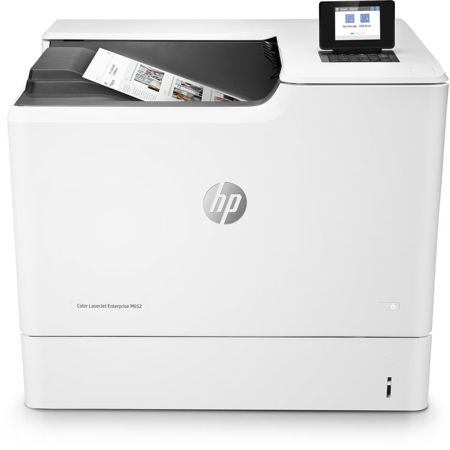
About HP Color LaserJet Enterprise M652dn Laser Printer, 50ppm, 1200x1200 dpi, 650 Sheet Standard Paper Capacity, Automatic Duplexing

This HP Color LaserJet Printer with JetIntelligence combines exceptional performance and energy efficiency with professional-quality documents right when you need them-all while protecting your network with the industry's deepest security.

The world's most secure printing
• With HP Sure Start, each printer regularly checks its operating code and repairs itself from attempted hacks
• Help prevent potential attacks and take immediate action with instant notification of security issues
• Centralize control of your printing environment with HP Web Jetadmin-and help build business efficiency
• Give workgroups what they need to succeed. Easily choose and deploy over 175 HP and third-party solutions

High speed performance meets energy efficiency
• Speed through tasks and save paper. Print two-sided documents at up to 50 images per minute
• This printer wakes up fast and prints your first page faster-in as quickly as 8.4 seconds
• This printer uses exceptionally low amounts of energy thanks to its innovative design and toner technology
• Paper handling options include a wheeled stand and 550-sheet input feeder for paper sizes 4 x 6" to legal

More Pages, Performance and Protection
• ColorSphere3 toner formulation, combined with an automatic media sensor, help provide leading print quality
• Original HP Toner cartridges with JetIntelligence supply 2x more color pages per cartridge vs. predecessor
• Help retain the Original HP quality you paid for with anti-fraud and cartridge authentication technology
• Spend less time replacing toner and more on business. Choose high-yield toner cartridges

What's in the box:

  • HP Color LaserJet Enterprise M652dn Laser Printer
  • Power Cord
  • Original Box
  • Item Note: Missing Ink Cartridges