Overview
Compare
Specs
Protection

Reviews about this item

Review Summary

2016-10-06T17:09:47

Rated 5 out of 5

Very good remote

Got this as a replacement after my original drone broke Very happy

ELI S.

Select a plan in the Add Protection section above and purchase with this product by clicking “Add to Cart”.

image-protection

TRUSTED PROTECTION PLANS, EXCEPTIONAL SERVICE.

Invest in Pre-Owned Gear & Peace of Mind!

Extend coverage on pre-owned products after the retailer warranty ends and protect photo & video gear from accidental damage with Adorama Protect.

Repair or Replacement

Repair or Replacement

If we can’t fix it, we’ll replace it at no additional cost.

Accidental Damage

Extended Protection

Coverage for pre-owned gear begins after the retailer warranty ends, plus accidental damage protection for photo/video gear that starts on day one.

Peace of Mind

Peace of Mind

Enjoy your gear without fear. We have you covered!

Malfunction Protection

Malfunction Protection

When regular use of your product over time results in mechanical or electrical failure.

Zero Deductible

Zero Deductible

We will never charge you a deductible after the purchase of a plan.

Customer-Focused Support

Customer-Focused Support

Our claims process is simple & easy and our customer service team is happy to help.

Adorama Protect powered by Extend is available for purchase to customers in the United States. Not available for International and U.S. territories purchases. Plans on pre-owned items do not cover pre-existing damages.

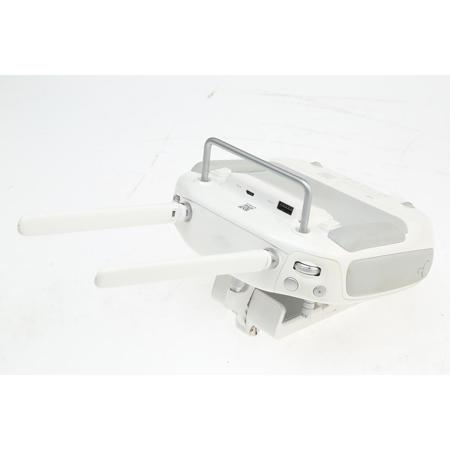
DJI Remote Controller Specifications

  • Compatibility

    Phantom 3 Advanced and Professional Quadcopter

  • Frequency

    2.400 to 2.483GHz

  • Communication Distance

    6561.7' / 2000.03m (outdoors and unobstructed)

  • Receiver Sensitivity

    1%PER: 101 dBm +/-2 dBm

  • Transmitter Power

    EIRP: 20 dBm

  • Working Current

    1.2 A at 7.4 V

  • Connectivity

    USB type A female for mobile device interface
    Micro-USB female for firmware updates / assistant software Charge port

  • Lightbridge Support

    Yes; compatible iOS or Android mobile device with USB required

  • Mobile Device Holder

    Compatibility: Tablet or smartphone

  • Mobile App Name

    DJI Pilot

  • System Requirements

    OS: iOS 8.0 or later; Android 4.1.2 or later

  • Recommended Devices

    iOS: iPhone 5s, iPhone 6, iPhone 6 Plus, iPad Air (Wi-Fi and cellular versions), iPad mini 2 (Wi-Fi and cellular versions), iPad Air 2 (Wi-Fi and cellular versions), iPad mini 3 (Wi-Fi and cellular versions)
    Android: Samsung S5, Note 3, Sony Xperia Z3, Google Nexus 7 II, Google Nexus 9, Mi 3, Nubia Z7 mini

  • Operating Temperature

    32 to 104 deg. C / 90 to 219 deg. F

About DJI Part 10 Remote Controller for Phantom 3 Advanced and Professional Quadcopter

With sensitive control sticks, dedicated buttons and an over 1.2 mile (2km) range, your customizable Phantom 3 remote controller gives you a completely new way to fly and interact with your Phantom. Ergonomically built to fit perfectly in your hands, your remote gives you the confidence to fly the way you want.

Easy, Intuitive Controls
Controlling both your Phantom 3's flight path and the included camera feels simple and natural. This advanced remote has been built from the ground up specifically for aerial photography: dedicated buttons let you take photos and video, tilt the camera, direct where your Phantom 3 flies and bring it back to you at the press of a button.

Integrated Dji Lightbridge
Enabling the incredibly long range and live HD video stream from your camera, DJI Lightbridge is built into both the remote and the Phantom 3 itself. These two parts work in tandem to ensure a continuous link between you and your Phantom 3. Powerful communication signals slice through most environmental interference, giving you precise, full control and information from the aircraft at amazing distances.

Customized Commands
Change your flight mode and set additional commands through the DJI Pilot app. Customize what each of the sticks does and personalize the two buttons on the back of the remote to activate your favorite functions.






