2023-06-07T20:00:00
Rated 5 out of 5
Great printer
This printer was very easy to set up-especially for a person not tech savvy. The printer itself besides easy to use also does a great job printing.
Claudia U.
Originally posted at

2023-06-06T20:00:00
Set up went fast. Boot-up quick compared to previous HP. I tried it! I like it!
SnMc
Originally posted at
2023-06-01T20:00:00
Rated 5 out of 5
Got just what I wanted.
Easy to setup, easy to use, excellent printing, HP Smart is easy to use and has everything in one place. Not sure what more I could have asked for, especially at the price.
AzKid
Originally posted at
2023-04-25T20:00:00
Rated 5 out of 5
Prints B&W and color from a Mac.
Very very happy.
San p.
Originally posted at
2023-02-20T19:00:00
Rated 4 out of 5
Like but not obsessed
I upgraded my old HP printer to this and while I do like it I wish it printed a little faster. It always feels like I'm waiting forever. Other than that it was easy to set up and easy to use. I love the option to print front and back which my old printer didn't have.
Paige H.
Originally posted at
2023-01-14T19:00:00
Rated 1 out of 5
Bring back the Envy 4500
The slowest printer I have ever owned. It's temperamental, and prints a test page every time you change paper. Completely useless. Will not buy HP again
You C.
Originally posted at
2022-12-28T19:00:00
Rated 5 out of 5
As good as it gets!
Great printer in a compact package. Exactly what I needed at a great price. The HP Smart software from HP is a much improved version and setup was a snap.. Plus 2 years worth of ink supply..
JuneBob
Originally posted at
2022-12-27T19:00:00
Rated 5 out of 5
Perfect for me!!
I bought through you with the knowledge of help needed. Printer needed to work with my older computer. Needed some updates. Printer arrived promptly. Works great and fits my needs perfectly!
Jedge
Originally posted at
2022-12-13T19:00:00
Rated 4 out of 5
HP ENVY 6075 All-In-One Printer
Had some problems getting printer to connect to the wireless mode but got it done.
Wendyh
Originally posted at
2022-12-11T19:00:00
Rated 5 out of 5
Love my new printer
My printer gives great quality copies and pictures. So happy I got this new one. I replaced my old HP with this new printer. I have had HP printers exclusively for over 20 years, with great success.
Nana61
Originally posted at
2022-12-08T19:00:00
Rated 4 out of 5
Good printer but a few issues?
Having difficulty with the printer freezing up. Have to unplug it and reconnect to get it to print. Remote printing produces an out of proportion result.
Bamo
Originally posted at
2022-11-27T19:00:00
Rated 5 out of 5
HP Envy 6075
The instructions and how the product itself responds through internet connectivity is amazing,even Luddites like myself can succeed.
Alan W.
Originally posted at

2022-11-26T19:00:00
Rated 5 out of 5
HP Envy 6000
Great printer, easy to install with clear print
L.D
Originally posted at
2022-11-07T19:00:00
Rated 1 out of 5
HP Envy 6075 Printer
I am a senior and have been using 3 in home printers for over 20 years and never had one without a screen on the printer. I have been unable to install, and can't find directions online and learned that this printer operates from a cell phone and have to download an app to print. I tried downloading from the hp install directions link, but doesn't work, and I never print from the Microsoft app. This printer is useless to me and extremely frustrating for a senior use to having a screen. Couldn't even figure out how to make the ink holders move to where can load. I had an HP Envy 7000 series and was first printer that was wifi only and first printer I was able to easily install, though HP tech had to download different program for scanning which I do everyday - the microsoft printer app didn't work for scanning and isn't working for this new one. Am returning before 30 days.
Jilza
Originally posted at
2022-11-04T20:00:00
So far so good
RobertQ
Originally posted at
2022-10-12T20:00:00
Rated 5 out of 5
Slim Line Printer
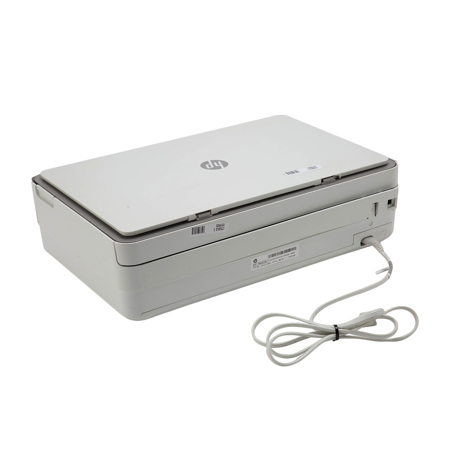
Small in size, which is what I wanted. Green ready lite which does not blind you when you turn it on. Good price.
Ronald W.
Originally posted at
2022-10-10T20:00:00
Rated 5 out of 5
Easy peasy
Easy set up and works really well.
Tracy G.
Originally posted at
2022-06-01T20:00:00
Rated 4 out of 5
Nearly perfect!
Easy setup and problem-free to use. The one thing that would have been a nice addition would be a scan button on the device itself.
Genevieve P.
Originally posted at
2022-04-25T20:00:00
Rated 1 out of 5
I hate this printer
I HATE THIS PRINTER. The HP Smart app is glitchy and unhelpful, even on Windows 10 on a relatively new laptop, so setup didn't work as planned and I still can't scan anything. The labyrinth of help options between the app and online help is impenetrable, and customer service is offline more than they are available. The display on the printer itself is incomprehensible, with various flashing lights and symbols that make little sense. The printer is slow and prone to printing random system pages -- I just burned 2 pages of expensive labels when it decided to print an alignment page.
Also, HP Instant Ink is a complete joke. I spent no less than 2 hours on the phone with customer service last week because everything I tried to print in color came out yellow only, but the app insisted my color cartridge was fine. No wonder there is a class action about this stupid, useless service.
Never 1.
Originally posted at
2022-03-22T20:00:00
Rated 5 out of 5
HP Envy 6075
Excellent product. Very simple instructions and easy to set up.
PHarris
Originally posted at
2022-02-12T19:00:00
Rated 5 out of 5
Great printer
Easy to set up. Quiet. Great print quality. Smaller than last HP printer
MEWelch
Originally posted at
2022-02-09T19:00:00
Rated 1 out of 5
Product needs work as far as the ink it accepts
It didn't work i sent it back. It would not except any ink i put into it.
KML53
Originally posted at
2021-12-24T19:00:00
Rated 2 out of 5
HP Envy 6000 printer
Took lots of time on phone to get it working. Printer drivers had to be corrected by hp. Would not do it automatically. Once fixed it worked well for a while. But now I need to unplug and replug every time to get it to print.
Jeff T.
Originally posted at
2021-12-16T19:00:00
Rated 1 out of 5
Another HP Printer that DOESN'T work.
I bought this in May, didn't open it up until September. That was my first mistake. I bought this to Replace our other HP printer that wasn't printing and kept going offline. This one does the same thing and only works 1/3rd of the time. My best advice is to not buy HP. Waste of time & Money. Used to be a quality brand but not anymore.
Tarryn
Originally posted at
2021-11-27T19:00:00
Rated 4 out of 5
Nice wireless printer
At first, couldn't set up with my computer, but smartphone app worked fine. Then got computer to work. Printer works fine but is noisy, reason for 4 stars.
SlimRider
Originally posted at
2021-11-27T19:00:00
Rated 5 out of 5
Best printer
I bought this a couple of months ago. I love it! Ease of use, good app. The only negative is if you first set it up via your phone, it?s kind of tough to add it to your computer. My daughter had the same issue. Other than that, an excellent printer and the scan from phone feature is amazing. The size is great too-no big, bulky printer.
Catlsdy
Originally posted at
2021-11-23T19:00:00
Rated 2 out of 5
Computer troubles
I have had a lot of trouble getting this printer to link up with my computer. Very frustrating
revbendi
Originally posted at
2021-11-20T19:00:00
Rated 4 out of 5
The Envy is disappointing
This printer was difficult to set up and although the ink is less expensive, it runs out quickly.
Martysgirl
Originally posted at
2021-11-10T19:00:00
Rated 1 out of 5
Chimes and Lights Don't Get the Print Job Done
Printer is now 3 months in service. Never was able to access Instant Ink because of connectivity. User interface is terrible and the printers primary tool to communicate is by printing pages with messages. The online tools misidentified ink as off brand. One jam and everything is misaligned. Apps and tech support say a hard restart will re align. Nope. Now I have a newly ordered batch of ink and blinking lights galore which explain nothing.
I wish we were in the good old days when a printer was a durable good, meant to last a while.
Smokey18
Originally posted at
2021-10-30T20:00:00
Rated 1 out of 5
No connection
Changed internet provider and couldn't get printer connected to my new network
Terry510
Originally posted at