Picture does not represent the actual item
See what's in the box
Picture does not represent the actual item
See what's in the box
This item is no longer available.
At a glance.
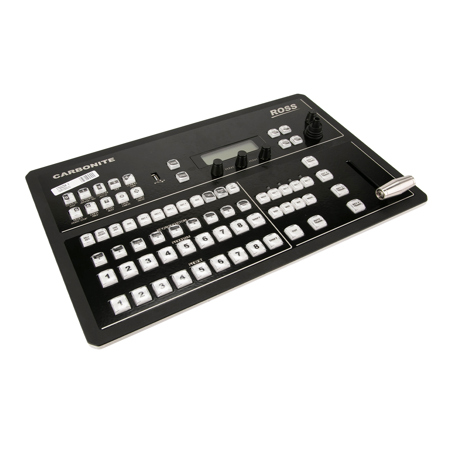
Carbonite Black Solo Compact Production Switcher
Today's content creators are expected to deliver increasingly engaging content to their audiences, while keeping costs low. Compact and affordable, the Carbonite Black Solo 1ME production switcher is built with the tools to create a top-notch show, wherever you take it.
Small Footprint, Big Feature Set
Carbonite Black Solo provides the compact form and affordability of a small switcher, while offering the big switcher feature-set of the Carbonite Black series.
Revolutionary Media Player
Dedicated single-channel clip player built directly into the production switcher, for simple playout of video clips directly from a connected USB-media drive. There is no other production switcher in the world with this kind of built-in functionality.
Eliminate Additional Purchases
If your productions are on the go, at different facilities and events, you want to make it easy to plug-in and get the show rolling. Carbonite Black Solo is built with internal video processing and MultiViewer resources, so no external gear is required.
Flexible Me Resources
Need a unique output for an on-screen monitor? Want to do a multi-screen projection on-stage? Carbonite Black Solo's unique MiniMEs give you the resources to do this - without touching the main ME bus.
One-Button Playout
Smaller switchers generally feature base-level custom controls and memories, but not Carbonite Black Solo. This switcher features fully-customizable macros and a memory system with unique smart recall and effect recall functionality.
Simple Control
In addition to a refined control panel, Solo is part of the Ross DashBoard Control ecosystem. This network control software allows total control of all switcher functions and makes it easy to create a purpose-built UI for your specific production environment.
Powerful Main ME
Carbonite Black Solo's main ME has 4 powerful keyers with luma, linear, Chroma and DVE key types - as well as an additional 5th hidden keyer for animated Media Wipe and DVE transitions. Advanced pattern generators are available for wipes, pattern masks and color washes. The ME also provides a clean feed output.
2 Built-In MiniMEs
The 2 MiniME modules do not reside in a fixed position in the signal flow, they float and can be used anywhere in the signal path. These are great for additional dissolves and key layers. MiniMES are completely independent of Solo's single ME and contain their own key/mix resources, making them great for unique outputs, on-set monitors, and multi-screen processors.
DVEs & Chroma Keys
Solo's 2 DVE channels are great for making box shots and can also be used for DVE transitions. The single UltraChrome chroma keyer uses patented Ross technology to provide the best chroma key possible for virtual productions. UltraChrome offers optimal capture of high luma detail in the edge regions, as well as compensation for similar foreground and background levels in the chroma key. All of these DVE and chroma key resources "float" within the system and can be used system-wide by the main ME or 2 MiniMEs.
Memories & Macros
Carbonite Black Solo has 72 Custom Control Macros available for use directly from the switcher control panel, while up to 256 Custom Control Macros can be created in DashBoard - each of which can be customized with numerous events and timing settings.
The Memory system allows for up to 100 memories per ME and MiniME per show file, while multiple show files can be stored on the USB drive. Effects Memory functionality allows for animated memory recalls, while MemoryAI ensures memory recalls will not adversely affect what is currently on-air.
Internal Video Processing
Freely-assignable within the system, the 6 internal frame syncs / format converters eliminate the need for external conversion and sync equipment. The frame sync functionality ensures untimed signals can be incorporated with ease, while format converters allow you to incorporate mixed signal equipment or send specific format outputs. In the event that more frame syncs are required, each of the 4 MediaStore channel can be converted for use as an additional frame sync.
Built-In MultiViewer
The 10 window MultiVIewer has been engineered to provide the best possible monitoring solutions for your production. The fully configurable layouts include automatic source naming with tally and border control. In addition, a user configurable clock can be sized and positioned anywhere on the multi-viewer screen.
V2.0 Software Release
USB Media Player
Carbonite Black Solo's latest software release unlocks a powerful USB Media Player functionality, for playback of full-length video clips from a connected USB-media drive.
Xpression Graphics
The included XPression LiveCG software can be run on any network-connected computer to create high-quality still graphics that are rendered directly into Solo's MediaStores,providing excellent live titling without added hardware costs.
USB Media Player
Truly unique and innovative, Carbonite Black Solo provides a dedicated single-channel clip player for playout of compressed MPEG-4 AVC media directly from a connected USB-media drive. This internal clip player can be assigned as a source on any bus in the switcher and playout is easily controlled from a dedicated DashBoard interface, Custom Controls or AMP commands.
4 MediaStores
Four media player channels are available switcher-wide. Stills, logos and animated graphics are
played out from the on-board 8Gb memory and can be loaded via connected USB-media drive. All
MediaStores can be managed directly over Ethernet via Solo's browser-based graphic tools.
Applications
This product can be used as part of the following Smart Production Solutions:
• Government
• Corporate
• House of Worship
• Mobile
• Education
Device Control
Control Protocols
Carbonite Black Solo is equipped with RossTalk and third-party control protocols, making Solo the perfect central hub of a tightly-integrated production solution.
Xpression Graphics
The included XPression LiveCG can select and transition between graphics from Solo custom controls and memories. With DashBoard CustomPanels, you can build an interface that totally simplifies graphics operation - this is great for inexperienced staff.
PTZ Cameras
Ross PIVOTCams are built to excellent spec and offered at the best price point in the PTZ market. Tight integration with Ross switchers means you can setup all your camera shots with preset shot custom controls, and manually control PTZ functions with the switcher panel joystick.
Control Devices
Carbonite Black Panels
The Carbonite Black Solo panel is simple and elegant. For every task you need to perform there is a dedicated button, no more searching and stepping through menus. Carbonite switchers have been a success with thousands of operators because the most complex tasks can be performed quickly and easily.
DashBoard Control
DashBoard provides a single interface for full control and management of your Carbonite Black Solo switcher. Enjoy setup, configuration, and operation from a network-connected DashBoard application. To really unlock the magic of DashBoard, build out a CustomPanel to consolidate control of your entire production solution into a single customized interface.
ViewControl
ViewControl consolidates the control a Carbonite Black Solo production switcher, XPression Live Graphics system and Tria video server onto a single intuitive touch screen interface. Now via Carbonite Black Solo's powerful Custom Control macros and Ross DashBoard interface, every production element is visually displayed for instant touch selection.






