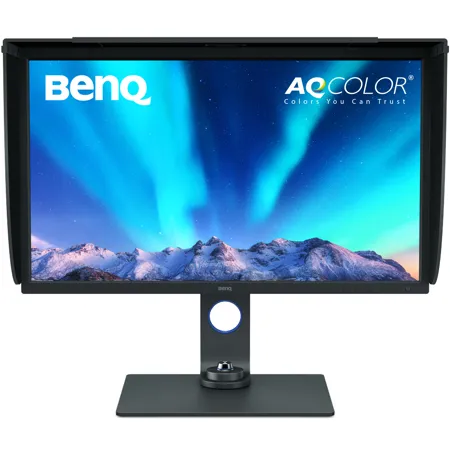
Used BenQ SW321C 32" 4K Photo and Video Editing Monitor Adobe RGB

SKU: US1998575 MFR: SW321C
$1,531.00
New: $1,999.99
Used Savings: $468.99 (23%)
OR
Earn VIP Reward Points

What`s in the box:

    See more

    Key Features

    • Experience stunning clarity with the BenQ 32" 4K monitor's ultra-high resolution.
    • Achieve color accuracy with 99% Adobe RGB coverage, ideal for photo and video editing.
    • Enjoy smooth visuals with a 60Hz refresh rate and 5ms response time for seamless editing.
    • Connect easily with USB-C, HDMI, and DisplayPort options on this versatile BenQ monitor.
    • Customize your view with the adjustable stand and VESA mount for ergonomic comfort.
    • Hardware calibration ensures consistent colors on your IPS panel for professional results.
    See More Product Details

    INCLUDES FREE WARRANTY

    • This used item comes with a free 1-year warranty. ?
    Overview
    Compare
    Learn
    Specs
    Protection

    Reviews about this item

    Review Summary

    2025-03-18T03:06:29

    Rated 5 out of 5

    Very pleased.

    Happy with the monitor. Size is great. The nits are a tad low for me - yet not terrible. Quality is clear. R!

    RANDALL P.

    2024-02-01T09:10:37

    Rated 5 out of 5

    Great photo editing monitor

    Love everything about this monitor.

    Stephen T.

    2023-12-03T07:28:29

    Rated 5 out of 5

    Great monitor

    It is a beautiful monitor. The picture is very sharp. It's a mat finish and not glossy. That took some getting used to, but it's worth it

    STEVE H.

    2022-11-20T11:06:17

    Rated 5 out of 5

    Excellent monitor

    This is one beautiful monitor. All you would expect from Benq

    Anthony S.

    2022-10-21T08:13:04

    Rated 5 out of 5

    Awesome monitor

    For the first time in a while my monitor color rendition matches my photo prints, great quality, perfect size for my needs at a great price, highly recommended.

    LUIS G.

    2022-09-21T14:04:12

    Rated 5 out of 5

    Great Monitor, works with MacBook M1 chips, read below about calibration issues

    Great monitor. Super resolution, great refresh rate. Painful to troubleshoot. I am running this monitor on my MacBook Pro 14? M1 Max laptop connected via USB-C to USB-C. When I tried to calibrate it, I spent hours trying to get the monitor to calibrate and the calibration to pass validation using the Palette Master software and an Xrite i1 Colorimeter. I finally learned that you must turn off HD, Auto Brightness and True Tone on your laptop display as those settings also control the external monitor. Turning these things off resulted in finally passing the calibration validation.

    Cheryle C.

    2022-08-14T09:05:21

    Rated 5 out of 5

    Great monitor

    No complaints - with high expectations it is everything we hoped. It's not cheap obviously, but if you don't want to compromise, this is won't disappoint. One tip, we got best results with the USB cable vs. HDMI with 14-inch MacBook Pro (2021).

    PAUL H.

    2022-06-24T08:48:51

    Rated 5 out of 5

    Good monitor for the value

    The monitor is solidly built. I like the reolution. I initially had an ?issue? with the monitor turning on and not displaying the log in screen for my mac mini. (I am using the USB-C connection) But after enabling automatic login on the mac mini the monitor comes on. I almost returned it. Good thing I did a little investigating. The monitor does not come with instructions on putting it together, but it is pretty straight forward and not rocket science. so far so good. if it craps out on me i will uodste this reviee.

    JARED B.

    2022-05-27T08:50:01

    Rated 5 out of 5

    Excellent Monitor for Photo Editing

    After agonizing between purchasing 2K and 4K monitor, I decided on the BenQ 27" 2K and am quite happy with its performance. Working at "native" resolution and typical eye-to-screen distance and no scaling (i.e. 100%) screen text is easy to read, as are fine details, and the image quality is excellent. The screen is more than bright enough for photo editing, and the included "puck" makes it very easy y to adjust brightness and switch between color spaces. I had to restart the Pallete Master Software a couple of times before it would properly work with my Spyder X but once it was working, calibration was straightforward (though it was not clear it was necessary since the monitor was well calibrated out of the box). Other items of note: 1)The included screen hood was easy to attach and is very effective, 2) The monitor came packaged in the best designed, most protective packaging I've ever seen, 3) The powered USB-C connection is quite useful as is the ability to attach a couple of USB devices to the monitor.

    Sanford G.

    2022-05-25T07:26:45

    Rated 5 out of 5

    Incredible monitor for color accuracy; works very well with Mac Studio

    Wonderful monitor, and with color calibration (via SpyderX) achieved 100% of sRGB and 100% of Adobe RGB. Only negative I can think of is if you're already used to a 5K monitor (such as coming from a 27" iMac), then you will miss the extra pixels.

    Neal P.

    2022-04-01T08:48:13

    Rated 5 out of 5

    Best color-accurate monitor for the price

    A necessary piece of equipment for color accuracy and screen real estate with a budget. Right now, it's only connected to a Macbook pro. The USB-C won't power it, but needs a cable to be used. A USB-C hub is highly recommended when you factor wired accessories like a tablet, keyboard (if you don't have a bluetooth version), external hard drives, and computer power, just to name a few. I have a giant bright window behind me and the matte finish makes glare a non-issue. It takes a LOT of desk real estate. Keep that in mind. If you're like me and like to keep the hood on, you won't have a place to put a monitor-mounted lamp on top like the BenQ's Screen Bars. So the lamp would likely take even more desk space.

    ALAIN B.

    2022-02-11T07:44:42

    Rated 5 out of 5

    A dream of an editing monitor

    For editing, this monitor has been a dream. Calibrated very well right out of the box, although I re-calibrated with the sypderx later. I can genuinely say that this monitor has improved my editing quite a bit, and I'm very happy with the purchase. I'm also glad I got this model as opposed to the others.

    Rob F.

    2022-01-19T16:58:11

    Rated 5 out of 5

    I liked that it works with any video card

    Good images

    RAFAEL A.

    2022-01-03T09:35:58

    Rated 4 out of 5

    Wonderful Monitors, except for issues when using multiple monitors

    The two BenQ SW270C monitors I purchased together and BenQ's Customer Support are both wonderful. I removed my previously installed monitors and installed the first SW270C, which worked flawlessly. Difficulties with calibration of the Calibration presets of both monitor's began as soon as I installed the second SW270C. Verification of the Calibration Presets of both monitors would consistently fail and the Calibrations presets of the second monitor became "frozen." Customer Support determined that the monitors had to be calibrated "individually." The monitor not being calibrated had to be turned off, or the video cable disconnected, depending on which monitor the colorimeter was connected to. The monitors are now working flawlessly. I would definitely recommend the monitors, not only because of their wonderful images, but the wonderful Customer Support as well. I rated this review as 4/5 only because I could find no information regarding this issue on BenQ's web site, or anywhere else.

    LARKIN S.

    2021-12-13T10:29:01

    Rated 5 out of 5

    A great step up monitor for someone advancing beyond click and print

    As budding photographer and digital artist, I needed a better monitor than the five year old bargain basement monitor I had. This monitor works with my Spyder X calibration hardware to give me accurate colors reducing the amount of ruined prints that I was making. I hope that in the next couple of years I can step up to the next level BenQ Photographer Model, but currently the 24? SW240 (showing the art I am working on) is next to my old 21 inch monitor (displaying the software tool selections and I don?t have room for anything bigger.

    Harold C.

    2021-12-10T13:36:35

    Rated 5 out of 5

    I like it. Glad I bought it.

    Clear sharp colors, non-reflective screen, easy control buttons to use. (I don?t know why they didn?t include an HDMI-to-HDMI cable with the three other cables they provided. That?s the one I needed.)

    MARSHA P.

    2021-12-08T08:46:28

    Rated 5 out of 5

    Phenomenal monitor!

    Phenomenal monitor! Best photo editing monitor I've ever used.

    ALEXANDER K.

    2021-10-15T18:32:59

    Rated 5 out of 5

    Great Monitor For Portrait and Wedding Photographers

    Amazing upgrade in replacing a 10 year old monitor. For years I was content with my old Gateway monitor. I kept it color calibrated and the prints I received from the lab were spot on. My old monitor started getting some dead pixels and then started to not want to turn on. Since I am a photographer and my clients purchase prints, I wanted to upgrade to a monitor for photography work. After researching several different monitors, I finally decided on the BenQ SW240. Adorama was also including the hood for free with these monitors. I'm so glad I made this purchase. Working on this monitor is much easier on the eyes. The IPS screen looks great from any angle and with the lens hood this system is a game changer. The included features are really great for editing photos and I find it less fatiguing on my old eyes. This monitor isn't for everyone. It's services a specific purposes and performs those extremely well. I highly recommend this monitor to professional photographers who specialize in people photography. It's a great monitor without busting the bank account.

    LARRY D.

    2021-10-03T12:40:17

    Rated 4 out of 5

    Monitor does not disappoint!

    I would have given it 5 stars?but the monitor did not come with a DisplayPort cable!? otherwise?buy this product?the only thing better than the monitor was the packaging it came in.

    STEVE G.

    2021-09-30T08:23:10

    Rated 4 out of 5

    Great for a photographers

    I bought this monitor specifically to help with my photo editing. My laptop monitor was terrible and this has been a game changer. The color is so much more accurate and has sped up my process.

    Janet H.

    2021-09-03T08:34:37

    Rated 2 out of 5

    Not impressed!

    So far I am not too happy! The literature said that it would be compatible with my i18 Display Calibration device but so far we have not been able to make that work. The monitor is useless to me if I can?t get it calibrated. Their tech support couldn?t figure it out and said they were looking into it , but that has been over a week ago and I have yet to hear back from them.

    DESIGN P.

    2021-07-22T11:39:39

    Rated 4 out of 5

    Not Perfect but good value

    Haven?t spent that much time with this monitor but it calibrated nicely, calibration software said it was 120% of Adobe RGB which I assume means it has more gamut range than is needed for Adobe RGB. The control wheel is not the greatest, controls are delayed and so slow you turn the wheel and it lags behind so it?s hard to get the right option selected, I?m hoping this will be fixed in a software update and the monitor is also very slow to wake from sleep which is a pain if you walk away often. For a regular computer monitor it is great to have the 32? size but I mainly purchased this to do color correction on and so far it seems to be quite accurate for that.

    MARK L.

    2021-06-08T10:19:07

    Rated 5 out of 5

    Great Monitor

    Love this monitor, meets all of my needs. Thank you

    BRANDON H.

    2021-01-24T09:21:24

    Rated 5 out of 5

    Great monitor.

    Just what I was looking for. Yes, you should order a longer usb-c cable if that your preferred connection.

    PETER A.

    2021-01-01T10:51:07

    Rated 5 out of 5

    Dream monitor for professionals

    You won’t be disappointed! Amazing monitor for the professional photographer. 32” size makes it easy to see and edit small details and color accuracy is dead on.

    STEVEN E.

    2020-11-30T04:23:29

    Rated 5 out of 5

    great monitor

    The colors are accurate. Monitor is easy to set up. The included hood keeps out glare.

    SCOTT T.

    2020-10-14T08:40:31

    Rated 5 out of 5

    Worthwhile Investment for Photographers

    This monitor is feature rich. Cannot say enough positive things. The colors are vibrant and should be seen to be believed. Sharp, crisp pictures make editing in Photoshop and Lightroom so much more detailed. The "puck" is incredibly handy for adjusting all monitor settings - switching between sources is an absolute breeze as is brightness adjustment. PIP can be a very handy feature as well and support side by side in addition to the traditional PIP. Money well spent!

    Terence T.

    2020-10-09T08:51:09

    Rated 4 out of 5

    Great monitor, quirky on Mac

    Great monitor overall, with a few caveats as a Mac user: 1. It’s sometimes really, really hard to get it to wake up from sleep mode. I’m not sure if this is a setting issue I’ve not yet figured out, or if it’s just a Mac+BenQ issue. (Their manual and support site is absolutely terrible) 2. The native resolution on the Mac makes the monitor image HUGE. I mean really, really HUGE. I dialed it down, but there are applications that don’t handle this as well (Mac Messages, for example) and the text gets a little crunchy. I think it’s fine overall, but it’d be nice to have a reasonable native resolution rather than having to have it scale to a usable monitor size. 3. I have 2019 USB-C MacBook Pro. I have the monitor plugged in via the provided USB-C cable. This is used to charge and to provide the video connection between monitor and computer. Charging works fine about 60% of the time. The rest of the time, I unplug the computer after 2 days of having it plugged in and 60% charged

    JACOB M.

    2020-06-17T12:18:10

    Rated 5 out of 5

    A little pricey but well worth the cost

    What an improvement over my last monitor. Even after calibration my prints never came close to matching the image on the monitor and I was not a very happy camper. After asking other amateur and pro photographers what they recommended for photo editing, the overwhelming response was BENQ. Now my prints match the image on the monitor and I'm a very happy camper again.

    JOSEPH M.

    2020-03-11T10:23:25

    Rated 5 out of 5

    Every photographer dream to see color

    Easy to hook up had all wires short tho but colors look good on srgb. Also somebody at ups tired to steal something because i know they ain’t send no box opened up. Everything was still in it ready go untouched in side once they seen no camera gear

    Yvenel B.

    BenQ Photo/Video Monitor Specifications

    Display

    Display

    Jump to...
    • Screen Size

      32" (81.2cm)

    • Resolution (max.)

      3840 x 2160

    • Panel Type

      IPS

    • Backlight Technology

      LED backlight

    • Brightness

      250

    • Native Contrast (typ.)

      1300:1

    • Viewing Angle (L/R;U/D) (CR>=10)

      178 / 178

    • Response Time

      5 ms (GtG)

    • Refresh Rate

      60Hz

    • Aspect Ratio

      16:9

    • Display Colors

      1.07 billion colors

    • Color Gamut

      99% AdobeRGB, 95% P3, 100% sRGB

    • Display Area

      708.48 x 398.52mm

    • Pixel Pitch

      0.1845mm

    • PPI

      137

    • DCR (Dynamic Contrast Ratio) (typ.)

      20M:1

    • Color Bit

      10 bit

    • Headphone Jack

      Yes

    Monitor

    Jump to...
    • Segment

      Photographer

    • Color

      Gray

    • Color Mode

      Adobe RGB, sRGB, Rec.709, DCI-P3, Display P3, M-book, B+W, HDR, Calibration 1, Calibration 2, Calibration 3, Custom, Paper Color Sync, DICOM

    • HDR

      HDR10, HLG

    • Display Mode

      Full, Aspect Ratio, 1:1

    • Color Temperature

      5000 Degree K, 6500 Degree K/ 9300 Degree K, Custom, User Defined

    • Gamma

      1.6 - 2.6, sRGB

    • K Locker

      Yes

    • OSD Language

      18 Languages (English, Francais, Deutsch, Italiano, Espanol, Polish, Czech, Hungarian, Romanian, Dutch, Russian, Swedish, Protuguese, Japanese, Chinese, S-Chinese, Arabic/Korean)

    • PIP/PBP

      Yes

    • HDCP

      2.2

    • VESA Wall Mount

      100x100mm

    • AMA

      Yes

    • Display Screen Coating

      Anti-Glare, Anti-Reflection

    Professional

    Jump to...
    • 3D-LUT

      16 bit

    • Delta E

      <= 2 (average)

    • Uniformity Technology

      Yes

    • Hardware Calibration

      Yes

    • Video Format Support

      Yes

    • Gamut Duo

      Yes

    • Black & White mode

      Yes

    • Black Level

      Yes

    • Hotkey Puck G2

      Yes

    • Factory Calibration Report

      Yes

    Connectivity

    Jump to...
    • HDMI

      HDMI (v2.0) x 2

    • DisplayPort

      DisplayPort (v1.4)

    • USB 3.1 Hub

      USB Downstream x 2
      USB Upstream x 1

    • USB Type-C

      Yes (PD60W, DP Alt mode, Data)

    • Card Reader

      SD/MMC type
      Support Format: SD/SDHC/SDXC/MMC

    • Voltage Rating

      100-240V

    • Power Supply

      Built-in

    • Power Consumption

      170W (on mode.)
      52W (based on Energy Star)
      0.5W ½ (stand by mode)
      0.5W (sleep mode)

    Software

    Jump to...
    • Palette Master Element

      Yes

    • Support Calibrator

      X-Rite il Display Pro, il Pro, il Pro 2, il Studio, ColorMunki Photo, Datacolor Spyder 4, Spyder 5, Spyder X

    Video Signal Data

    Jump to...
    • Frequency

      Horizontal: 27-140Khz
      Vertical: 24-76Hz

    • Video Bandwidth

      600M Hz

    Reliability

    Jump to...
    • MTBF (hr, exclude backlight)

      60000

    • Operating Temperatur

      32 - 104 Degree F (0 - 40 Degree C)

    • Operating Humidity (non-condensing)

      10% - 90%

    • Backlight Life (hr) Typical

      30000

    Certification

    Jump to...
    • CalMAN Verified

      Yes

    • Pantone Validated

      Yes

    Compatibility

    Jump to...
    • Mac Compatible

      Yes

    • Windows Compatible

      Windows10, Windows8.1, Windows8, Windows7

    Physical

    Jump to...
    • Dimensions (H x W x D)

      17.8 x 29.8 x 10.1" (453.45 x 759.4 x 257.89mm) (w/o Base) (with shading hood)

      Landscape: 19.7 - 25.6 x 29.4 x 8.8" (502.25 - 652.25 x 747.2 x 223.61mm) (without shading hood)
      Pivot: 31.4 x 17.6 x 8.8" (798.6 x 448.15 x 223.61mm)

      17.6 x 29.4 x 3.06" (448.15 x 747.2 x 77.82mm) (w/o Base)

      Landscape: 20.2 - 2612.7 x 29.8 x 13.4" (513.65 - 663.65 x 759.4 x 340.53mm)
      Pivot: 31.9 x 18 x 13.4" (811.5 x 460.35 x 340.53mm)

    • Weight

      26 lbs (11.8kg) (without shading hood)

      Landscape: 20 lbs (9.1kg)
      Pivot: 20.7 lbs (9.4kg)

      Landscape: 29 lbs (13.2kg)
      Pivot: 29.7 lbs (13.5kg)

    About BenQ SW321C 32" 4K Photo and Video Editing Monitor Adobe RGB

    FEATURED REVIEWS

    Great monitor

    By PAUL H.

    No complaints - with high expectations it is everything we hoped. It's not cheap obviously, but if you don't want to compromise, this is won't disappoint. One tip, we got best results with the USB cable vs. HDMI with 14-inch MacBook Pro (2021).

    Every photographer dream to see color

    By Yvenel B.

    Easy to hook up had all wires short tho but colors look good on srgb. Also somebody at ups tired to steal something because i know they ain’t send no box opened up. Everything was still in it ready go untouched in side once they seen no camera gear

    AQ Color - Colors You Can Trust

    • Industry
    STANDARD

    • Displaying
    DETAILS

    • Out-of-the-Box
    GUARANTEE

    The AQCOLOR Advantage
    BenQ AQCOLOR technology delivers 'Accurate Reproduction.' This translates to the display of color precisely as it is intended to appear. Led by a color expert, the BenQ team took part in the ICC and ISO to establish color-related standards and implementation guidelines.

    Note: International Color Consortium
    International Organization of Standardization

    Gold Standard Color Performance
    SW321C meets the most exacting standards. Incredible color coverage and remarkable color consistency get gold standard results.

    Realistic Results
    Capture nature's beauty. SW321C meets high color standards by covering 99% Adobe RGB, 100% sRGB/Rec. 709, and 95% DCI-P3/Display P3.

    Color Precision
    The 16-bit lookup table (LUT) improves color blending for precise reproduction. Delta E <= 2 in Adobe RGB and sRGB color spaces assures accuracy.

    10-bit Color Depth
    Access more than one billion colors, natural shading, and smooth color gradations with SW321C's 10-bit panel.

    Uniformity Technology
    BenQ Uniformity Technology delivers corner-to-corner authentic color and consistent luminescence. The display is divided into sub-regions and meticulously fine-tuned for precision. This innovative tech assures dependable image integrity.

    Multiple Monitor Consistency
    BenQ ensures monitors from different production lines will display color at identical levels. Photographers and videographers will perceive consistent colors when working on dual monitors.

    Hardware Calibration
    Adjust the internal image processing chip without changing the graphics card output data. Displayed images match the original content without impact from the graphic card setting.

    Palette Master Element Calibration Software
    Use Palette Master Element and a calibrator to customize color settings or maintain the display's color at its optimal state.

    Note: Supported Platforms: Win7 or above, Mac OS 10.6.8 or above
    Supported Calibrators: X-Rite i1 Display Pro / i1 Pro / i1 Pro 2 / i1 Studio, Datacolor Spyder 4/5, Spyder X, Colormunki Photo

    Professional Factory Calibration
    SW321C is out-of-the-box color accurate. Each display arrives with its unique factory calibration report.

    Verified by CalMAN and Pantone Validated
    Have confidence in your color. BenQ SW321C earned Verified by CalMAN certification and is Pantone Validated.

    Dynamic Digital Display
    Digital photography is everywhere. BenQ SW321C supports HDR and other video formats for fine detail viewing and precise editing.

    Video Editing Support
    SW321C is compatible with HDR10 and HLG formats. Preview the HDR effect of video content during the editing process for your best results.

    Video Format Support
    Preview video without pulldown or distortion. SW321C supports 24P/25P film content shown at native cadence for seamless display.

    Video Calibration Software Supported
    SW321C supports world-leading video calibration software, CalMAN and LightSpace. Adjust your display's 3D LUT (Lookup Table) for accuracy and consistency at all levels.

    Focus on the Moment
    Every detail matters. From capturing the image to putting it on display, each step is essential. BenQ specialized features assure an efficient workflow from retouching to printing. Enjoy dependable, color accurate results.

    Paper Color Sync
    Proprietary Paper Color Sync simulates printing results. Edit photos with confidence in this time-saving screen-to-print process. Simply pick the color gamut, printer model, and paper type to get a preview. SW321C's unique panel reduces reflected light and screen glare for a preview that matches what you'll see on the paper.

    Shading hood
    The detachable shading hood effectively reduces screen glare from ambient lighting. Block external light for stellar color accuracy.

    Intuitive Design
    BenQ professional productivity and efficiency boosts simplify photo retouching and video editing.

    USB-C port
    The latest USB-C port provides high-speed Video/Audio/Data transmission and power delivery with a single cable.

    Note: The transmission rate of USB-C can vary. USB-C is compatible with Thunderbolt 3.
    Please make sure your laptop's USB-C port supports DisplayPort Alt mode. Please make sure the purchased cable is certified by USB-IF and is full-featured with power delivery and video/audio/data transfer functions.

    Hotkey Puck G2
    Access preferred color modes and features using these preset shortcuts.

    Advanced Black & White Mode
    Preview color photos in any of three preset black and white settings before editing.

    GamutDuo Mode
    Preview the same image in two color gamuts, side-by-side, for comparison.

    BenQ SW321C 32" 4K Photo and Video Editing Monitor Adobe RGB Features

    • Paper Color Sync Technology Simulates Photo Print Effect on Screen
    • Uniformity Technology for Screen-Wide Color Accuracy
    • 99% Adobe RGB Color Space with IPS Technology

    Warranty Information

    This used item has a FREE 1-year warranty. See details.

    Key Features

    • Experience stunning clarity with the BenQ 32" 4K monitor's ultra-high resolution.
    • Achieve color accuracy with 99% Adobe RGB coverage, ideal for photo and video editing.
    • Enjoy smooth visuals with a 60Hz refresh rate and 5ms response time for seamless editing.
    • Connect easily with USB-C, HDMI, and DisplayPort options on this versatile BenQ monitor.
    • Customize your view with the adjustable stand and VESA mount for ergonomic comfort.
    • Hardware calibration ensures consistent colors on your IPS panel for professional results.