Overview
Compare
Specs
Protection

Reviews about this item

Review Summary

2018-11-16T03:24:25

Rated 5 out of 5

Very pleased

This is a good product.

JOHN H.

2018-08-16T04:04:54

Rated 5 out of 5

Superb

I first bought a MacBookAir around 2012 and when it was time to replace it, I didn't even consider purchasing anything different. If you haven't used a Mac before, the adjustment is easy and wo well-worth the effort. No waiting for start-up, no freezing,no crashing. I carry mine with me every day and they are work horses. I use mine all day and all evening every single day. I would say the only shortcoming is there is no good substitute for Microsoft's Publisher. I have to create a lot of newsletters, booklets, brochures and photo manipulation but don't have the skills or budget for the professional desktop publication software. I will never use anything else.

GLORIA S.

2018-01-10T08:01:03

Rated 5 out of 5

Great price and great service from Adorama.

The MacBook air is perfect for me. I really needed a new computer for school and found this one was just what I needed for the price. I would have liked to have more storage but I simply bought more icloud storage space. The processor is fast, the computer is super thin, and light. Perfect for a college student that needs to use a computer for classes etc. I have not had any issues so far with the computer and I am very pleased with my purchase.

Keiron D.

2017-12-05T08:09:06

Rated 5 out of 5

So far so good

Have not used it much yet, but so far do good! Adorama customer service is AMAZING!!!

Sissi A.

2017-08-08T09:02:54

Rated 5 out of 5

Great laptop...

Apple always great. This mac book air works great. I loved it.

Gurdeep S.

Select a plan in the Add Protection section above and purchase with this product by clicking “Add to Cart”.

image-protection

TRUSTED PROTECTION PLANS, EXCEPTIONAL SERVICE.

Invest in Pre-Owned Gear & Peace of Mind!

Extend coverage on pre-owned products after the retailer warranty ends and protect photo & video gear from accidental damage with Adorama Protect.

Repair or Replacement

Repair or Replacement

If we can’t fix it, we’ll replace it at no additional cost.

Accidental Damage

Extended Protection

Coverage for pre-owned gear begins after the retailer warranty ends, plus accidental damage protection for photo/video gear that starts on day one.

Peace of Mind

Peace of Mind

Enjoy your gear without fear. We have you covered!

Malfunction Protection

Malfunction Protection

When regular use of your product over time results in mechanical or electrical failure.

Zero Deductible

Zero Deductible

We will never charge you a deductible after the purchase of a plan.

Customer-Focused Support

Customer-Focused Support

Our claims process is simple & easy and our customer service team is happy to help.

Adorama Protect powered by Extend is available for purchase to customers in the United States. Not available for International and U.S. territories purchases. Plans on pre-owned items do not cover pre-existing damages.

Apple MacBook Air 13.3" (2017) Specifications

  • Display

    13.3" (diagonal) LED-backlit glossy widescreen display with support for millions of colors
    Supported resolutions: 1440 by 900 (native), 1280 by 800, 1152 by 720, and 1024 by 640 pixels at 16:10 aspect ratio and 1024 by 768 and 800 by 600 pixels at 4:3 aspect ratio

  • Processor

    1.8GHz dual-core Intel Core i5, Turbo Boost up to 2.9GHz, with 3MB shared L3 cache
    Configurable to 2.2GHz dual-core Intel Core i7, Turbo Boost up to 3.2GHz, with 4MB shared L3 cache

  • Memory

    8GB of 1600MHz LPDDR3 onboard memory

  • Storage Drive

    256GB PCIe-based SSD
    Configurable to 512GB SSD

  • Battery and Power

    Up to 12 hours wireless web
    Up to 12 hours iTunes movie playback
    Up to 30 days standby time
    Built-in 54-watt-hour lithium-polymer battery
    45W MagSafe 2 Power Adapter with cable management; MagSafe 2 power port

  • Graphics and Video Support

    Intel HD Graphics 6000:
    Dual display and video mirroring: Simultaneously supports full native resolution on the built-in display and up to 3840-by-2160 resolution at 60Hz on an external display, both at millions of colors

  • Graphics and Video Support (Cont)

    Thunderbolt digital video output:
    Native Mini DisplayPort output
    DVI output using Mini DisplayPort to DVI Adapter (sold separately)
    VGA output using Mini DisplayPort to VGA Adapter (sold separately)
    Dual-link DVI output using Mini DisplayPort to Dual-Link DVI Adapter (sold separately)
    HDMI audio and video output using third-party Mini DisplayPort to HDMI Adapter (sold separately)

  • Camera

    720p FaceTime HD camera

  • Charging and Expansion

    Two USB 3 ports (up to 5 Gbps)
    Thunderbolt 2 port (up to 20 Gbps)
    MagSafe 2 power port
    SDXC card slot
    3.5 mm headphone jack

  • Wireless

    802.11ac Wi-Fi wireless networking; IEEE 802.11a/b/g/n compatible
    Bluetooth 4.0 wireless technology

  • Audio

    Stereo speakers
    Dual microphones
    3.5 mm headphone jack

  • Keyboard and Trackpad

    Full-size backlit keyboard with:
    78 (U.S.) or 79 (ISO) keys, including 12 function keys and 4 arrow keys (inverted "T" arrangement)
    Ambient light sensor
    Multi-Touch trackpad for precise cursor control; supports inertial scrolling, pinch, rotate, swipe, three-finger swipe, four-finger swipe, tap, double-tap, and drag capabilities

  • Line voltage

    100-240V AC

  • Frequency

    50Hz to 60Hz, single phase

  • Operating temperature

    50 to 95 deg. F (10 to 35 deg. C)

  • Storage temperature

    -13 to 113 deg. F (-25 to 45 deg. C)

  • Relative humidity

    0% to 90% noncondensing

  • Operating altitude

    Tested up to 10000' (3048.04m)

  • Maximum storage altitude

    15,000'

  • Operating System

    macOS Sierra:
    macOS

  • Accessibility

    Accessibility features help people with disabilities get the most out of their new MacBook Air. With built-in support for vision, hearing, physical and motor skills, and learning and literacy, you can create and do amazing things
    Features include:
    VoiceOver
    Reduce Motion
    Closed Captions
    Zoom
    Siri and Dictation
    Text to Speech
    Increase Contrast
    Switch Control

  • Built-in Apps

    Photos
    iMovie
    GarageBand
    Pages
    Numbers
    Keynote
    Siri
    Safari
    Mail
    FaceTime
    Messages
    Maps
    Notes
    Calendar
    Contacts
    Reminders
    Photo Booth
    Preview
    iTunes
    iBooks
    App Store
    Time Machine

  • Dimensions (HxWxD)

    0.11-0.68 x 12.8 x 8.94" (0.28-1.73 x 32.51 x 22.71cm)

  • Weight

    2.96 lbs (1.34kg)

About Apple 13.3" MacBook Air; 1.8GHz Dual-Core Intel Core i5, 8GB RAM, 256GB SSD 2017

macOS
macOS is the operating system that powers everything you do on a Mac. macOS Sierra introduces Siri to Mac - along with new ways to enjoy your photos, shop more securely online and work more seamlessly between devices.

Make the most of your day. From startup to sundown
Fifth-generation Intel Core processors in MacBook Air give you more time to do more things. Add that to an array of other smart and efficient features and you have an incredible amount of power in your hands. While carrying next to nothing.

Up to 12 hours of battery life. Power through your whole day
Thanks to compact SSD storage in MacBook Air, there's plenty of room for a big battery. Working together with the power-efficient fifth-generation Intel Core architecture, this battery can post some impressive numbers. MacBook Air gets up to 12 hours of battery life on a single charge. That gives you all-day power for surfing the web or watching iTunes movies. Put MacBook Air to sleep for more than 3 hours and it enters standby mode to conserve battery life for up to 30 days.

Fifth-generation Intel Core processors. Performance, meet endurance

MacBook Air is powered by fifth-generation Intel Core i5 processor. This ultra-efficient architecture was designed to use less power and still deliver high performance. Which means not only can you do whatever you want - you can keep doing it for longer than before. In addition, the Intel HD Gr aphics 6000 processor offers advanced performance you'll especially notice with games and other graphics-intensive tasks.

802.11ac Wi-Fi. The definition of fast

MacBook Air supports ultrafast 802.11ac Wi-Fi. When connected to an 802.11ac base station - including AirPort Extreme and AirPort Time Capsule - wireless performance is up to 3x faster than 802.11n Wi-Fi. And your Wi-Fi range improves as well. With Bluetooth technology, you can connect MacBook Air to Bluetooth-enabled devices like speakers and headphones. Even without all the wires, you're totally connected.

Fast SSD storage. Ready. Set. Done

Part of what makes MacBook Air so responsive is that it's designed entirely around SSD storage. Not only does this make MacBook Air much lighter and more portable than traditional notebooks, it also provides faster access to data. Available in capacities up to 512GB (This Model has 256GB), this PCIe-based SSD storage is up to 17x faster than a traditional 5400-rpm notebook hard drive. So when you flip open MacBook Air, it's ready to go right away. Even after a month in standby mode, the screen springs to life.

Thunderbolt 2 and USB 3. Make some powerful connections

Connect your MacBook Air to your devices and displays with a Thunderbolt 2 port that's twice as fast as the previous generation. But that's not the whole story. MacBook Air also comes equipped with two USB 3 ports, so you can connect the latest USB 3 devices and all your USB 2 devices as well. With just a few connections, MacBook Air transforms from an ultraportable notebook to a complete workstation.

Display, camera and mics. A sound vision

LED-backlit display. Millions of pixels. Millimeters thin
MacBook Air gives you 1440-by-900-pixel resolution on a display that measures a mere 4.86 millimeters (0.19 inch) thin. And LED backlighting makes colors bright and vibrant from edge to edge. So whether you're editing photos, perfecting a presentation or watching a movie, you're going to love what you see.

FaceTime HD camera. Stay sharp
Let your friends and family see more of you with the 720p FaceTime HD camera. Every smile looks bright, even halfway around the world. And the widescreen format means everyone can fit into the picture without having to crowd around the display.

Dual mics. They'll hear you loud and clear
The dual microphones in MacBook Air are great for when you want to be heard. If you're making a FaceTime call, for example, the mics reduce background noise from behind the notebook. And when you use Dictation, they create an adaptive audio beam that intelligently adjusts to detect your voice - instead of the noise around you.

Multi-Touch trackpad

It goes hand in hand with macOS
The Multi-Touch gestures in macOS make everything you do on MacBook Air more intuitive, direct and fun. And the spacious Multi-Touch trackpad is perfectly designed for them, whether it's a three-finger swipe to activate Mission Control or a four-finger pinch to see all your apps in Launchpad. Gesture responses are smooth and realistic. So when you're scrolling up and down a web page or swiping from one full-screen app to another, it's almost like you're touching what you're seeing.

Click
Press down anywhere to click. Or, with Tap to Click enabled, tap the trackpad.

Double-click
Press down two times anywhere. Or, with Tap to Click enabled, double-tap the trackpad.

Tap to zoom
Double-tap the trackpad with two fingers to magnify a web page or PDF.

Two-finger scroll
Slide two fingers up or down the trackpad to scroll through documents, websites and more.

Swipe to navigate
Flip through web pages, documents and more like thumbing pages in a book.

View Mission Control
Swipe Upon the trackpad to get a bird's-eye view of everything running on your Mac.

Backlit keyboard. What you see is what you type
As incredibly compact as MacBook Air is, it still manages to fit a full-size keyboard that makes typing as natural as it is comfortable. And the keyboard is backlit, so you can type with ease in even the dimmest light. A built-in ambient light sensor detects changes in lighting conditions and adjusts the display and keyboard brightness automatically. From a seat in a sunny caf to a seat on a cross-country red-eye, you'll always have the perfect lighting for any environment.

iCloud. Your content. On all your devices
iCloud stores your content and lets you access your music, photos, calendars, contacts, documents and more from whatever device you're on. So if you take a picture with your iPhone or make changes to your meeting schedule on your iPad, iCloud makes sure everything appears on your Mac, too. And it works both ways - create a to-do list on your Mac and you can make edits to it on your iPhone.

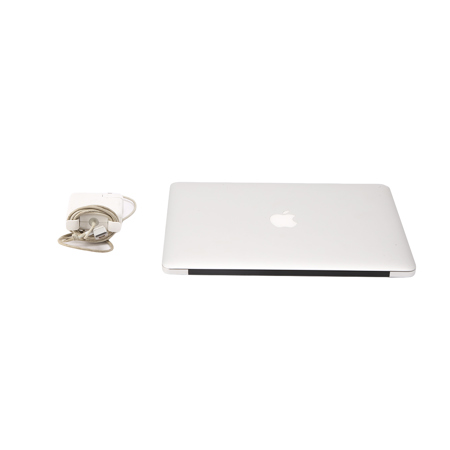
What's in the box:

  • MacBook Air
  • AC Wall Plug
  • 45W MagSafe 2 Power Adapter
  • Power Cord







