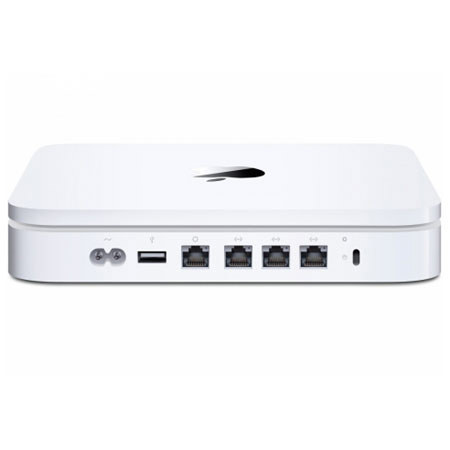
Used Apple Apple MB765LL/A Time Capsule, Wireless Back-up Hard Drive / Full Featured 802.11n Wi-Fi Router, 1 TB

SKU: US1717026

This item is no longer available.

Overview
Compare
Specs
Protection

Reviews about this item

Review Summary

Specification about this item

  • Security

    Wi-Fi Protected Access (WPA/WPA2)2
    Wireless security (WEP) configurable for 40-bit and 128-bit encryption
    MAC address filtering
    NAT firewall
    Support for RADIUS authentication
    802.1X, PEAP, LEAP, TTLS, TLS, FAST
    Time-based access control

  • Line voltage

    100-240V AC

  • Frequency

    50Hz to 60Hz, single phase

  • Maximum continuous power

    30W

  • Agency approvals

    FCC Part 15 Class B, Canada RSS-210, EN 300-328, EN 301-489, EN 301 893, ARIB STD-T66, RCR STD-T33, AS/NZS 4268: 2003, UL 60950, CSA-C22.2 No. 60950

  • Storage

    500GB or 1TB 7200-rpm Serial ATA server-grade hard disk drive

  • Interfaces

    One Gigabit Ethernet WAN port for connecting a DSL or cable modem
    Three Gigabit Ethernet LAN ports for connecting computers or network devices
    USB port for connecting a USB printer or USB external hard drive
    802.11n wireless

  • Operating temperature

    50 to 95 Deg F (10 to 35 Deg C)

  • Storage temperature

    -13½ to 140½ F ( -25½ to 60½ C)

  • Relative humidity (operational)

    20% to 80% (non-condensing)

  • Relative humidity (storage)

    10% to 90%

  • Maximum operating altitude

    10,000 feet

  • Wireless protocols

    Draft 802.11n
    802.11a/b/g

  • Compatibility

    Interoperable with Wi-Fi Certified 802.11a, 802.11b and 802.11g and 802.11n draft 2.0 Mac computers, Windows-based PCs and other Wi-Fi devices
    NAT, DHCP, PPPoE, VPN Passthrough (IPSec, PPTP and L2TP), DNS Proxy, SNMP, IPv6 (6to4 and manual tunnels)

  • Frequency bands

    2.4GHz or 5GHz

  • Radio output power

    20 dBm (nominal)

  • Channels

    Channels 1-11, 36-48 and 149-165

  • System Req For backup using Time Machine

    For Mac Users: Mac computer with Mac OS X v10.5.1 or later

  • System Req For setup and administration

    For Mac Users: Mac with Mac OS X v10.4 or later, CD drive, Ethernet or wireless networking capability
    For PC Users: PC with Windows XP (SP2) or Windows Vista, CD drive, Ethernet or wireless networking capability

  • System Req For wireless client access

    For Mac Users: Mac with AirPort or AirPort Extreme wireless capability
    For PC Users: PC with 802.11a, 802.11b, or 802.11g card

  • System Req For shared printing

    For Mac Users: USB printer, Mac with Mac OS X v10.2.7 or later
    For PC Users: USB printer, PC with Windows XP (SP2) or Windows Vista; Bonjour for Windows (included on Time Capsule CD)

  • System Req For AirPort Disk

    For Mac Users: Mac with Mac OS X v10.4.8 or later
    For PC Users: PC with Windows XP (SP2) or Windows Vista; Bonjour for Windows (included on Time Capsule CD)

  • Length

    7.7 inches (197 mm)

  • Width

    7.7 inches (197 mm)

  • Height

    1.4 inches (36.3 mm)

  • Weight

    3.5 pounds (1587 grams)

  • Warranty

    Apple warranty

About Apple Apple MB765LL/A Time Capsule, Wireless Back-up Hard Drive / Full Featured 802.11n Wi-Fi Router, 1 TB

The Apple Time Capsule is an Internet router with a built-in hard drive, designed for use with OS X Leopard's Time Machine backup software. It features a USB port for printer and hard disk sharing.

The router allows you to share your Internet connection between several computers via the draft 802.11n wireless protocol. It also features three standard 10/100/1000Mbps RJ-45 Gigabit Ethernet ports. The router is fully backwards compatible with legacy 802.11a/b/g devices.

The Time Capsule features a firewall to protect you from malicious software that can attack your computer from the Internet, as well as wireless security to insure that your data remains private. It can serve as an Internet router for both Macs and PCs.

Apple Apple MB765LL/A Time Capsule, Wireless Back-up Hard Drive / Full Featured 802.11n Wi-Fi Router, 1 TB Features

  • Automatic backup with Time Machine: Time Capsule works automatically with Time Machine in Mac OS X Leopard to create the perfect no-hassle backup solution. There are no cables and you can back up all the computers in your home to a central location.
  • Server-grade storage: The massive 1TB or 2TB server-grade hard drive2 gives you all the capacity and safety you need for backing up all your Mac computers.
  • Easy wireless networking: Connect your DSL or cable modem to Time Capsule, then quickly set it up with the easy-to-use AirPort Utility, which is included for both Mac OS X and Windows.
  • Simultaneous dual-band Wi-Fi: For maximum range and compatibility, Time Capsule works simultaneously on both the 2.4GHz and 5GHz bands, allowing all the devices on the network to use the most efficient band automatically.
  • Guest networking: Now you can set up a separate Wi-Fi network with a separate password for your visitors. Simply enable the new guest networking feature and your guests can use the Internet but can't access other parts of your private network.
  • Wireless drive sharing: Time Capsule also works great as a wireless hard drive, whether you have a Mac or a PC. It sets up in a snap, giving you a networked hard drive you can use for storing and sharing all kinds of files.
  • Print without wires: Print documents, photos and more from any room in your home or office to a central printer connected to Time Capsule via USB.
  • Strong security and access controls: Protect yourself with the built-in firewall and industry-standard encryption technologies including WPA/WPA2 and 128-bit WEP.
  • Works with iPhone, Apple TV and more: Time Capsule works with Mac computers, PCs, iPhone, iPod touch, Apple TV and virtually all 802.11a/b/g/n Wi-Fi wireless devices - all at the same time.

What's in the box:

  • Apple Time Capsule
  • CD with AirPort Utility (Mac and Windows)
  • AirPort Disk Utility for Mac OS X v10.4 and Windows
  • 802.11n Enabler for Mac OS X v10.4 and Bonjour for Windows
  • Power cord
  • Printed and Electronic Documentation
  • Original Box