


Picture does not represent the actual item
Picture does not represent the actual item
This item is no longer available.
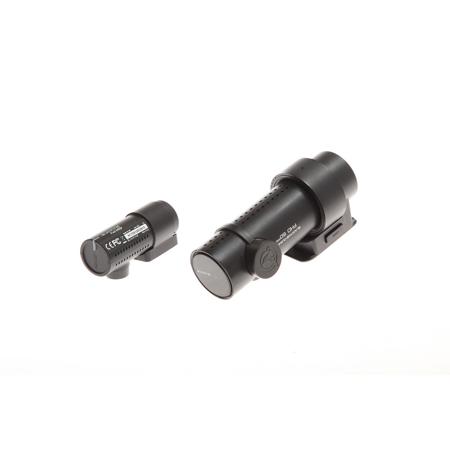
The Cloud Dashcam Standard
A dual-channel dashcam without compromise
Both front and rear cameras feature Full HD Sony STARVIS image sensors for best image quality under any light. Also included are GPS logger, Wi-Fi, Cloud connectivity, impact and motion detection. All this in a stealthy design that never gets in the way of your driving. No need for a screen: with the free BlackVue app, connect to your dashcam whenever you want.
Refined design. Reinvented performance
Successor to the DR650S Series, BlackVue DR750S Series sets a new standard for connected dashcams. Not only does it offer BlackVue Over the Cloud capability, but it also brings you image quality rarely seen in a dashcam.
Dual-Full HD Cloud Dashcam
Dashcam without Compromise
Dual STARVIS sensors in Full HD 1080p (front 60 / rear 30 frames per second). Seeking a dual-camera system that does not compromise on fidelity? Look no further. Record fluid videos of the front and back of your car at a wide 139deg. view angle. STARVIS imaging sensors are a reference in video clarity under low light and they equip both the front and rear cameras of the DR750S-2CH. You can rest assured that your dashcam will capture critical details whether you are driving or letting your BlackVue monitor your parked vehicle. With the free Over the Cloud add-on service, check on your car from anywhere, anytime.
Built-In Impact & Motion Detection
Mark Important Files and Enable Parking Mode
While driving, your BlackVue detects impacts and sudden changes in speed. While parked, it also detects movements. Videos files are marked accordingly so that you can easily find the relevant ones in the BlackVue Viewer for Windows and Mac OS or the BlackVue App for Android and iOS.
BlackVue App (iOS, Android) and Viewer (Windows/Mac)
Easily Manage Your Video Files
Both the BlackVue App and Viewer are free to download and use. They let you easily change your BlackVue configuration settings and browse through your videos in an intuitive way. With the BlackVue App, connect to your BlackVue in Wi-Fi to access files and check realtime Live View for easy setup and positioning of your dashcam.
Sleek Design and Controls
Multifunction Button and Customizable Proximity Sensor
BlackVue DR750's stealthy design incorporates easy access to useful functions.
• Proximity sensor: Toggle audio recording ON and OFF by simply waving your hand in front of it. The sensor can also be configured to trigger Manual Event videos in the settings
• Wi-Fi button: Turn Wi-Fi ON/OFF (short press), reset your Wi-Fi password (hold until voice prompt, then short press) or format the microSD card (hold until voice prompt and then hold again). All actions are confirmed by a voice prompt
Built-In Wi-Fi and GPS
GPS Adds Location and Speed Data to Your Videos
• Speed: Speed data will be overlaid in the video (can be turned off in the settings)
• You can choose to display the speed in Kilometers per hour (Km/h) or Miles per hour (Mph)
• Location: You can visualize the location of your vehicle in the BlackVue Viewer's Map during video playback
Connect To Your Dashcam with Your Phone
• Wi-Fi lets you connect to your BlackVue with a smartphone or tablet. Wi-Fi also lets your BlackVue connect to BlackVue Over the Cloud via any home or mobile Wi-Fi hotspot (router)
Optimized File Management
Event Files Overwrite Protection
Dashcams record in a loop, overwriting older files when the memory is full. BlackVue DR750S-2CH can prevent Event files (triggered manually or by impacts) overwriting. Up to fifty (50) files can be protected this way. You can choose to allow new Event files to overwrite past Event files, thus keeping the latest fifty.
Adaptive Format-Free File Management
Developed by BlackVue, this file system improves recording stability and reduces the need for microSD card formatting, while giving you the flexibility to change recording time unit (1/2/3 minutes) and quality settings. Still, the videos saved are playable on most viewers.
High Frame Rate For Extra Fluidity
The Advantage of 60 fps Video Capture
The front-facing camera records extra fluid videos at 60 frames per second, keeping all details sharp even in fast action. With 60fps, motion blur is much reduced compared to 30fps. That means your BlackVue can better capture details-like license plates-even in fast-moving objects.
Note 1
The higher the image quality setting, the higher the bitrate and the bigger the file size. A bigger size will increase the time necessary to transfer a video file over Wi-Fi.
Note 2
Remote Live View using BlackVue Over the Cloud is not affected by the image quality and framerate settings.
BlackVue Over the Cloud
Me and My Car. Connected
• Connect to your BlackVue anytime, from anywhere in the world with BlackVue Over the Cloud
• Enjoy remote Live View and Push Notifications to your phone
• Back up important videos to the free Cloud storage
• Play and download videos from your dashcam's memory or the Cloud from anywhere
• Enjoy Two-way Voice Communication with the driver from the app through the BlackVue's integrated speaker and mic
The Sony STARVIS Difference
The Sony STARVIS image sensors that equip both the front and rear cameras of the DR750S-2CH deliver outstanding low-light performance. For those who want even more brightness in dark environments, the DR750S-2CH features Enhanced Night Vision. When activated, it boosts the ISO sensitivity in low light without blowing up the highlights in bright surroundings.
Intelligent Parking Mode Monitoring
Rest easy, knowing that your car is being monitored while you are away. BlackVue automatically switches to Parking Mode to monitor you parked vehicle, but only writes to the memory card when something happens (motion or impact detected). Thanks to the video buffer, the few seconds leading to the triggering event are also recorded.
Scheduled Reboot
Electronic recording devices can benefit from restarting between long recording sessions. When hardwiring a dashcam for Parking Mode, it may stay on for days. In some extreme cases, unexpected errors can occur. To avoid this, the DR750S Series features the option to schedule a daily automatic reboot (by default in the middle of night) to minimize potential errors. Reboots can happen only when the dashcam is in Parking Mode and not writing any data to the microSD card. This means no Normal driving, Event or Parking Mode recording will be interrupted by a scheduled reboot.
Super stealthy
BlackVue DR750S Series allows you to completely turn off all LED indicators in Parking Mode. Only the recording LED indicator facing the interior of the vehicle will blink when motion or impact is detected.








