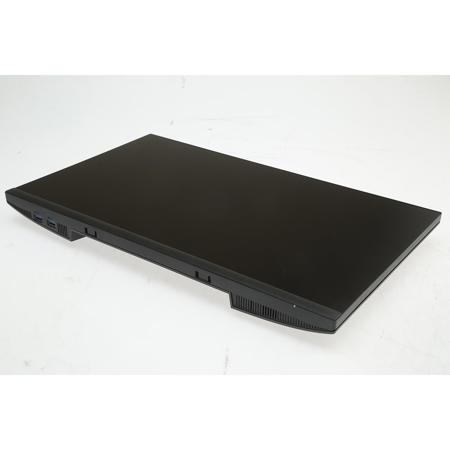
Overview
Compare
Specs
Protection

Reviews about this item

Review Summary

2024-03-18T20:00:00

Rated 5 out of 5

Monitors

Good value. Good size and resolution for general office use for office apps. Shipment came on time. One box was loosely closed. Would suggest better sealing for individual product shipment.

Tom

2024-03-18T20:00:00

Rated 4 out of 5

It's nice

The monitor is really nice. Overall, easy to set up. Wish I would have known that the cords that came with it wouldn't fit my laptop. Easily fix with a thunderbolt 3/4 cord.

Be M.

2024-03-10T20:00:00

Rated 5 out of 5

very pleased.

quick service and wonderful monitor.

CEzell-Ralph L.

2024-03-10T20:00:00

Rated 5 out of 5

Monitor

good monitor, would purchase again.

Dez

2024-03-10T20:00:00

Rated 5 out of 5

The Working Man's Monitor

Right off the bat, I'll say I didn't end up keeping this monitor - but that has nothing to do with the monitors quality. These were sturdy, ergonomic monitors that are perfect for a multi-monitor working setup for the vast, vast majority of people. Several screens can be stacked, set side by side, or any combination of configurations, and easily display all information needed for work. My only issue is that I was unknowingly spoiled by the crispness of 4k visuals, and I simply cannot go back.

Devin

2024-03-06T19:00:00

Rated 5 out of 5

Great monitor for its size and price.

Great general purpose monito for its size and price. Multiple choices for video cable connection.

Jomama

2024-02-21T19:00:00

Rated 5 out of 5

Quick and easy.

Super simple to unbox and hook up. Nice, bright display.

gunbugs

2024-02-17T19:00:00

Rated 5 out of 5

Inexpensive

Good quality and great price for an monitor

Alexi

2024-01-28T19:00:00

Rated 4 out of 5

Great Monitor for a Workplace

The screen display is crisp and clear-all that I wanted for a workplace duel monitor setup. In addition, the USB ports are conveniently located so that I can quickly access docs while working.

Roscoe

2024-01-27T19:00:00

Rated 3 out of 5

Sales Person is Great... Tech Service is pathetic!

The sales folks are some awesome folks. Extrememly helpfull but...I am NOT impressed with Dells service. Talking to your people in India is an absolute nightmare and I don't have time for this when we have problems. I paid for extended service contracts on this equipment and having to talk to people in India about issues is unacceptable. I'm an american... I need to talk to an American tech; not somebody in India who can't speak English! It's an absolute joke! If it wasn't for Matt, I would give 1 star or no stars at all!! Matt is NOT the issue...it's your service protocol and shuffeling of customers to India for support!

Hjguitarplayer

2024-01-11T19:00:00

Rated 4 out of 5

Excellent color and resolution, but awkward controls

Unlike my other Dell monitors, all the controls are inconveniently in the back including the power switch

John

2024-01-06T19:00:00

Rated 5 out of 5

Great secondary monitor

Excellent choice for my use as a second monitor in vertical mode. Thin bezel allows near seamless movement between screens. One note though, at high resolution, the cursor jumps up or down. I found that I can balance it at roughly halfway up my primary screen for a very satisfying transition. Picture is great.

EWalzer

2024-01-01T19:00:00

Rated 5 out of 5

P2222H Ergonomic Monitor

Purchased this ergonomic monitor to be used in an office set up. Works great out of the box and was easy to set up. Having the USB ports on the side of the monitor instead of the bottom would make it easier to access and use. Otherwise no complaints.

Andy L.

2023-12-31T19:00:00

Rated 5 out of 5

Fínancial Advisor

I ordered 2 monitors. I am for the most part happy. However one of them did not work out of the box and had to do a major update on the software of the monitor to make it work for which I needed expert help from IT dept of my employer otherwise the monitor would not work.

Juan

2023-12-24T19:00:00

Rated 5 out of 5

Value model

Great monitor for the price

Scott p.

2023-12-24T19:00:00

Rated 5 out of 5

Value model

Great monitor for the price

Scott

2023-12-11T19:00:00

Rated 4 out of 5

Great monitor with minor display issues

Video is great but I can't get the color temp to match my other non-Dell monitors, it has a constant blue light filter that makes it more orange then the others and you can't turn it off

Manchester I.

2023-11-14T19:00:00

Rated 5 out of 5

Big screen!

great quality picture, big screen, and easy to install.

Armida

2023-11-09T19:00:00

Rated 5 out of 5

great product

Great size, not too big. Easy to connect as a second monitor.

kbroussard

2023-11-08T19:00:00

Rated 5 out of 5

Great Monitor

Best purchase made and would definitely get another on in the future.

SM

2023-11-02T20:00:00

Rated 5 out of 5

easy to use

Works great for students - easy set up

J S.

2023-10-29T20:00:00

Rated 5 out of 5

Great monitor

Easy setup, great picture!

TK

2023-10-21T20:00:00

Rated 4 out of 5

Dell 22 Monitor

Device operated as expected.

Michaelb

2023-10-01T20:00:00

Rated 5 out of 5

IT business account review of the Dell 22 Monitor - P2222H

Dell 22 Monitor - P2222H meets expectations and is the preferred monitor that I have standardized across all my client locations. After assembling 100+ I enjoy the ease of assembly out-of-box

Horton

2023-09-25T20:00:00

Rated 5 out of 5

Great Dell Monitor

Very nice monitor and easy to hook up. Love that it tilts and swivels if needed!

Leroy

2023-09-25T20:00:00

Rated 1 out of 5

Dell Monitor is a great work horse.

It shows crisp, clean images and has very little bezel.

b

2023-09-24T20:00:00

Rated 4 out of 5

Good Monitor, weird usb port placement, but still good

I kind of miss when the USB ports were on the side. and not on the back. it makes having the USB-B port ...kind of obsolute and annoying? like why put 2 USB 3 ports in the back of the monitor, right next to the USB-B port(which you give me a cable for)? otherwise its good!

David B.

2023-09-24T20:00:00

Rated 5 out of 5

Great for photo and video editing

Looks great. We use it for Photoshop and Premiere Pro all day with no eyestrain

Matt P.

2023-09-10T20:00:00

Rated 4 out of 5

What cable should I use on this terrific monitor?

In almost every respect the monitor is outstanding. Lack of documentation is disappointing, especially understanding and choosing the best cable for my applications.

Chris 1.

2023-09-04T20:00:00

Rated 5 out of 5

Mi monitor soñado

No lo pude comprar mas grande porque mi mostrador es pequeño, pero luce tan bello, que felicidad, es perfecto

Jour

Select a plan in the Add Protection section above and purchase with this product by clicking “Add to Cart”.

image-protection

TRUSTED PROTECTION PLANS, EXCEPTIONAL SERVICE.

Invest in Pre-Owned Gear & Peace of Mind!

Extend coverage on pre-owned products after the retailer warranty ends and protect photo & video gear from accidental damage with Adorama Protect.

Repair or Replacement

Repair or Replacement

If we can’t fix it, we’ll replace it at no additional cost.

Accidental Damage

Extended Protection

Coverage for pre-owned gear begins after the retailer warranty ends, plus accidental damage protection for photo/video gear that starts on day one.

Peace of Mind

Peace of Mind

Enjoy your gear without fear. We have you covered!

Malfunction Protection

Malfunction Protection

When regular use of your product over time results in mechanical or electrical failure.

Zero Deductible

Zero Deductible

We will never charge you a deductible after the purchase of a plan.

Customer-Focused Support

Customer-Focused Support

Our claims process is simple & easy and our customer service team is happy to help.

Adorama Protect powered by Extend is available for purchase to customers in the United States. Not available for International and U.S. territories purchases. Plans on pre-owned items do not cover pre-existing damages.

Dell P2222H Specifications

General

General

Jump to...
  • Color

    Black/Silver

  • Display Type

    LED-Backlit LCD Monitor / TFT Active Matrix

  • Diagonal Size

    21.5"

  • Viewable Size

    21.5"

  • Built-in Devices

    USB 3.2 Gen 1 hub

  • Panel Type

    IPS

  • Aspect Ratio

    16:9

  • Native Resolution

    Full HD (1080p) 1920 x 1080 at 60 Hz

  • Pixel Pitch

    0.248mm

  • Pixel

    102"

  • Brightness

    250cd/sq.m

  • Contrast Ratio

    1000:1

  • Color Support

    16.7 Million Colors

  • Response Time

    8ms (Gray-to-Gray Normal)
    5ms (Gray-to-Gray Fast)

  • Horizontal Viewing Angle

    178

  • Vertical Viewing Angle

    178

  • Screen Coating

    Anti-Glare

  • Backlight Technology

    WLED

  • Features

    LED edgelight system, 99% sRGB color gamut, Flicker Free technology, Mercury free, arsenic-free glass, Dell ComfortView Plus

Connectivity

Jump to...
  • Interfaces

    DisplayPort
    VGA
    HDMI
    USB 3.2 Gen 1 upstream
    4x USB 3.2 Gen 1 downstream

Mechanical

Jump to...
  • Display Position Adjustments

    Height, pivot (rotation), swivel, tilt

  • Tilt Angle

    -5/+21

  • Swivel Angle

    90

  • Rotation Angle

    180

  • Height Adjustment

    5.9"

  • VESA Mounting Interface

    100 x 100 mm

Miscellaneous

Jump to...
  • Features

    Security lock slot (cable lock sold separately), VESA interface support

  • Compliant Standards

    RoHS, NFPA 99, DisplayPort 1.2, BFR-free, HDCP 1.4, PVC-free

  • Input Voltage

    AC 100-240 V (50/60 Hz)

  • Power Consumption (On mode)

    11.8 Watt

  • Power Consumption (Typical)

    46 Watt

  • Power Consumption Stand by

    0.3 Watt

  • Power Consumption Sleep

    0.3 Watt

  • Power Consumption (Off Mode)

    0.2 Watt

  • On / Off Switch

    Yes

Environmental Standards

Jump to...
  • EPEAT Compliant

    EPEAT Gold

  • ENERGY STAR Certified

    Yes

Physical

Jump to...
  • Dimensions (W x D x H)

    With stand: 19.2 x 7.1 x 19" (48.76 x 18.0 x 48.26)

  • Weight

    With stand: 10.6 lbs (4.8kg)
    Without stand: 6.2 lbs (2.81kg)

About Dell P2222H 21.5" 16:9 Full HD IPS LED Monitor - Black/Silver SKU#1554234

A better View from Anywhere

Comfort without Sacrificing Color
Optimize eye comfort with ComfortView Plusi, an always-on, built-in screen that reduces potentially harmful blue light emissions while delivering excellent color accuracy.

Color Consistency Comes Standard
See consistent, vibrant colors across a wide viewing angle enabled by In-Plane Switching (IPS) technology. With 99% sRGB coverage, you get precise color right out of the box.

Sleek, Stylish and Organized
Hide cords in the monitor riser to keep things organized. This sleek monitor has a three-sided ultrathin bezel, small base and an improved, easy-to-use cable management system.

Comfort is Key
Tilt, swivel, pivot and adjust the height of your monitor (150mm height adjustment range) for extra comfort during work.

Designed with You in Mind
Snap on the Dell Slim Soundbar (SB521A) and elevate your listening experience.

Connect to Productivity

Extensive Connectivity
Easily connect to a variety of devices with extensive connectivity ports, including DisplayPort, HDMI, VGA and 4x SuperSpeed USB 5Gbps.

Quick-Access Ports
Easily share and deliver content via quick-access ports conveniently placed at the front of the display.

Easy Navigation
Navigate the menu and adjust screen settings with the easy-to-use joystick control.

Expand Your Efficiency
The three-sided ultrathin bezel lets you enjoy an uninterrupted view of your content across multiple monitors. Furthermore, you can boost your productivity by up to 21% with a dual monitor setup.

Dell Display Manager

Productive at Every Level
Easy Arrange allows you to easily tile multiple applications across one or more screens with 38 pre-set window partitions and the ability to personalize up to five windows, giving you improved multitasking abilities.

Seamless Transitions
The auto-restore feature remembers where you left off, so applications will go back to where you left them, even after you've unplugged.

The Key to Convenience
Shortcut keys can save you even more time, letting you easily configure your display management settings so you can get to work faster.

More Ways to Manage
Asset management reports allow IT managers to quickly capture and track monitor information as well as configure multiple monitors at once through a single setup.

Green Thinking for Today and Tomorrow

Environmental Standards
This monitor meets the latest regulatory and environmental standards such as EnergyStar, EPEAT Goldi and TCO Certified Edge Displays.

Eco-Conscious Packaging
To reduce our manufacturing impact on the environment, this monitor is shipped Styrofoam-free and the packaging is made of at least 75% recycled cardboard.

Energy Conservation
Save energy when your monitor is not in use with PowerNapi, a feature that dims or puts your monitor to sleep when it's not in use.

Advancing Sustainability
Dell Technologies is committed to reducing environmental impact throughout the product lifecycle. Read more about our commitment to sustainability and our 2030 Social Impact goals here, and our product's carbon footprint here.

Dell P2222H 21.5" 16:9 Full HD IPS LED Monitor - Black/Silver SKU#1554234 Features

  • 21.5" Screen Size
  • Resolution Full HD (1080p) 1920 x 1080 at 60 Hz
  • IPS Technology
  • 8ms (gray-to-gray normal); 5ms (gray-to-gray fast) Response Time
  • DisplayPort, VGA,HDMI, USB 3.2 Gen 1 upstream, 4x USB 3.2 Gen 1 downstream Ports

What's in the box:

  • Dell P2222H 21.5" 16:9 Full HD IPS LED Monitor (Black/Silver)
  • 6' DisplayPort to DisplayPort Cable
  • USB Cable
  • Power Cable
  • Origianl Box






