Overview
Compare
Specs
Protection

Reviews about this item

Review Summary

2020-05-31T20:00:00

Rated 1 out of 5

Challenging!

For whatever reason, this printer continues to have problems even though it has been in use for only 2 years. Paper jams and a horrible Gears-Grinding noise have become too annoying. Today, the lower paper tray stopped working, entirely. Too many moving parts...

Jeffrey50

2019-10-29T20:00:00

Rated 4 out of 5

It's fine with a few unique aspects

This printer replaced an old warhorse printer. This one is fine. The ink doesn't seem quite as dark, but maybe it's my imagination. The manual tray is backwards, in that you have to remember to put letterhead in the opposite direction than you expect. Printer defaults to double sided printing, so your IT person will need to change that if you do not want that.

Linn2019

2019-10-27T20:00:00

Rated 1 out of 5

Overpriced junk

Way overpriced I returned it for a better model. No color no duplexing I don’t even know why they make this one.

Harry85

2019-09-22T20:00:00

Rated 1 out of 5

Will not print what I need.

I am printing labels with bar codes on them. The printer will print them out spotted and unable to read. It also pulls more than 1 page at a time. It may pull 3 pages out and only print on one page, not all the times but several times a day. This printer if fast enough but does not do what the older HP printers did. It seems to me that they have gone down hill.

Wildrug

2019-05-05T20:00:00

Rated 2 out of 5

Frustrating printer software.

This is a great printer. I would recommend it to anyone who does NOT use the auto-feeder except perhaps for envelopes. Here's why: If you are familiar with HP printers, then this printer will print 'upside down' to what you are used to. This is not a real problem on its face and you can reset it to print 180 via settings but while adjusting that 180 degrees SHOULD work, it didn't in all instances. I had problems with my Quicken checks and engraved labels that were impossible for me to work around. I actually swapped out this very nice printer with a crappier older printer in my office that prints the usual way. Before that I was discarding Quicken checks that were no longer 3 to a page (couldn't handle that, jammed every time) and hand writing my engraved labels - not very professional. Changing the page orientation HP had used for years became *my* problem and I'm frustrated that I am stuck with this older (but good) HP printer and had to give up my new one but even tech support gave up on this for me. Lame.

Alley54321

2019-04-24T20:00:00

Rated 1 out of 5

Why artificially prohibit high capacity toner??

Why artificially prohibit high capacity toner in your ENTERPRISE printing line? Don't let the marketing folks tank your printing division too. I know this practice has been going on for a few years, but it really hurts the last bit of reputation you have for well engineered products.

LabMan

2019-04-02T20:00:00

Rated 3 out of 5

Control Panel/User Interface could use some work

I bought this a couple months ago and set up in the warehouse where they print 6000-10000 pages per month. Do not use USB print or Stored Print Jobs. But that is all you see on the control panel until you scroll around. No jams no real problems with the printer itself but I don't ever want to buy another printer with a UI that can't be modified to make it user friendly. They don't like this printer because of this.

Molliel

2019-03-26T20:00:00

Rated 1 out of 5

Complete garbage

The drivers are awful, the new menu layout is impossible to figure out, build quality is extremely cheap and flimsy. Fortunately I don't expect it to last too long.

jpm1211111

2019-03-06T19:00:00

Rated 1 out of 5

HP Quality has gone downhill

We have used HP printers for many years at our accounting firm and the older models worked really well but eventually needed to be replaced. We upgraded 2 of our machines last fall and for the first few months they worked well, but within the last few weeks a horizontal line has started printing on some of the pages that we print, but not all pages. We had our local tech guy out to look at the machines but being so new, it didn't seem like parts were needing replacement. After he had a discussion with an HP tech it was determined that the actual laser jet part might need to be replaced; keep in mind this machine still has 8 months of warranty on it. After almost two hours on the phone with an HP tech doing tests (we are an accounting office and we are in the deep end of tax season right now and time is of the essence), it was determined that they would send out a tech to replace the laser jet part, this happened within a few days. However, this did not resolve the issue and I spent another almost 2 hours on the phone with tech support, again testing different things. We continue to have the problem and an HP supervisor tried to say it was the software we were printing from creating the issue. I find that very unlikely as we have other HP printers (different models) that haven't had the issue and other brands of printers that haven't had the issue from the "software." Two weeks later I am still trying to figure out if HP is going to resolve this issue or send us a new printer, but in the mean time I have had to order another brand printer as our work environment is being compromised. What is worse, is the 2nd HP printer that was purchased at the same time, same model, now is showing signs of this same line! For machines that are not that old and are supposed to be the latest and greatest it is very disappointing in the quality of product, and the hoops that our firm has (and continues) to have to go through to try to get HP to resolve this issue or replace the machine. I would not recommend this product and we are very disappointed in the quality of these HP printers and will be using a different brand in the future for our printer needs.

Jacqui

2018-07-29T20:00:00

Rated 4 out of 5

This printer is fast

Easy set-up for this department printer.... and man can it print fast! Impressive....

KiaOra

2018-04-23T20:00:00

Rated 2 out of 5

Tray 2 does not accept legal size paper

The printer work great and is fast. One concern is that tray #2 does not accept legal size paper. You have to use tray #1 which does not store many sheets. If you use lots of legal size paper like we do you have to get an additional tray which is costly. Not had this issue with other model we have purchased in the past

GPPela

2018-03-29T20:00:00

Rated 1 out of 5

Absolute garbage. Avoid!

Problems straight out of the box, frequent paper jams with quality stock (fails to pick up, even with check stock). Also, whatever Authentic HP Toner comes with the machine, it's complete trash -- doesn't stick to paper, labels come out all smeared, and checks have the ink lifted off! It's a terrible design. Also, the little LCD screen is completely idiotic -- there's nothing useful on there, it just has a bunch of "apps" that are useless. Why doesn't it say "Ready" or something? Too simple? I'm about done with LaserJet nonsense, it's no longer a brand name I trust.

laserjunk

2018-03-09T07:39:17

Rated 5 out of 5

President

Order, delivery process, information updates were all very good

Jon B.

2018-01-17T09:42:38

Rated 1 out of 5

Good return policy

The good news is your return policy is very easy to use. I no longer have the printer.

MICHAEL F.

2017-11-22T19:00:00

Rated 5 out of 5

solid performance printer

tough printer. Easy to setup

draaron

Select a plan in the Add Protection section above and purchase with this product by clicking “Add to Cart”.

image-protection

TRUSTED PROTECTION PLANS, EXCEPTIONAL SERVICE.

Invest in Pre-Owned Gear & Peace of Mind!

Extend coverage on pre-owned products after the retailer warranty ends and protect photo & video gear from accidental damage with Adorama Protect.

Repair or Replacement

Repair or Replacement

If we can’t fix it, we’ll replace it at no additional cost.

Accidental Damage

Extended Protection

Coverage for pre-owned gear begins after the retailer warranty ends, plus accidental damage protection for photo/video gear that starts on day one.

Peace of Mind

Peace of Mind

Enjoy your gear without fear. We have you covered!

Malfunction Protection

Malfunction Protection

When regular use of your product over time results in mechanical or electrical failure.

Zero Deductible

Zero Deductible

We will never charge you a deductible after the purchase of a plan.

Customer-Focused Support

Customer-Focused Support

Our claims process is simple & easy and our customer service team is happy to help.

Adorama Protect powered by Extend is available for purchase to customers in the United States. Not available for International and U.S. territories purchases. Plans on pre-owned items do not cover pre-existing damages.

HP M607dn Specifications

  • Print speed black

    Normal: Up to 52 ppm

  • First page out (ready)

    Black: As fast as 5.4 sec

  • Print quality black (best)

    Up to 1200 x 1200 dpi

  • Print Resolution Technologies

    FastRes 1200; 1200 x 1200 dpi

  • Duty cycle (monthly, A4)

    Up to 250,000 pages (Duty cycle is defined as the maximum number of pages per month of imaged output. This value provides a comparison of product robustness in relation to other HP LaserJet or HP Color LaserJet devices, and enables appropriate deployment of printers and MFPs to satisfy the demands of connected individuals or groups.)

  • Recommended monthly page volume

    5000 to 20,000 (HP recommends that the number of printed pages per month be within the stated range for optimum device performance, based on factors including supplies replacement intervals and device life over an extended warranty period.)

  • Print technology

    Laser

  • Processor speed

    1.2 GHz

  • Print languages

    HP PCL 6, HP PCL 5 (HP PCL 5 driver available from the Web only), HP postscript level 3 emulation, native PDF printing (v 1.7), Apple AirPrint

  • Display

    2.7-in (6.86 cm) QVGA LCD (color graphics) rotating (adjustable angle)

  • Mobile printing capability

    HP ePrint
    Apple AirPrint
    Mopria-certified

  • Wireless capability

    Energy Star: 2.131 kWh/Week

  • Connectivity, standard

    1 Hi-Speed USB 2.0 Device
    2 Hi-Speed USB 2.0 Host
    1 Gigabit Ethernet 10/100/1000T network

  • Connectivity, optional

    HP Jetdirect 2900nw Print Server J8031A
    HP Jetdirect 3000w NFC/Wireless Accessory J8030A

  • Minimum system requirements

    2GB available hard disk space, OS hardware requirements see microsoft.com
    1.3GB available hard drive space, Internet, OS hardware requirements see Apple.com for more info

  • Compatible operating systems

    Android, Linux Boss (5.0), Linux Debian (7.0, 7.1, 7.2, 7.3, 7.4, 7.5, 7.6, 7.7, 7.8, 7.9, 8.0, 8.1, 8.2, 8.3, 8.4, 8.5, 8.6), Linux Fedora (22, 23, 24), Linux Mint (17, 17.1, 17.2, 17.3, 18), Linux Red Hat Enterprise (6.0, 7.0), Linux SUSE (13.2, 42.1), Linux Ubuntu (12.04, 14.04, 15.10, 16.04, 16.10), OS macOS 10.12 Sierra, OS X 10.10 Yosemite, OS X 10.11 El Capitan, UNIX, Windows 10 all 32- & 64-bit editions (excluding RT OS for Tablets)

  • Compatible operating systems (Cont)

    Windows 7 all 32- & 64-bit editions, Windows 8/8.1 all 32- & 64-bit editions (excluding RT OS for Tablets), Windows Vista all 32bit editions (Home Basic, Premium, Professional, etc.), Windows XP SP3 32-bit editions (XP Home, XP Pro, etc.)

  • Memory

    512 MB

  • Maximum memory

    1.5 GB, MAX memory, when 1GB Accessory DIMM is installed

  • Paper handling input (standard)

    100-sheet multipurpose feeder, 550-sheet input feeder

  • Paper handling input (Optional)

    Optional 1x550-sheet paper feeder
    optional 1x550 paper feeder and stand with cabinet
    optional 3x550-sheet paper feeder and stand
    optional high-capacity paper feeder and stand with 1x550 sheet feeder and 1x2
    000-sheet feeder

  • Paper handling output (standard)

    500 sheet output bin

  • Paper handling output (Optional)

    Optional 5 bin stapler stacker

  • Maximum output capacity (sheets)

    Up to 1300 sheets

  • Duplex printing

    Automatic (standard)

  • Media sizes supported

    Feeder 1: A4, A5, A6, RA4, B5 (JIS), B6 (JIS), 10 x 15 cm, Oficio (216 x 340mm), 16K, envelopes (C5, B5, C6, DL ISO), Postcard (JIS single and double)
    Feeder 2: A4, A5, A5-R, B5 (JIS), 16K

  • Media sizes custom

    feeder 1: 76 x 127 to 216 x 356mm
    feeder 2: 99 x 148 to 216 x 356mm

  • Media types

    Paper (plain, light, bond, recycled, heavy, extra heavy, cardstock, pre-printed, pre-punched, colored, rough, heavy rough), mono transparency, labels, letterhead, envelope, heavy envelope

  • Supported media weight

    Feeder 1: 60 to 199 g/m2
    feeder 2: 60 to 120 g/m2

  • Power

    100V - 127V nominal at +/-10% (min 90V, max 140V)
    50 - 60Hz nominal +/- 3Hz (min 47Hz, max 63Hz), 12 A
    220V - 240V nominal, at +/-10% (min 198V, Max 264V)
    50 - 60Hz nominal +/- 3Hz (min 47Hz, max 63Hz), 6 A

  • Power consumption

    780 watts (printing), 15.3 watts (ready), 3.1 watts (sleep), < 0.1 watts (Auto Off/Manual On), < 0.1 watts (Manual Off)

  • Energy efficiency

    ENERGY STAR certified
    Blue Angel
    EPEAT Silver
    EPEAT Gold (#AAZ, #201 options only)

  • Operating temperature range

    15 to 32.5 deg. C (59 to 90 deg. F)

  • Operating humidity range

    10 to 90% RH

  • Acoustic power emissions (ready)

    Inaudible

  • Acoustic pressure emissions bystander

    55 dB(A) (active, printing)

  • Dimensions (WxDxH)

    Minimum: 431 x 466 x 380mm (16.97 x 18.35 x 14.96")
    Maximum: 431 x 1040 x 453mm (16.97 x 40.94 x 17.83")

  • Weight

    21.6kg (47.62 lbs) (With print cartridges)

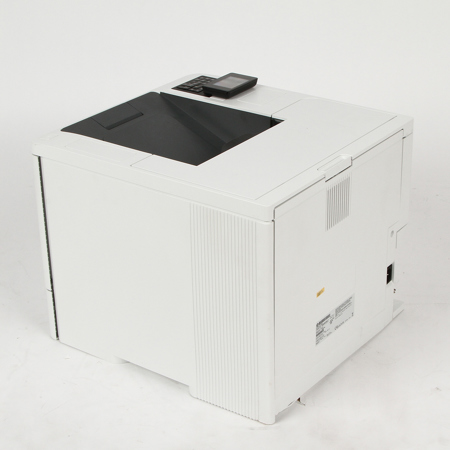
About HP LaserJet Enterprise M607dn Black and White Laser Printer - SKU#1328130

This HP LaserJet Printer with JetIntelligence combines exceptional performance and energy efficiency with professional-quality documents right when you need them-all while protecting your network from attacks with the industry's deepest security.

The world's most secure printing
• With HP Sure Start, each printer regularly checks its operating code and repairs itself from attempted hacks
• Run-time intrusion detection continually monitors to detect and stop attacks, then automatically reboots
• Centralize control of your printing environment with HP Web Jet admin-and help build business efficiency
• Give workgroups what they need to succeed. Easily choose and deploy over 175 HP and third-party solutions

High-speed performance meets energy efficiency
• Speed through tasks and save paper. Print two-sided documents nearly as fast as single-sided
• This printer wakes up fast and prints your first page faster-in as quickly as 7.8 seconds
• This printer uses exceptionally low amounts of energy thanks to its innovative design and toner technology
• Paper handling options include a wheeled stand and 550-sheet input feeder for paper sizes 4 x 6" to legal

More. Performance and Protection
• Produce sharp text, bold blacks and crisp graphics with precision black toner
• Help retain the Original HP quality you paid for with anti-fraud and cartridge authentication technology

What's in the box:

  • HP LaserJet Enterprise M607dn Black and White Laser Printer
  • Power Cord
  • Item Note: Requires new Toner Cartridge