2026-04-25T20:00:00
Rated 5 out of 5
Excellent Printer
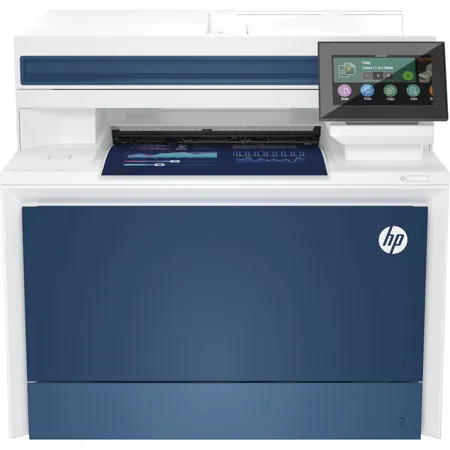
I upgraded to this printer after realizing that the one I had (which was still running fine) started to get difficult to stock with cartridges (no longer available at the retailer where I bought the printer 10 years ago). I am so glad I upgraded. The set up was easy, printing is much sharper; the capacity is much more, and while I was told it was a lot bigger, it still fit into the spot of my home office where I had the previous one. This is why I stay with HP, and once again, I was not disappointed.
MichaelW
Originally posted at

2026-04-25T20:00:00
Rated 1 out of 5
Not recommended
Disappointed and regretting the purchase of this HP Printer.
Set-up is more complicated than any other printer I've had. The print option and/or the
scanner are very rarely 'on-line'/active when they are needed.
This printer is unreliable - it regularly goes idle/off line. I am constantly turning it off on/unplugging etc. This is time-consuming and frustrating trying to get printouts and/or scans.
Also, I find it difficult to determine which if any updates pertain to my printer from the specs.
In March (2026) I contacted HP Support, was given a Case #. That was the last I heard - I still have the problem...no solution in sight.
I cannot recommend this, and would not consider this Brand, if I was to buy another printer.
Madele
Originally posted at
2026-04-20T20:00:00
Rated 4 out of 5
Great printer with a troubling flaw
I've owned HP printers for years. I grudgingly replaced our 6-year-old M479DW when the control panel began to fade to the point that some info became unreadable (known issue by the way). So I bought this one. Quick and easy setup, solidly built, acceptable footprint, very good quality prints, and quick prints. One problem, and it's not insignificant. The wifi connection keeps dropping. Every time it goes to sleep. I changed the IP from dynamic to static, which helped a bit, but when printing via AirPrint, it's still unpredictable. This is again, just like the fading panel with my old printer, a known issue. So now I need to get this permanently resolved. HP, are you reading these reviews?
FB C.
Originally posted at
2026-03-29T20:00:00
Rated 4 out of 5
Great product, but it runs through ink quickly
Great product, but it runs through ink quickly
RJPotts
Originally posted at

2026-03-09T20:00:00
Rated 4 out of 5
Worth buying refurbished
Good printer, maybe to modern look, well packaged. Shipped in a reasonable time. Works great and fast.
Paul S.
Originally posted at
2026-02-26T19:00:00
Rated 5 out of 5
Excellent printer
Works great! Easy to set up prints fast and has lots of different things you can do with it.
The printer arrived quickly and in very good shape. The ink cartriges are included of course, making the first printing easy.
I highly reccomend this printer!
dfriend99
Originally posted at
2026-01-15T19:00:00
Rated 5 out of 5
Very good MF color laser!
Once we got the printer set up, it works great. The only possible downfalls is the size of the paper drawer and the very small size of the input screen which we will adjust to. We are very pleased.
LD A.
Originally posted at
2026-01-13T19:00:00
Rated 2 out of 5
Very disappointed
Disappointed with this printer. It worked just fine for 2 months. After the last firmware update, the printer now just starts randomly printing a line or 2 of garbage on several pages of paper. I have contacted support several times. They sent 2 technicians, both of whom were unable to fix the problem. Then, the offered to send me a refurbished printer. I did not purchase a refurbished printer, and will not accept one as a replacement. Yet they will not offer me a new printer, which is what I paid for. Now I just keep getting thrown around in circles from one support person to another. We found our own work around, which was to turn off the TCPIP, and use UDP. The only problem with that, is we have 2 separate networks in our building, so I can't be connected to my own network in order to print. I probably won't be purchasing any more HP printers. Horrible customer service.
Coleen W.
Originally posted at
2025-09-14T20:00:00
Rated 1 out of 5
take time to read, Network naming don't mean 2025 networking....
print good, but .... in 2025 every printer should have wifi, the era of no wifi or as an option on same model, then with or without just ain't good nowadays, WiFi should be standard with LAN.
jean_pierre
Originally posted at
2025-09-13T20:00:00
Rated 2 out of 5
Doesn't work.
I hit print. It hums like it's going to start . Then nothing happens.
Juliesue
Originally posted at
2025-09-08T20:00:00
Rated 3 out of 5
Check the toner price !
OK Small business printer or home office. It's a nice network printer, with the typical good quality from HP Printers. I like the scan to email feature, Printing quality very good, printer size is reasonable. There are two annoyances I found: the password complexity cannot be changed and the printer toner is absurdly expensive, works out to 17 cents / page, so don't be fooled about the low purchase price, the cost is in the toner.
RobP
Originally posted at
2025-09-07T20:00:00
Rated 5 out of 5
HP LaserJet Pro MFP4301fdn
I have a home office and recently upgraded my HP Laser/Printer/Copier I previously used for over 10 years. This model is the newest version and I was amazed on how much quicker it printed. In addition, this printer can do doubled sided prints and scans which save me money on paper. I was hesitant on purchasing a "Certified Refurbished" unit, but so far (approx. a month when writing this review), I have had zero issues. The laser cartridges are expensive, so I choose to print most thing in black and white, unless I need color copies. There was quite a few negative reviews online, but I'm not sure why. It seemed like a lot of negative comments were based on the software and slow printing. For best results, use the HP computer software to scan and have the printer is connected directly to the network. Hope this helps!
Got_Toys
Originally posted at
2025-07-24T20:00:00
Rated 5 out of 5
They just work.
HP make the best laser printers, period.
carguy
Originally posted at
2025-07-24T20:00:00
Rated 3 out of 5
Has a lot of glitches.
It is glitchy. Sometimes only prints in black and when, at times the duplexer doesn't work, but when it's working the print quality is fabulous.
Quilt 2.
Originally posted at
2025-06-12T20:00:00
Rated 3 out of 5
Color laser jet pro mfp430 fdw
It's intermittently cuts off and will not print when in sleep mode
Just j.
Originally posted at
2025-06-06T20:00:00
Rated 5 out of 5
Best printer ever.
I've had a lot of small office printers and this one is by far the best ever. Simple set up, reliable wifi, intuitive controls. Printing is beautiful and very very fast. Cannot recommend this enough. Also, super happy with the refurb. Perfect condition.
wcarbon
Originally posted at
2025-06-04T20:00:00
Rated 2 out of 5
Decent printer
Pages print out of order. Disappointed that there are no new drivers for windows 11. Would've bought something else had I known there wouldn't be continued support.
Disappointed b.
Originally posted at
2025-05-21T20:00:00
Rated 5 out of 5
Great printer, highly recommend!
Very pleased with print quality, both in colour and black/white. Super easy to set up. Have used many different printer brands and HP is one of the best. Highly recommend!
LoveJK
Originally posted at
2025-04-12T20:00:00
Rated 3 out of 5
Good choice
Easy to setup.
Omar O.
Originally posted at
2025-04-11T20:00:00
I have to fill the paper tray more often than in my previous one.
Rost
Originally posted at
2025-04-10T20:00:00
Rated 5 out of 5
Easy set up, great quality prints--what's not yo like
Easy set up, great quality prints
JosephCanmore
Originally posted at
2025-02-05T19:00:00
Great printer, but is constantly
going offline. We're constantly restarting the printer, so that we can get a job printed.
Joe P.
Originally posted at
2025-01-24T19:00:00
Rated 5 out of 5
Mgng Partner
Great color and clarity
Frederick R.
Originally posted at
2025-01-23T19:00:00
Rated 2 out of 5
MFP 4301fdw return
It was good when it worked. It kept going off line and saying it was out of paper when it had a full tray. I returned it with in the 30 day return date.
frustrated m.
Originally posted at
2024-12-30T19:00:00
Rated 5 out of 5
Must have small business multi-function printer.
Excellent printer, with powerful features and software. Very fast both in grayscale AND color.
53HAT
Originally posted at
2024-11-13T19:00:00
Rated 5 out of 5
New and Improved!
This all-in-one surpasses my expectations and is remarkably better than the HP product that it replaces.
Juancho1
Originally posted at
2024-10-25T20:00:00
Rated 5 out of 5
Worth the extra few bucks
Purchased to replace a competitor unit that wasn't delivering anymore. So far, I have printed a thousand ish pages. Pros: No jam, outstanding printing quality, little to no wait to start the first page. We are happy that we got the extra tray. Cons: it needs some extra time to get a grip on the scanning capabilities from a Mac. It works, but not seamlessly just yet. We use it as a business printer where we print on different media (labels, stock, manila and cardboard. About 1-2k pages a month. Highly recommended.
Nic F.
Originally posted at
2024-10-12T20:00:00
Rated 1 out of 5
HP MFP 4301fdw
Prints correctly. Paper jams on every scan.
Gary735
Originally posted at
2024-09-29T20:00:00
Rated 5 out of 5
HP Colour LaserJet Pro MFP 4301fdw Printer
Printer works really good. It's unfortunate that HP's corporate greed locks firmware to only use their cartridges if you choose to use their program then cancel.
Kevin S.
Originally posted at
2024-09-13T20:00:00
Rated 1 out of 5
2 Months No Power Cord
I received my printer without a power cord and called to let them know the same day. Three times I was asked to check the box, instead of being helpful. Once I finished the request, I was told it would be sent out right away with 2-day shipping. It has been two months since that request and just recently got a message that they were sending it. I of course had already bought a cord and spent more money in HP's failure to have good customer service. Never again!
JohnJ2456
Originally posted at