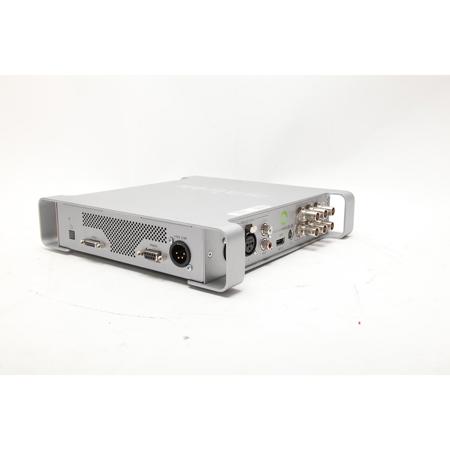
Used Matrox MXO2 LE with Max for Desktop, Audio & Video Support, PC and Mac Compatible

SKU: US1538305

This item is no longer available.

Overview
Compare
Specs
Protection

Reviews about this item

Review Summary

2013-11-11T19:00:00

Rated 4 out of 5

It does the job that needs done.

First of all, I'm happy this product exists. I bought an MX02 LE when I was using a PC laptop so I used the Expresscard on it. Then the laptop was stolen by some cowards who, I suppose, needed the laptop more than I (kinda like the guy from Bicycle Thief) and I picked up a new MacbookPro. I was delighted to learn that I just needed this box and didn't have to upgrade my whole dang MX02 LE (with MAX!). I've never had connection issues, and since I picked up the longer Thunderbolt cable, my field setup is much more flexible than the Expresscard and (short) Matrox cable. I haven't read the documentation enough to know the proper way to disconnect the thing so I've always powered down completely but I think there may be a safe way to disconnect it from the computer without powering down. Seems fairly well built and it's great it doesn't need external power. It's a simple box with 2 holes, just make sure you put the B side of the Matrox cable facing up.

AK

2013-01-21T19:00:00

Rated 4 out of 5

Works Well in my Workflow

Works well to feed the HDMI camera feed into the Mac/PC for broadcasting, if you choose drivers well. Contact Matrox support before installing the driver.

MM

2011-12-04T19:00:00

Rated 4 out of 5

Decent value - calibration not there yet

This is a good mid-price option to connect HDTVs and pro monitors to your editing setup. The use of an internal card makes it a desktop-only solution (you won't be taking this on set with your laptop). Unline using some sort of adapter from your video card, this sends an unadulterated signal for viewing. You can also use it to record video via HDMI or analog. The main feature that attracted me was the calibration utility -normally you would use hardware like this to drive a professional monitor, which you would calibrate using color bars. But large flatscreen pro monitors are frightfully expensive - the ability to calibrate a 30" HDTV and use it for editing sounds dynamite. But apparently, it only works properly with the (rather rare) 1:1 pixel TVs. I hooked it up to a large Samsung. The calibration utility "believed" the monitor was fine, but I compared it to my small Marshall (calibrated via color bars) and it was way off. So for now, I use an HDMI splitter to use the little marshall AND the big TV, and I use the TV controls to get the TV as close to the Marshall as possible. This gives me accurate color (via the small marshall) and a large screen that doesn't get all quicktimed-up (for a total of four screens at my workstation - hmm, chicks dig it!) Yep, the much cheaper blackmagic card would do the same thing, but hopefully firmware upgrades will come as the calibration utility evolves. Other issues you may have are that it can take a LOT of fooling with settings to make this work (After Effects is pretty seamless, FCP can be an oddball mess of FCP prefs and Matrox panels). Sometimes it just *stops* sending a signal, and you have to play with settings to wake it back up.

MICHAEL C.

2011-01-11T19:00:00

Rated 3 out of 5

Read instruction book before you buy

This is for the professional and requires a professional playback monitor. Some of the fps rates can play in RGB and some in HDMI. As of 1/2011 the driver does not work with After Effects. You get a pretty good range of options with Premier Pro CS5. Some of the playback options are in the pSF format, not likely that a consumer monitor will be compatible. For my purposes right now it is fine but may not be for everyone with this version of the Mac driver.

STEVE N.

2011-01-11T19:00:00

Rated 4 out of 5

Good...

Good... More...option software support ,example Show video output from Windows Mediaplayer .

Last

Select a plan in the Add Protection section above and purchase with this product by clicking “Add to Cart”.

image-protection

TRUSTED PROTECTION PLANS, EXCEPTIONAL SERVICE.

Invest in Pre-Owned Gear & Peace of Mind!

Extend coverage on pre-owned products after the retailer warranty ends and protect photo & video gear from accidental damage with Adorama Protect.

Repair or Replacement

Repair or Replacement

If we can’t fix it, we’ll replace it at no additional cost.

Accidental Damage

Extended Protection

Coverage for pre-owned gear begins after the retailer warranty ends, plus accidental damage protection for photo/video gear that starts on day one.

Peace of Mind

Peace of Mind

Enjoy your gear without fear. We have you covered!

Malfunction Protection

Malfunction Protection

When regular use of your product over time results in mechanical or electrical failure.

Zero Deductible

Zero Deductible

We will never charge you a deductible after the purchase of a plan.

Customer-Focused Support

Customer-Focused Support

Our claims process is simple & easy and our customer service team is happy to help.

Adorama Protect powered by Extend is available for purchase to customers in the United States. Not available for International and U.S. territories purchases. Plans on pre-owned items do not cover pre-existing damages.

Matrox MXO2 Specifications

  • Inputs

    Video:
    (1) SDI HD/SD
    (1) Component HD/SD 10-bit
    (1) Y/C 10-bit
    (1) Composite 10-bit
    (1) HDMI HD 10-bit
    Audio:
    (2) XLR balanced
    (2) RCA unbalanced
    (1) SDI embedded up to 8 channels
    (1) HDMI embedded up to 8 channels

  • Outputs

    Video:
    (2) SDI HD/SD
    (1) Component HD/SD 10-bit
    (1) Y/C 10-bit
    (1) Composite 10-bit
    (1) HDMI HD 10-bit
    Audio:
    (2) XLR balanced
    (2) RCA unbalanced
    (1) SDI embedded up to 8 channels
    (1) HDMI embedded up to 8 channels

  • System Requirements 1

    PC or Intel-based Mac Pro and Apple Xserve desktop systems
    Mac OS X v10.5 or later (Snow Leopard support available via driver update on Matrox site)
    Windows 7 (64-bit), Windows Vista (32- and 64-bit), Windows XP (32-bit) laptops and desktops
    One free PCIe slot to install the Matrox PCIe host adapter

  • System Requirements 2

    If using MXO2 with Final Cut Studio 2, 2GB physical memory (RAM) when working with compressed HD and uncompressed SD sources, or 4GB physical memory (RAM) when working with uncompressed HD sources
    HDMI monitor that supports 1920 x 1080 and "dot-by-dot" mode is recommended for 1:1 pixel mapping

About Matrox MXO2 LE with Max for Desktop, Audio & Video Support - SKU#1538305

The MxO2 LE with MAx (Desktop) from Matrox is a device designed to provide all the features of an I/O card in a sturdy, portable breakout box. It features both professional audio and video connectivity. The model is designed for use with PCs and Intel-based Mac Pro and Apple xserve desktop systems.

This model features Matrox MAx, a technology that implements faster than real-time H.264 encoding for resolutions ranging from iPod to HD. It uses a dedicated hardware processor to accelerate the creation of H.264 files for Blu-ray, the web and mobile devices. By using specialized hardware acceleration, jobs are finished more quickly and system resources are freed up for other tasks. This technology allows direct export to higher-quality H.264 Blu-ray compliant files from Compressor.

Along with broadcast-quality audio & video input and output, the MxO2 LE provides calibration controls that include blue-only. You also benefit from a wide variety of HD and SD workflows with Adobe Premiere Pro and Final Cut Pro thanks to Matrox MxO2 LE's 10-bit hardware up/down/cross scaling engine and support for a wide variety of file-based formats and industry-standard codecs.


Matrox MXO2 LE with Max for Desktop, Audio & Video Support - SKU#1538305 Features

  • Works with PCs and Intel-based Mac Pro and Apple Xserve desktop systems
  • Lightweight
  • Fits in an equipment bag
  • 4-pin XLR power connector for AC or field battery operation
  • HD/SD SDI, HD/SD analog component, Y/C, and composite inputs and outputs
  • Genlock - SD analog black burst (bi-level) or HD tri-level sync
  • 10-bit HDMI input, output, and monitoring with calibration controls including blue-only
  • 10-bit real-time hardware up/down/cross conversion on capture and output
  • Up to five user selectable simultaneous video outputs: HD and/or SD on HDMI, SDI, and analog
  • RS-422 machine control for frame-accurate capture and print-to-tape
  • Captures to virtually all codecs, including Apple ProRes 422 HQ and 10-bit uncompressed HD
  • File-based workflow support - XDCAM, XDCAM HD, XDCAM EX, P2, P2HD
  • RED workflow support
  • HD-SDI closed captioning support
  • Works with Adobe Premiere Pro, Final Cut Pro, Apple Color, Adobe After Effects and all QuickTime applications that support the V-out component

What's in the box:

  • 4pin Power XLR Cable
  • Item Note: Missing PCIe Host Adapter; Matrox MXO2 LE PCIe cable 3' (1m); Matrox MXO2 LE External Power Supply; IEC-C13 Power Cord





