27-7/16 x 11 x 2 (Back) - 5/8" (Front)/71.52 x 27.94 x 5.08 (Back)-1.58 cm(Front)
Weight
16.3 lb/7.39 kg
About NewTek TCXD850 CS Control Surface - SKU#1469711
NewTek TCXD850 CS Control Surface - SKU#1469711 Features
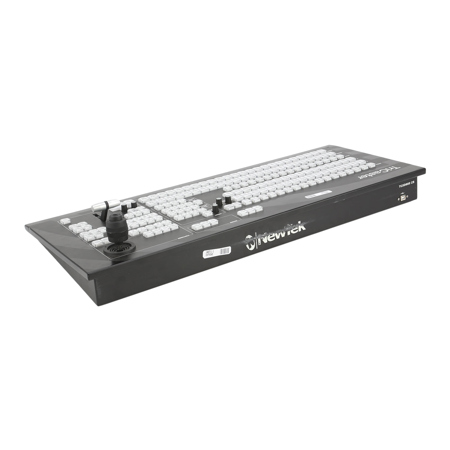
Intuitive Control Layout allows you to have physical control of all sources. Back-lit buttons, twist knobs, a premium T-bar and three-axis joystick provide a hands-on connection to the functions and effects available from the TriCaster TCXD850 interface
One-button Recording captures content from your live production at full resolution (up to 1080p). Record your entire presentation for later use or capture clips for DDR playback during the show
One-button Internet Streaming allows you to use Adobe Flash or Microsoft Windows Media to deliver a full HD live stream directly to the Web, with simultaneous archive for later viewing
Positioner Controls provide easy access to position, scale, crop and rotation functions. Delegate controls allow you to determine what the three-axis joystick controls for quick changes during your live production
Three-axis Joystick offers refined control of position, scale, crop and full 3D rotation functions. Multi-purpose functions also allow you to take manual control of the virtual zoom and jog or shuttle the selected media player
Virtual Input Controls let you select two primary switcher sources to create a virtual mix/effect composition and use an additional source as an overlay. Configure HD live virtual sets, layer live elements, set upstream picture-in-picture elements and more
Live Virtual Set Controls allow you to set the zoom levels for camera shots within TriCaster virtual sets (using proprietary NewTek LiveSet technology) and execute animated zooms at variable speeds with the press of a button
Virtual Input Delegate lets you assign complex switcher effects to a single switcher button. Multi-select delegate capabilities allow you to make changes across any of the eight fully customizable Virtual Inputs - simultaneously
Media Player Controls provide easy access to the five digital media players. Use the back-lit buttons to select from the DDRs, titles bin, still store and sound player, cycle through presets and manage playback options
Program And Preview Rows allow you to select the sources for your active and upcoming video output. Buttons light up so that selected sources are easily recognized
Utility Row Provides convenient access to live production utilities, allowing you to assign the Effects bus source, select downstream key elements and manage the AUX output - individually or simultaneously
Utility Bus Delegate offers refined control and delegation of the Utility Row, including support for multiple concurrent selections. Back-lit buttons allow you to see which delegate or delegates are active
Transition Controls provide you with the tools to transition individual or multiple video layers on and off screen
Premium T-Bar allows you to manually transition between multi-source compositions with confidence