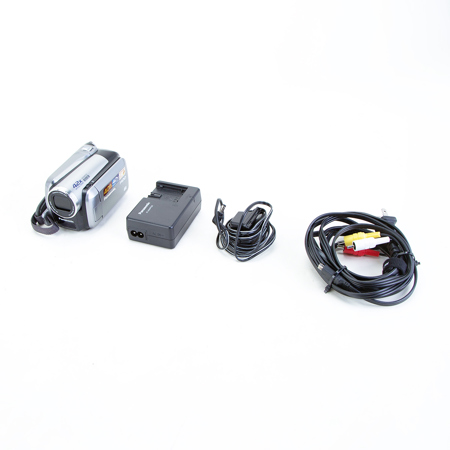
Used Panasonic Panasonic SDR-H40 1/6" CCD 40GB Hard Disk Drive & SD Hybrid Camcorder, 42x Optical Zoom, Advanced Optical Image Stabilization, 2.7" LCD Screen

SKU: US2003377 MFR: SDRH40
$87.00
Earn VIP Reward Points

What`s in the box:

  • Panasonic SDR-H40 40GB Hard Disk Drive/SD Hybrid Camcorder
  • AC Adaptor
  • Lithium-Ion Battery Pack
See more
Overview
Compare
Specs
Protection

Reviews about this item

Review Summary

Panasonic Panasonic SDR-H40 1/6" CCD 40GB Hard Disk Drive & SD Hybrid Camcorder, 42x Optical Zoom, Advanced Optical Image Stabilization, 2.7" LCD Screen Specifications

  • Records Onto

    SD/SDHC Memory Card, Hard Disk Drive

  • Recording Format

    MPEG2 (Motion Image)

  • Image Sensor (Total)

    1/6" CCD (800K pixels)

  • Image Sensor (Effective)

    4:3 - 290K, 16:9 - 380K (Motion Image/Still Picture)

  • F Value

    F1.9 (Wide) / F4.3 (Tele)

  • Optical Zoom

    42x Variable Speed Zoom

  • Focal Length

    1.8 - 75.6 mm

  • 35mm Film Camera Equivalent

    40.9-1718 mm [4:3], 33.4-1403 mm [16:9][Motion Image], 40.7-1710 mm [4:3]/33.2-1393 mm [16:9][Still Picture]

  • Lens Type

    Panasonic

  • 3CCD Camera System

    No

  • Image Stabilizer

    Yes (Advanced O.I.S.)

  • Still Picture Recording

    VGA

  • Minimum Illumination

    2 Lux (Magic Pix)

  • Focus

    AF/Manual

  • White Balance

    Auto/Indoor/Outdoor/White Set (with IR Sensor)

  • High Speed Shutter

    1/30-1/8000 (Motion Image)
    1/30-1/500 (Still Picture)

  • Iris

    Auto/Manual

  • Backlight Compensation

    Yes

  • LCD Monitor

    2.7" Wide (123,200 Dots)

  • Power LCD

    Yes(Plus)

  • Pure Color Engine

    Yes

  • Soft-Skin Mode

    Yes

  • Easy-to-Use Mode Dial

    Yes

  • MagicPix Images

    Yes

  • Microphone

    Stereo Zoom Mic
    Wind Noise Reduction

  • Date Recording

    Auto Date (in Date Code)

  • Fade in/out

    Yes

  • On-Screen Display Language

    English / Canadian French / Spanish

  • Digital Zoom

    42x-2000x

  • Quick Start

    2.1 seconds

  • Cue and Review

    No

  • Skip

    No

  • Video Recording Format

    MPEG2 (Moving Picture)

  • Recording Mode

    XP (10 Mbps/VBR), SP (5 Mbps/VBR), LP (2.5Mbps/VBR)

  • Playback Mode

    XP (10Mbps/VBR), SP (5Mbps/VBR), LP (2.5Mbps/VBR)

  • Audio Recording Format

    Dolby Digital (2ch)/MPEG1 Audio Layer2

  • Recording Time

    HDD: 40GB: XP(9h)/SP(18h)/LP(36h), SDHC: 16GB: (up to 13h 20mins in LP)/8GB: (up to 6h 40mins in LP)/4GB: (up to 3h 20mins in LP), SD: 2GB: XP(25mins)/SP(50mins)/LP(1h 40mins), 1GB: XP(12mins)/SP(25mins)/LP(50mins)

  • Still Picture

    JPEG Picture Size: 0.3 MEGA: 640 x 480 (4:3), 0.2 MEGA: 640 x 360 (16:9)

  • Still Picture Recording Number

    SDHC: 8GB(640 x 480/640 x 360): 55260 High, 99999 Normal, 4GB(640 x 480/640 x 360): 27150 High, 54290 Normal
    SD: 2GB(640 x 480/640 x 360): 13820 High, 27640 Normal, 1GB(640 x 480/640 x 360): 6790 High, 13580 Normal

  • Counter

    Yes

  • Wind Noise Reduction

    Yes

  • Remaining Indication

    Yes

  • Pre-Rec Function

    No

  • One-Touch Navigation

    Yes

  • Help Mode

    Yes

  • Disc Copy Function

    Yes (when using a DVD Burner (VW-BN1), data from SD Memory Card can be copied to a 12-cm DVD Disc)

  • USB Host Function

    Yes

  • Built-in SD Slot

    Yes (SD/SDHC)

  • DPOF

    Max. 999 stills

  • PictBridge Compatible

    Yes

  • S-Video Out Jack

    No

  • USB Jack

    Hi-Speed USB (USB 2.0)(mini AB)

  • Analog In/Out Jack

    Out only

  • Accessory Shoe Jack

    No

  • AV Jack

    Out

  • AC Adaptor

    Yes

  • Battery Pack

    Lithium-Ion

  • Strap

    No

  • AV Cable

    Yes

  • USB Cable

    Yes

  • IR Remote

    No

  • SD Memory Card

    No

  • Lens Cap

    Built-in lens cover

  • Software

    VideoCam Suite 1.0

  • Other Cables

    AC/DC Cables

  • Power Supply

    DC 7.2/9.3 V

  • Power Consumption

    4.0W

  • Dimensions (H x W x D)

    2.76'' x 2.64'' x 4.57''

  • Weight

    0.75 lbs

  • Warranty

    Panasonic 1 year parts & 90 days labor warranty

About Panasonic Panasonic SDR-H40 1/6" CCD 40GB Hard Disk Drive & SD Hybrid Camcorder, 42x Optical Zoom, Advanced Optical Image Stabilization, 2.7" LCD Screen

The Panasonic SDR-H40 40GB Hard Disk Drive/SD Hybrid Camcorder features large hard disk drive, so you'll virtually never run out of recording space, not to mention never have to worry about carrying extra tapes or DVDs around. This affordable hard disk drive camcorder records in standard definition and features a 2.7" wide LCD display with Power LCD Plus for adjusting screen brightness.

A 1/6" CCD image sensor captures rich, natural-looking video and 640 x 480 stills to SD/SDHC memory cards. Other features include 42x optical zoom, Advanced Optical Image Stabilization (OIS) and the Easy Archive function for direct burning to DVD.

Panasonic Panasonic SDR-H40 1/6" CCD 40GB Hard Disk Drive & SD Hybrid Camcorder, 42x Optical Zoom, Advanced Optical Image Stabilization, 2.7" LCD Screen Features

  • Advanced O.I.S. Reduces Camera Shake, Even at 42x Zoom: The SDR-H40's 42x optical zoom lens has the power you need to take dramatic closeups or get remarkable shots of even distant subjects. But with long-distance zoom shots, even a tiny bit of hand shake has a huge effect on picture quality
  • Non-Stop Shooting Fun with 40GB Hard Drive: The SDR-H40's 40GB internal hard disk drive lets you record continuously for up to 36 hours (in LP mode) without changing a disc, tape or other recording media
  • Anti-Shock Shield Helps Protect Your Memories: Panasonic's Anti-Shock Shield helps protect recorded video data from damage due to jolts and impact. The Drop Detect function senses if the camera is falling and moves the head away from the hard disk
  • One-Touch DVD Copying: This hard disk drive camcorder has a USB Host function, which lets you connect directly to a DVD burner (sold seperately) via a USB cable. You can then copy recordings from the hard disk to a DVD disc by simply pressing a button
  • Edit Your Videos: You can transfer the motion-image data from the SD card or the camcorder's hard drive right to your PC2 using your PC's USB port. Then with the included VideoCam Suite 1.0 software, you can easily put scenes in a different order and delete the ones you don't want