2026-03-26T09:41:06
Rated 5 out of 5
Best option
Have never had issues with these drives, not the fastest out there but they are excellent for storing photos and videos for archives.
KEITH L.
2026-02-23T19:00:00
Rated 1 out of 5
"Size on disc" fail
The "size on Disc" differs greatly from the actual amount of data placed on the disc. I was hoping to transfer all of the data on my 12 TB disc onto it, but I ran out of space before the transfer was complete. Consequently I was required to buy another passport to offload some of the data from my 12 TB drive, as it was already in the red.
Rodney
Originally posted at

2026-02-22T19:00:00
Rated 5 out of 5
Couldn't be happier with it.
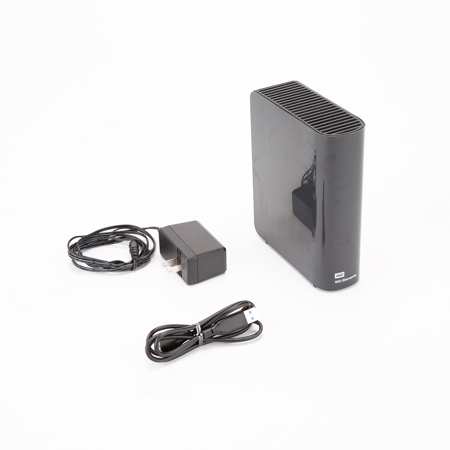
This review is for the WD 8TB Elements Desktop (WDBWLG0080HBK-NESN)
I bought this drive as a replacement for another 8TB desktop drive that just didn't work out for me. The difference has been noticeable in all the right ways.
The biggest thing I appreciate is how quiet this drive is. In my home office setup, it's essentially silent during normal operation. Even during larger backups, there's no constant mechanical chatter or grinding sounds - just smooth, steady performance. If you work near your equipment, that alone makes a huge difference.
The vertical design is another plus. It has a small footprint and doesn't take up unnecessary desk space. It looks clean and unobtrusive, which I appreciate since it sits in view all day.
Setup was straightforward. It arrived well packaged and included everything needed to get started. It ships formatted for Windows, but reformatting it for macOS and configuring it for Time Machine took less than a minute. After that, it's been completely reliable - backups run automatically and quietly in the background without any drama.
Performance has been consistent and stable. Transfers are smooth, and the drive feels solid and dependable. That's really what you want in a backup device: something you don't have to think about once it's running.
My only minor complaint is the front LED indicator - it's fairly bright in a dim room. Not a functional issue at all, but if you're sensitive to bright LEDs, you may want to dim or cover it.
Overall, this has been a very positive experience so far. It's quiet, compact, easy to set up, and feels built for long-term use. Exactly what I was hoping for in a desktop backup drive.
JuanGuapo
Originally posted at
2026-02-21T19:00:00
Rated 1 out of 5
"Size on disc" fail
The "size on Disc" differs greatly from the actual amount of data placed on the disc. I was hoping to transfer all of the data on my 12 TB disc onto it, but I ran out of space before the transfer was complete. Consequently I was required to buy another passport to offload some of the data from my 12 TB drive, as it was already in the red.
Rodney
Originally posted at
2026-02-18T07:29:24
Rated 5 out of 5
Great value.
Great drive at a great price. Works as designed.
JAMES U.
2026-01-06T19:00:00
worked. Until it didn't. I haven't even used the HDD since 12/2024. When I moved I put it on my shelf at the new place and just plugged it all back in today. Disc seems to not be spinning up properly, complete waste of money and all the data lost. DON'T BUY THIS, unless you get a 10 year warranty on it.
marco p.
Originally posted at
2025-12-30T19:00:00
Rated 5 out of 5
Fast Shipping! Works Great
The hard drive arrived quickly and was well packaged. Setup was easy, cjust plug and play. I've been using it for storage assets and it's been working reliably so far. Solid product.
Liu_Y
Originally posted at
2025-12-29T19:00:00
Rated 5 out of 5
New TimeMachine Storage
Purchased to replace Apple Airport to do TimeMachine Backups for a Mac Desktop and a MacBook Pro
Scott K.
Originally posted at
2025-12-29T19:00:00
Rated 5 out of 5
Great Ext. hard drive, great deal, great discount
I love it, it was a great deal and discount, I bought 4 until now, I'm thinking to by two more if I get same discount
Ziyad C.
Originally posted at
2025-12-26T19:00:00
Rated 1 out of 5
Horrible delivery and horrible customer service
Worst ever experience buying from Western digital. I received a broken item and I have been fighting with customer support to give me my money back, but I have failed miserably after days of follow up. I have finally disputed the amount of my bank, but it looks like Western digital is still contesting the amount. Please see photos attached of the product.
NizB
Originally posted at
2025-12-24T19:00:00
Rated 5 out of 5
Stable, high-capacity external HDD suitable for la
It delivers consistent and predictable performance expected from Western Digital's large-capacity storage solutions. Deployment is straightforward with plug-and-play support over USB 3.0, making it suitable for immediate integration into backup workflows on Windows systems without additional configuration.
Sustained read/write operations remain stable during long transfer sessions, which is critical for bulk data migration, media archiving, and periodic full backups. The externally powered design ensures adequate and reliable power delivery, minimizing throttling or instability under continuous load. The enclosure operates quietly with minimal vibration and maintains acceptable thermal behavior within normal operating ranges.
From a storage management perspective, the 14TB capacity offers excellent density for consolidating data sets while maintaining a relatively small physical footprint. Overall, the HDD demonstrates strong build quality, dependable performance, and aligns well with professional and prosumer use cases requiring reliable mass storage. I'm satisfied with the quality and long-term reliability this drive provides. Happy with the price I paid and the value I got!
Zee J.
Originally posted at
2025-12-22T19:00:00
Rated 5 out of 5
Great transfer speed, excellent capacity
This drive is not everything I would like, I would love expansion ports on the front like Seagate offers, but WD is the reliability king. And if I am going to commit 14 tb of my data to a drive, reliability is the most important datapoint. These drives are usually at a substantial premium to Seagate's but the 14 tb was on sale for Christmas at a great price. I'm seeing 200Mb/s sustained which is twice the speed of the Seagate I have to compare it with. One thing missing is error checking software. I downloaded the western digital software but it specifically omits this drive line so my 4tb portable shows up, my 2TB m2280 internal shows up, but not this drive. Testing it with other drive software takes 28+ hours continuous which I can't devote to that.
sleepy
Originally posted at
2025-12-20T19:00:00
Rated 5 out of 5
Great value and quality
I needed a trusted reliable external drive to backup all of my family's computers and devices. This drive has done a fantastic job.
Seatac C.
Originally posted at
2025-12-17T05:05:12
Rated 5 out of 5
Great value and solid performance.
Hard to beat the cost per GB value in these drives. We use quite a few of these for medium to long-term backups and have experienced very good reliability with them.
JOHN S.
2025-12-12T19:00:00
Rated 1 out of 5
Poor Delivery
very bad and item not received no refund please dont buy
rams
Originally posted at
2025-12-01T19:00:00
Rated 1 out of 5
not detecting...
came in defective and unallocated and not supported on my pc...
notworkingproductsadness
Originally posted at
2025-09-30T20:00:00
Rated 5 out of 5
Perfect for long term back up
It was easy to set up and I was able to copy nearly 2 TB in a reasonable amount of time. It was bigger than I expected. I'm using it as backup so the size is not a problem.
Lillian
Originally posted at
2025-08-30T20:00:00
Rated 5 out of 5
Great purchase
Device was very easy to use. The price was very good for the number of TB.
MssW
Originally posted at
2025-08-24T20:00:00
Rated 5 out of 5
WD Elements . . . . . . . . . . . . . . . . . . .
Setup, runs, just as advertised . . . . . . . . . .
Palm S.
Originally posted at
2025-08-12T20:00:00
Rated 5 out of 5
nice hard drive and long lasting
works well and fast and the price was good, hold very well
Dj G.
Originally posted at
2025-08-11T20:00:00
Rated 4 out of 5
Good Product, just too active and a bit loud.
Overall I'm happy with multiple WD I've been using the only problem is they're very loud, and they are always working even if I'm not using them, they sometimes vibrate my desk lol
Peter985
Originally posted at
2025-07-18T20:00:00
Rated 4 out of 5
Need help
It is great but windows keeps deleting it every time they upload their software updates.
When it is working it is great! Windows try's to block it so you have to use their systems!!
EddieJ
Originally posted at
2025-07-10T20:00:00
Rated 4 out of 5
Hi capacity, slow USB, noisy
Good capacity, but slow transfer. Don't know why there aren't more high cap drives with faster connections. Also, kinda noisy. Lastly, I didn't realize the Elements series can't be configured with one of the WD apps to sleep sooner, so mine is fidgeting all the time, adding to the noise issue.
Just D.
Originally posted at
2025-07-05T20:00:00
Great product for a great price. Would buy again!!
Geronimo
Originally posted at
2025-06-21T20:00:00
Rated 1 out of 5
Waste of money
Unit died just after one year. Drive fails to recognize any devices.
matthasapoopywddrive
Originally posted at
2025-06-02T20:00:00
It just works and I'm not a computer expert. No problems so far.
KenVet
Originally posted at
2025-04-22T20:00:00
Rated 5 out of 5
Great dealing buying direct from WD
Roomy, easy to use. Cautionary note, Microsoft counts storage differently, there is a little over 18TB of usable space after their overhead. If you really need 20TB, buy a larger model.
PhotoartbyDave
Originally posted at
2025-02-22T19:00:00
Rated 1 out of 5
Little Use Hard Drive Died. Quality Issue
I've had older cheaper brand harddrives outlive this thing. The amount of money you spend, that warranties should be longer. You figure to pay a little more to the Western Digital Brand backing, but NOPE, not doing Western Digital again.
josi
Originally posted at
2025-01-25T19:00:00
Rated 1 out of 5
I am really unhappy with this.
I am a long time user of WD's products. I still have a WD10000H1CS-00 s/n: WCASJ0976023 that after many years still works just fine. I have NAS in which I am running WD NASware drives. I also have a WD 2TB My Passport Slim s/n: WX81A74AFV18 portable drive that works just fine still.
So I bought this Elements 6TB. Shipping was super fast. But this is where good things are ending.
I did plug the Elements into one of my laptop's USB3 ports and worked fine for five minutes or so. Didn't copy anything to it. At first I thought it must have gone into sleep mode. The little light was off. Tried to access it in Explorer (Windows 10 Pro) but wasn't showing anymore. Disconnected it, waiting a minute or so, reconnected it and... nothing. Plugged it into another USB3 port then into another laptop, but still nothing. I can hear the drive inside spinning, but that is all. I guess, for some reason the little controller inside went bad.
I am really unhappy with this.
Since I am on some Caribbean island (using a shipping forwarder that work one way only), I can't return it and I think warranty won't help me either.
gicamuci
Originally posted at
2025-01-09T19:00:00
Rated 4 out of 5
20tb WD Drive
Everything seems to be working with such a large data storage. Its a little noisy when transferring, which is a bit disconcerting, but I suppose the disc has to move to read and write. Hoping for a good long life
StephenH
Originally posted at