

This item is no longer available.
Review Summary
2019-07-16T18:32:59
Purchased this hard drive just a few days over one year ago. A couple days ago, the power supply failed. 120 volts AC in and 0 volts DC out. According to the Lacie website, my hard drive is under warranty until June 8, 2021. Contacted Lacie for assistance in getting the power supply replaced. I was informed by Lacie that they do not repair nor do they replace defective equipment. I will no longer purchase a Lacie hard drive nor will I recommend one.
WESLEY G.
2018-07-29T12:50:11
The drive cord with the Thunderbolt 2 cable and is very easy to set up. It is fast for an external unit. It is a bit noisy as the fan never turns off.
KEITH H.
2018-07-13T10:14:27
The drive came in and lights came on but would not show in file manager. Drive was not formatted and had no instructions with it about how to do it. Went to LaCie's website and was able to download instructions and the GENI Timeline soft ware to run the backup procedure. Drive has worked great so far after a rocky start with nothing written included in the drive not even instructions tell to get on line to download...
MILTON S.
2018-07-12T22:16:57
I have absolutely no experience with this equipment but am working through getting it set up and running to back up my files and photos. I trust Adorama and am looking forward to being fully up and running.
CYNTHIA D.
2018-06-10T10:19:51
I bought this unit to replace the Apple 5400 RPM 1TB internal hard drive in my late 2014 Mac mini. I would have preferred an SSD but while the price of hard drives like this unit have become very inexpensive, even a TB SSD costs more. My only complaint is the noise of the drives spinning plus the cooling fan. This unit replaced an absolutely silent external 500GB SSD and the hard drive in the mini which is also silent. If Apple can mask the noise from it's internal hard drive, LaCie should be able to do the same. While the LaCie drives will never match the speed of the Thunderbolt2 interface, the dual 72RPM 3TB drives substantially increase the speed of my mini when booting or with any other data operations. I also like that the drives are hot swappable and can be upgraded at any time.
William S.
2018-01-07T12:34:36
This is a RAID storage device. It is quick and run's quietly in the background. It took me a bit of research to understand the value of this device and the software to maximize it's capabilities. The effort is worth it. I provides a synchronized back up of all my photographs and a bootable copy of my MAC.
STEPHEN C.
2018-01-03T15:06:50
It has very fast read and write speed. I don’t even really know why they give an opinion for safe which is slower for I haven’t had any issues in fast mode. I also purchased a 6TB four years ago in which I still have and never had an issue in fast mode! I bought this one because I need more memory.
JESSE D.
2017-12-17T10:33:10
Easy install to Mac system out of the box. Hardware raid, working well as backup
BEN P.
2017-12-14T03:02:18
This is my first thunderbolt that I bought and owned because of the price. So far I am very happy with the performance and would definitely recommend this to a friend.
MARIO M.
2017-12-13T08:54:49
I had been looking for a thunderbolt drive on eBay to fill out a small 3 drive raid 5 configuration. $ was about as low as I could find it (used). This showed up as a new drive on Cyber Monday for $... .I figured let's make it a four drive raid for only $ more. I'm glad that I did. The only minor problem was switching to JBOD for my software raid, the directions could be a little better, but I got it. A big improvement over the thunderbolt 1 version of the 2big. It is still available at $360 or so, still a great bargain. I'm not really sure why LaCie is discontinuing this model. It doesn't have the high end drives in it, but for adding to an existing thunderbolt chain to add extra storage or faster disk access, it fits a nice niche.
David S.
2017-11-08T08:33:39
...I'm finding a standard external portable 3Tb drive faster for editing footage. But it's great for storage, gives you secure feeling with the RAID doubled setup. Sometimes it's wonky with turning on and off (ie it's plugged in to the Mac but it's not showing up on the Finder) and you have to unplug the Thunderbolt wire and replug. :( Overall a solidly built drive
ELI K.
2017-06-22T09:44:32
Easy to set up Raid 1, with included tool. Looks good on the desk. Fast data transfer. Adorama is great to deal with.
Edward M.
2017-06-01T12:22:30
I've had great success with LaCie drives for many years. But not this one. It dismounts from my desktop whenever the PC goes into sleep for too long. Then remounting is impossible without shutting down and restarting. Daisy chaining with multiple LaCie drives also occasionally fails. Disappointing. I've replaced one drive under warranty and had three service calls. Not what I've come to expect from LaCie.
Mark A.
2017-05-24T10:03:15
The big boy was plug and play. I will use it for a work drive as it is fast a powerful. It is speedy and I will use the older drive it replaced as a backup. This one is much faster and hope 8 TB will last awhile. I recommend La Cie drives.
Linda B.
2017-03-31T10:39:09
The only consideration would be to make clear that the user really needs to review the on-line manual to make best use of the unit, such as how to change RAID mode. Also, the drive seemed to unexpectedly disconnect when my Mac Mini went to sleep until I installed the LaCie utility. Now it behaves as expected.
EDWARD C.
2016-12-15T16:02:44
excellent back up...even out on the field
EMMANUEL L.
2016-12-11T10:23:56
Bought the same drive a couple of years ago, and use it in mirroring mode. That drive I use just for photos. This drive will backup that drive, plus other documents. I have another Thunderbolt drive (Seagate), I use for time machine, but it is so slow. Glad I found a good deal on this drive, just when I needed one.
Regina R.
2016-12-10T08:52:26
I have always been happy with Lacie products, They are professional workhorses.
GEORGE M.
2016-10-12T13:41:38
This is a great large capacity hard drive with thunderbolt capability for fast up or download. Adorama had the best price and fast delivery. Such a good feeling when you buy a great product at a great price.
Marshall E.
2016-08-14T06:28:55
Well designed, and plenty of storage for all of my needs.
ADMIN P.
Accidents happen where life happens. Protect your favorite Adorama products and purchase a protection plan to stay covered from accidental damage, mechanical or electrical failure, and more.
If we can’t fix it, we’ll replace it at no additional cost.
Protect your product from drops, spills, and more.
Enjoy your gear without fear. We have you covered!
When regular use of your product over time results in mechanical or electrical failure.
We will never charge you a deductible after the purchase of a plan.
Our claims process is simple & easy and our customer service team is happy to help.
Adorama Protect powered by Extend is available for purchase to customers in the United States. Not available for purchase Internationally or in U.S. Territories.
Browse our FAQ
6TB
2 x hot-swappable 7200RPM/64MB cache (or greater) hard disks
2 x Thunderbolt 2 ports
1 x USB 3.0 port (UAS and USB 2.0 Compatible)
Thunderbolt 2: 20Gb/s
USB 3.0: 5Gb/s
Thunderbolt 2 and USB 3.0
RAID 0: 360 MB/s Read; 360 MB/s Write
RAID 1: 170 MB/s Read; 180 MB/s Write
Bidirectional 20Gb/s permits a high-resolution display and RAW 4K video playback
Reduce power consumption by pressing the front button to spin down disks without disrupting daisy chain transfers (short press initiates power-saving mode; long press turns product off completely)
Preconfigured HFS+ RAID 0
Hardware RAID 0 (FAST) / 1 (SAFE) / JBOD
Easy RAID selection button
Connect up to six Thunderbolt-compatible devices
AES 256-bit software encryption
Kensington lock compatible
Integrated cable lock
Aluminum enclosure with improved internal heat dissipation
Thermoregulated Noctua cooling fan: effective and whisper-quiet cooling
Idle mode: 25dB
Operating mode: 26dB
Operating Maximum: 28dB
100-240V; 50/60Hz; 60W
Computer with a Thunderbolt 2, USB 3.0, Thunderbolt or USB 2.0 Port
Thunderbolt 2: Mac OS X 10.8.5 or later
USB 3.0: Windows XP, Windows Vista, Windows 7, Windows 8 or Mac OS X 10.6 or later
Minimum free disk space: 600MB recommended
Intego Backup Manager Pro for Mac
Genie Backup Manager Pro for PC
LaCie Private-Public (protect data with AES 256-bit encryption)
LaCie Desktop Manager (provides system monitoring and email alerts for temperature or RAID events)
4.3 x 8.5 x 5.1" / 109.22 x 215.9 x 129.54mm
6.6lbs / 2.99kg
093053009441
Fast - love the first drive, so bought another!
By Regina R.
Bought the same drive a couple of years ago, and use it in mirroring mode. That drive I use just for photos. This drive will backup that drive, plus other documents. I have another Thunderbolt drive (Seagate), I use for time machine, but it is so slow. Glad I found a good deal on this drive, just when I needed one.
Great price for lots of storage!
By CYNTHIA D.
I have absolutely no experience with this equipment but am working through getting it set up and running to back up my files and photos. I trust Adorama and am looking forward to being fully up and running.
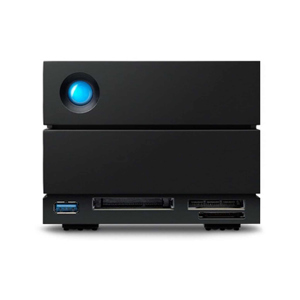
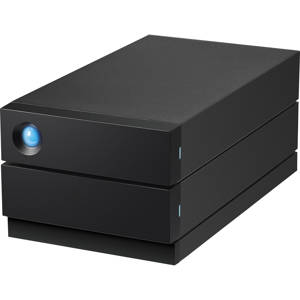
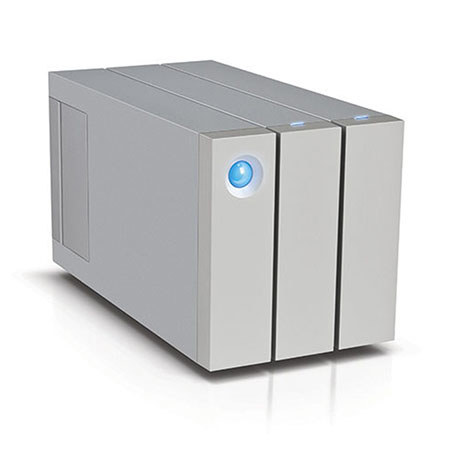
With the redesigned 2big, instead of aiming for incremental, LaCie shot for revolutionary. Its all-new industrial design demolishes the status quo and sets a new standard for versatility and reliability. The LaCie 2big Thunderbolt 2 6TB Hard Drive features unbeatable Thunderbolt 2 technology and hardware RAID for sensational performance.
Thunderbolt 2 Speeds for the 4K Era
With Thunderbolt 2 technology, the interface is no longer the performance bottleneck. For the 2big, LaCie harnessed the breakthrough performance potential of the Thunderbolt 2 I/O, squeezing the absolute best speeds out of the hard disks. Add a hardware RAID controller and 7200RPM disks and the result is incredible, sustained speeds of up to 420MB/s that turbocharge file transfers and backups.
With this kind of speed, videographers can edit multiple 2K uncompressed 10-bit streams or play back compressed 4K video. Digital photographers can browse a massive RAW photo library with zero lag. And, thanks to support for DisplayPort 1.2, it's now possible to daisy chain higher-resolution displays such as 4K monitors.
Versatility for Pro Environments
With USB 3.0 and Thunderbolt 2 interfaces, the LaCie 2big gets the best possible speeds on any late-model PC or Mac. And, USB 3.0 backward compatibility means that you can connect the LaCie 2big to any standard computer. With support for eXFAT and built-in hardware RAID, you can seamlessly connect to both PC and Mac computers without losing your RAID configuration. Whatever your workstation, move mountains of data - fast.
Thunderbolt 2 continues to support daisy chaining of up to six devices to a computer via a single cable (included in the box). This means that professionals can daisy chain up to five LaCie 2bigs plus a 4K display to a computer, bringing capacity, incredible speed and convenience. Thunderbolt 2 is also backward compatible and uses the same cables and connectors as first-generation Thunderbolt devices and computers.
RAID for Speed or Security
In addition to compatibility with any computer, hardware RAID delivers sustained performance and better reliability. The LaCie 2big's range of RAID modes also gives you the flexibility to tailor the product to meet your needs. It's incredibly easy to change the RAID mode, but impossible to do so accidently. You can leave it in RAID 0 (FAST) mode to maximize speed and capacity for working on current projects and then move completed projects to archival storage incredibly quickly.
Or configure the LaCie 2big in RAID 1 or Mirroring (SAFE) mode, which provides data protection if one disk fails. And thanks to hot-swappable disks, you can simply replace a disk - from the front - with zero data loss and no work interruption. Even in RAID 1, impressive transfer speeds slash the time it takes to perform backups, making it easier to back up more frequently. The LaCie 2big even features JBOD, so you can see and use each disk independently.
Innovative Design, Breakthrough Usability
When reengineering the industrial design of the 2big from the ground up, LaCie relentlessly focused on usability for professionals.
Power-Saving Mode
Save energy by pressing the power button to spin down disks without interrupting daisy chain transfers. Press and hold the button to shut down the product completely.
Front-Accessible Disks & Disk Status LEDs
Conveniently and quickly remove and replace disks from the front of the product. Keep track of disk health and RAID build status with the front-facing disk status LEDs.
Redesigned Heat Dissipation System
The cooling system more effectively diverts heat from components, ensuring long-term reliability. The fan pulls cool air through an unobstructed path from the front to the back. And the rear exhaust area size is 500% larger, allowing hot air to escape much faster.
Integrated Cable Lock
Prevent accidentally disconnected interface or power cables without compromising the look and design of the product.
Effective, Whisper-Quiet Noctua Fan
Work in silence thanks to the ultra-quiet, thermoregulated Noctua NF-A6x25 FLX fan. Not only does it turn on and off and at different speeds according to temperature, it also features extra-large blades, located at the rear of the enclosure. As a result, the fan produces an almost imperceptible amount of noise.
Wider and More Stable
Thanks to a wider footprint but 10% more compact design compared to the previous generation of LaCie 2big, the new LaCie 2big is less likely to tip and is even easier to stack.