Overview
Compare
Accessories
Specs
Protection
Q&A

Questions & Answers

Shopper : which external hard drive do you prefer LA CIE OR WESTERN DIGITAL. I am looking at a 3TB or 4 TB ?RAUL P : I previously had a WD hard drive. That hd lasted about 6 month before it died on me. During the 6 months it was one problem after another. It was replaced with a LA CIE HD. Never had any issue with them. The D2 is my second LA CIE HD and it is running perfect. Now, it could be possible the WD was just a defect but I would never purchased another again. DJUNDI K : I'd go w/ La Cie.... based on my Experience La Cie is much more reliable.... you pay more $ but... it's worth it...KELLIE M : and I say bare drives, they are external and I use a dock...two drives on the dock. I prefer to use the bare drives, and save the data to both at the same time.KELLIE M : I use WD Red Bare Drives...2-3 tb.JPM P : WD. I don't know about the other hard drive
Shopper : Why Did You Choose This?Janet M : reliable, compatible with MAC

Reviews about this item

Review Summary

2019-03-06T13:06:50

Rated 5 out of 5

back-up drive

I needed another back-up drive and, since I require Firewire 800, I chose this one, given that my preferred choice of a G-Tech is no longer available with Firewire. It worked out of the box, but it is still very early days yet—I’ve only had it a couple of weeks—when drives go south, it may be at any point, but usually after some continued use. I have two much older d2 Quadra drives with much smaller capacities than this 4TB drive and they are still running fine, so I am hopeful this Quadra d2 will as well. Time will tell.

VICTOR F.

2017-11-22T16:28:38

Rated 5 out of 5

A GREAT EXTERNAL HARD DRIVE

A great drive for handling backups and additional storage. All drives eventually fail, so buy two so you can store a mirror image off site in case of a catastrophic event. I have used LaCie drives before, they are fast and reliable.

Joseph F.

2017-05-23T10:30:38

Rated 5 out of 5

Trusted brand

Previously owned 2tb version since 2010. Was used heavily for daily video editing. After 6 years updated to this one. Looking forward for another few years with this hard drive.

VICTORIA T.

2017-05-19T05:14:11

Rated 4 out of 5

Reliable and fast

Seems like Lacie/Seagate discontinuing these drives. The D2 series was fairly reliable and fast. Mac user

JANET M.

2017-02-23T09:34:10

Rated 4 out of 5

Dependable unit...

It's my fourth and I've been happy with the consistent operation. Not crazy about the light staying off when it's on, I just have to remember to turn it off without having the light to remind me it's on.

RONALD G.

2017-01-05T10:25:25

Rated 5 out of 5

Sturdy Reliable Drives Strike Again

Lacie's proven HD reliability is again unmatched. We use these HD's at my production company and they have never failed. Beyond reliability they also offer a large number of plugins including FIrewire 800, which has been particularly helpful with some of our older systems. Overall, great HD and highly recommended.

KIRSTEN M.

2016-10-31T18:18:23

Rated 5 out of 5

Love my LaCie Hard Drives!

This is my 6th LaCie d2 Quadra Hard Drive. Never had a problem with any of them (knock on wood). They are all still running. Bought this 5TB for my main image drive (an upgrade from a 2TB). Back up to two 4TB LaCie's and have another I use to mirror my main image drive. When I learned that LaCie is no longer making this particular design, I went with the larger 5TB. So glad I did. The USB 3.0 is a fast interface (some of my older ones I use eSATA cables). What is not to like.

Janet L.

2016-10-23T13:07:04

Rated 5 out of 5

LaCie makes a great hard drive

I've a couple dozen of these drives used to archive my work over the years. They work great.

Phil W.

2015-11-18T05:44:37

Rated 1 out of 5

Hard Drive Never Worked Properly

Running Mac OSX 10.9.5. HD always would never reliably mount and would occasionally cause my computer to freeze. Could not diagnose the problem for the life of me, even when my other HDs (LaCie and other brands) functioned absolutely fine.

Ollie N.

2015-04-02T21:00:00

Rated 5 out of 5

Perfect for image library storage

It's fast, efficient and allows me to access my entire image library quickly.

MATTHEW G.

2014-03-01T19:00:00

Rated 4 out of 5

good solid drive

I use this drive as semi-permanent storage. I chose it because it has the connections for many different types of cables, and because I had positive experiences with all my previous LaCie Quadra drives

Vanni A.

2013-08-29T21:00:00

Rated 5 out of 5

Perfect Back-up Drive

With my business growing, I was looking to upgrade my primary system back up from 2TB. Wanting to take advantage of the firewire port on my MacBook Pro, the LaCie 2d Quadra 4TB was a perfect fit. Even better, I was able to daisy-chain my other drive to it for additional file storage! The drive is more solid than I ever imagined. When the time comes to go USB 3.0, it will be ready.

DAVID N.

2013-07-22T21:00:00

Rated 4 out of 5

get it

great drive for the price. Looks cool. I have about 20 LaCies. They're all still working.

COLIN L.

2013-05-27T21:00:00

Rated 5 out of 5

Great Drives

I have two of these drives and it is just like using my internal drive. I love the 7200 RPM speed.

cdhansen

2011-10-02T21:00:00

Rated 1 out of 5

Won't wake up, freezes programs in use

I use this product to store all my photo and video media. I use Lightroom, Photoshop and Final Cut Pro. I wasted my money on 3 of these drives. They go to sleep even during tasks like outputting files and transcoding media, so when you come back to your computer, the program will be frozen and you will have to manually eject the LaCie disk and crash your program to get them back. I was assured in July of 2011 that the firmware to fix the problem would be out in 1 week... it has been 3 months and my brand new drives are killing the productivity I need to make a living.

RSP P.

Select a plan in the Add Protection section above and purchase with this product by clicking “Add to Cart”.

image-protection

TRUSTED PROTECTION PLANS, EXCEPTIONAL SERVICE.

Invest In Your Gear and Peace Of Mind!

Accidents happen where life happens. Protect your favorite Adorama products and purchase a protection plan to stay covered from accidental damage, mechanical or electrical failure, and more.

Repair or Replacement

Repair or Replacement

If we can’t fix it, we’ll replace it at no additional cost.

Accidental Damage

Accidental Damage

Protect your product from drops, spills, and more.

Peace of Mind

Peace of Mind

Enjoy your gear without fear. We have you covered!

Malfunction Protection

Malfunction Protection

When regular use of your product over time results in mechanical or electrical failure.

Zero Deductible

Zero Deductible

We will never charge you a deductible after the purchase of a plan.

Customer-Focused Support

Customer-Focused Support

Our claims process is simple & easy and our customer service team is happy to help.

Adorama Protect powered by Extend is available for purchase to customers in the United States. Not available for purchase Internationally or in U.S. Territories.

LaCie d2 Quadra Specifications

  • Capacity

    4TB

  • Interface

    2 x FireWire 800 (9-pin) port
    1 x USB 3.0 port (USB 2.0 compatible)
    1 x eSATA 3Gb/s port

  • Rotational Speed (rpm)

    7200rpm

  • Cache

    32MB or greater

  • Interface Transfer Rate (max bus speed)

    FireWire 800: up to 800Mb/s
    USB 3.0: up to 5Gb/s
    eSATA 3Gb/s: up to 3Gb/s
    USB 2.0: up to 480Mb/s

  • Burst Transfer Rate (max. drive speed)

    FireWire 800: up to 85MB/s
    USB 3.0: up to 130MB/s
    eSATA 3Gb/s: up to 115MB/s
    USB 2.0: up to 35MB/s

  • LaCie Shortcut Button

    Launch any application with one push (backup, music, slideshows)

  • System Requirements

    Computer with a USB 3.0, USB 2.0, eSATA, FireWire 800, or FireWire 400 port
    Latest version of Windows XP, Windows Vista, Windows 7 / Mac OS X 10.5 (Intel Only), 10.6, 10.7, 10.8
    Minimum free disk space: 600MB recommended
    High-speed internet for online storage
    Check www.lacie.com/usb3mac for USB 3.0 Mac compatibility

  • Dimensions

    60x168x183mm / 2.36x6.61x7.20"

  • Weight

    1.7kg / 3.74lbs

  • UPC Code

    093053002114

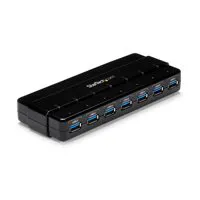
1 Accessories for LaCie d2 Quadra 4TB Hard Drive with USB 3.0

  • All Accessories (1)
  • Hubs (1)

About LaCie d2 Quadra

FEATURED REVIEWS

back-up drive

By VICTOR F.

I needed another back-up drive and, since I require Firewire 800, I chose this one, given that my preferred choice of a G-Tech is no longer available with Firewire. It worked out of the box, but it is still very early days yet—I’ve only had it a couple of weeks—when drives go south, it may be at any point, but usually after some continued use. I have two much older d2 Quadra drives with much smaller capacities than this 4TB drive and they are still running fine, so I am hopeful this Quadra d2...

View full Review

A GREAT EXTERNAL HARD DRIVE

By Joseph F.

A great drive for handling backups and additional storage. All drives eventually fail, so buy two so you can store a mirror image off site in case of a catastrophic event. I have used LaCie drives before, they are fast and reliable.

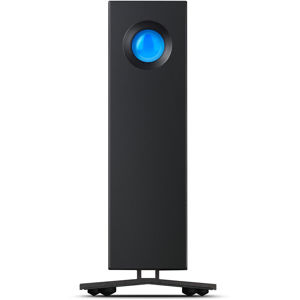
The LaCie d2 Quadra 4 TB Hard Drive with USB 3.0 5 Gb/s interface is the ideal tool for creative professionals who need both fast speeds and large storage capacity. It features 7200 rpm drives with a minimum of 32 MB cache for the best performance and seek times, so it can handle the most resource-intensive applications. Best of all, it can achieve speeds up to 130 MB/s in USB 3.0.

The d2 Quadra has got the latest connectivity with USB 3.0 and two FireWire 800 interfaces for daisy chaining, but it is still fully compatible with eSATA 3 Gb/s, USB 2.0 and FireWire 400. It's even USB 3.0-compatible on Mac computers, thanks to LaCie's USB 3.0 driver for Mac OS.

With all of its interfaces, the d2 Quadra has universal connectivity, so it is easy to back up and restore any workstation, no matter the configuration and interfaces. And thanks to the USB 3.0 performance, you can make faster, more frequent backups of your data, keeping it safe and secure. Since the d2 Quadra tops out at a 3 TB capacity, it can even be used as a simple and convenient storage expansion for a server.

With the preloaded LaCie Desktop Manager, you can easily configure the shortcut button to launch the application of your choice in one push and configure your drive's eco mode. And, with its two-color front LED indicator, it is easy to check the drive status. It also includes Genie Backup Assistant software and Intego Backup Assistant software with data restore for Windows and Mac. Both products provide an ideal solution for a simple and user-friendly backup and file retrieval.

LaCie d2 Quadra Features

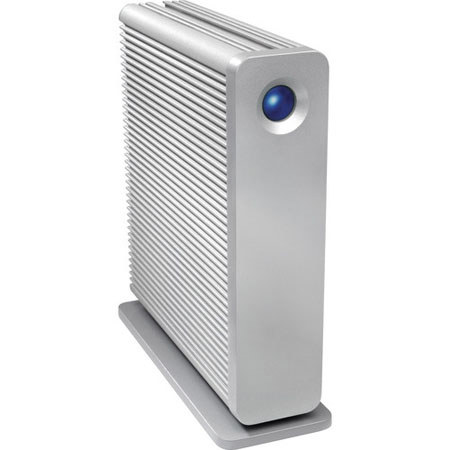
  • The Professional Choice for Design: The d2 Quadra's unique and unobtrusive design is respected in the creative content industry for good reason. The unique, fanless aluminum heat sink design provides an increased surface area, keeping it quiet, safe and free from dust inside

Key Features

  • Professional Choice for Design

What's in the box:

  • LaCie d2 Quadra 4TB Hard Drive
  • SuperSpeed USB 3.0 Cable (USB 2.0-Compatible)
  • eSATA-to-eSATA Cable
  • FireWire 800 (9-pin) Cable
  • External Power Supply
  • Drive Stand
  • Software Bundle
  • Quick Install Guide
  • LaCie 3 Year Limited Warranty